IT Equipment Rental Software: Tracking 60 Laptops, Not "60 Laptops"
A training company books 60 laptops for a three-day course. Fifty-eight come back. If your system logged the order as "60 laptops", you now know two are missing and nothing else: not which ones, not whose they were, not whether they left with a trainee or never left the warehouse.
That's the core problem with IT hire. A laptop looks like a counted item, the same as a folding chair, but it behaves like a camera body. Each one has a serial, a condition history, a charger that wanders off, and a hard drive that has to be wiped before the next client sees it. Software that treats your fleet as a number works fine at ten units and starts costing you money at sixty. This guide covers what to look for, and the tests to run before you switch. For the general basics of choosing a system, see our equipment rental software guide.
One record per device, even when you book fifty
The first question to ask any rental system is simple: when I book 60 laptops, does it create 60 tracked units on the job, or one line that says 60?
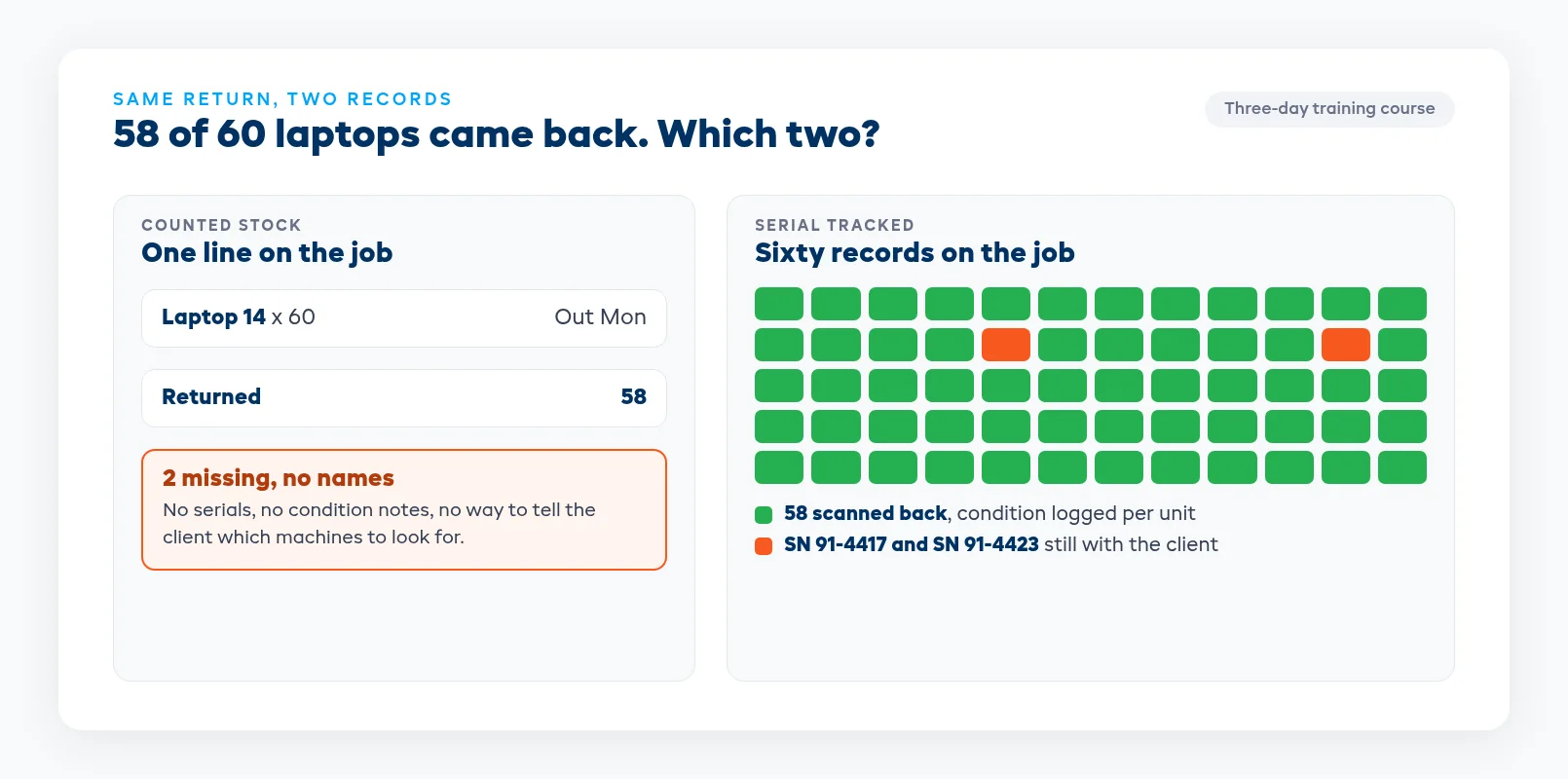
A counted line is quick to quote and impossible to chase. When the job comes back short, you can't tell the client which machines are missing, you can't check whether the same unit went missing last time, and you can't prove the one with the cracked hinge went out clean. With a record per device, every one of those questions has an answer.
You still want to quote quickly. A good system lets you commit a quantity to the job when you quote, say 60 laptops for the week, and attach the actual serials when the units are scanned out at dispatch. The client signs off on a number, and the warehouse ships named machines.
Keep serial tracking for the things worth chasing. Laptops, tablets, displays, projectors and hotspots get a record each. Cables, mice and spare adapters can stay as counted stock.
Chargers, cases and the bits that walk
The laptop rarely goes missing on its own. It's the charger, the sleeve, the USB-C hub, the presenter remote, the lock cable. On a 60-unit job, losing four chargers is normal, and nobody notices until the next booking goes out three short.
Put accessories on the same job as the devices, so the pull sheet lists them and the return check counts them. If chargers are counted rather than serialized, that's fine, as long as the job knows 60 went out and can tell you how many came back. Charging trolleys and transport cases belong on the job too, because a trolley that stays at the venue means the next deployment gets packed in cardboard.
Count imaging as downtime
A laptop back from a job isn't ready for the next one. It needs to be wiped, reimaged, updated, charged and checked. On a big return that takes a day or two, and that's where IT rental shops get caught: the device shows as back, the calendar shows it as free, and someone books it for Monday when it won't be imaged until Tuesday.
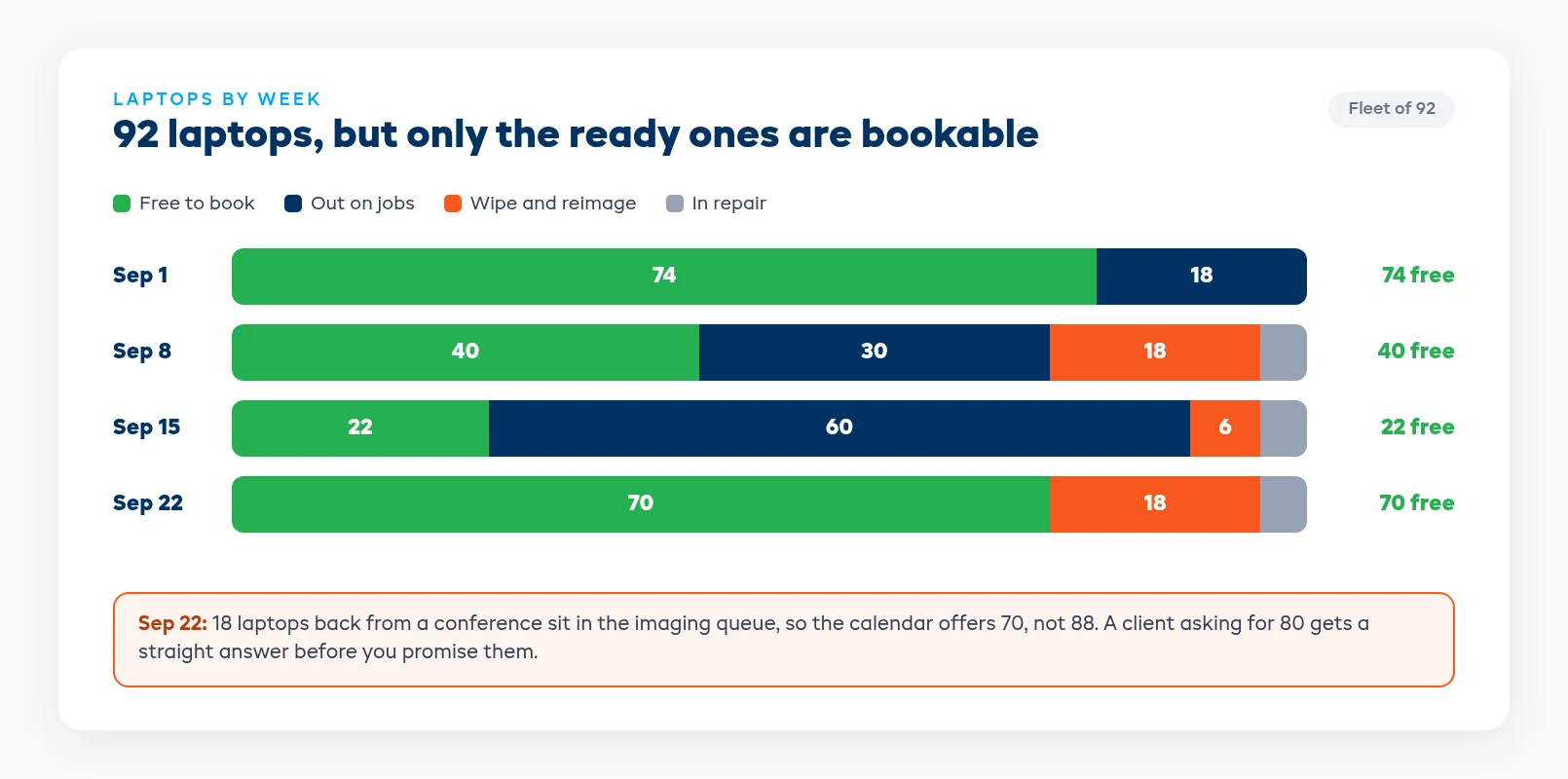
Look for software that treats wiping, imaging and repairs as downtime on the unit itself. While a machine is in the imaging queue, it shouldn't count as available, and the rest of the fleet should stay bookable. Then when a client asks for 80 laptops in September, the answer reflects what will actually be ready on the day.
The same goes for repairs. A unit with a dead battery or a sticky key should be blocked until it's fixed, with the note on that unit's record, so it doesn't quietly go back out on the next big order.
Condition and agreements per unit
Damage disputes in IT hire are usually about one machine: the cracked screen, the missing key, the dent on the lid. If condition is recorded against the job as a whole, you're arguing from memory. If it's recorded against the serial when the unit goes out and when it comes back, you have a dated record for that exact device.
Make the rental agreement part of the job, signed before the devices leave. Corporate clients will often have someone collect the gear who didn't sign anything, so the system should show you which jobs still have unsigned terms while there's still time to chase them.
Catch the short return on the day
The best time to find a missing laptop is while the trainer is still in the room. The worst time is the next stock count.
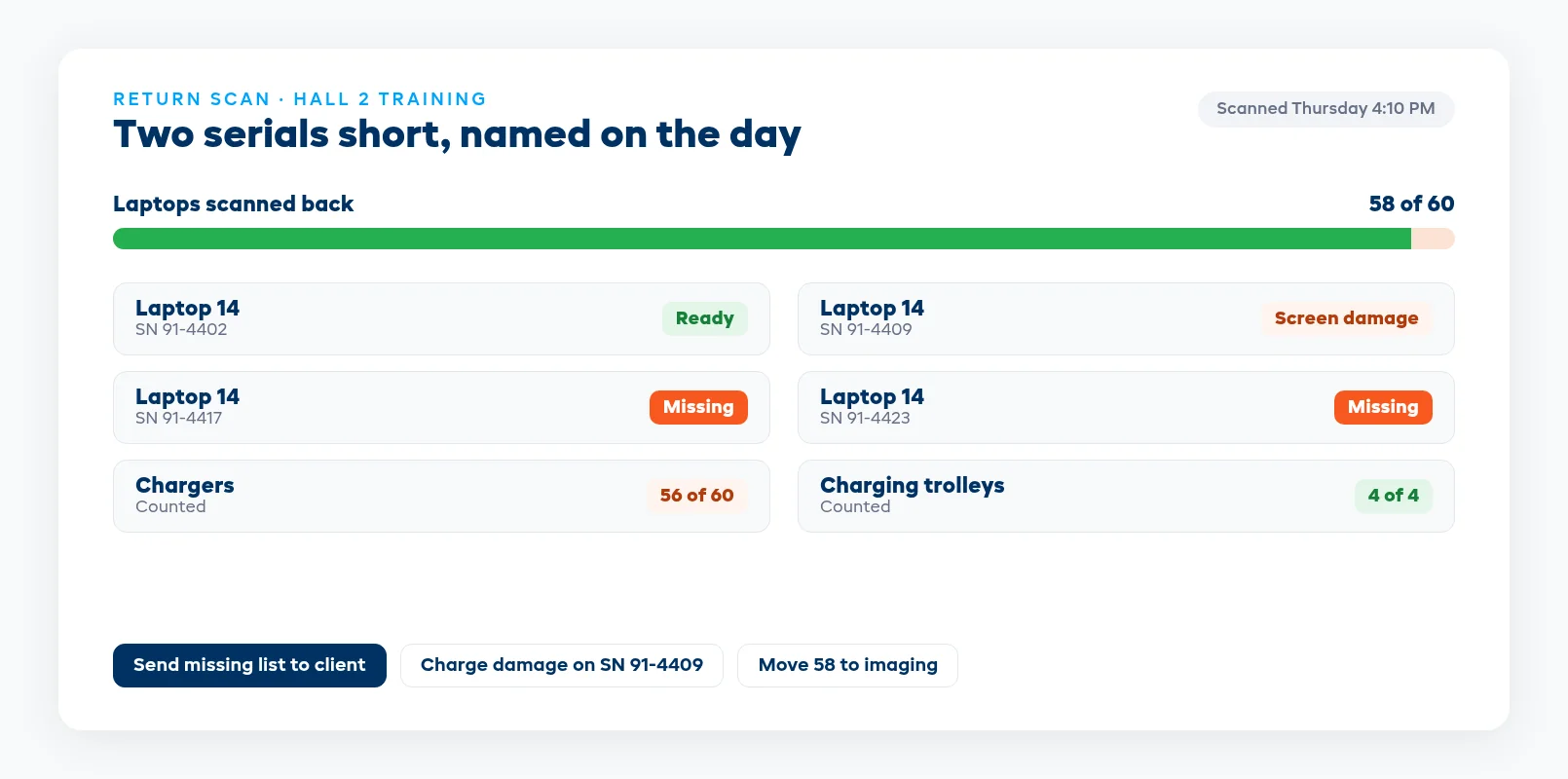
Scan units back against the job they went out on. When the scan finishes at 58 of 60, the system should name the two serials that didn't come back, so you can call the client that afternoon with specifics. Clients respond much better to "units 4417 and 4423 are still with you" than to "we seem to be two short."
Keep returned devices out of the bookable pool until they're checked and imaged. That way a short return or a damaged unit can't go straight back out on the next deployment.
Six tests to run before you switch
Run these with whoever quotes the jobs and whoever runs the warehouse, using a real deployment from last month.
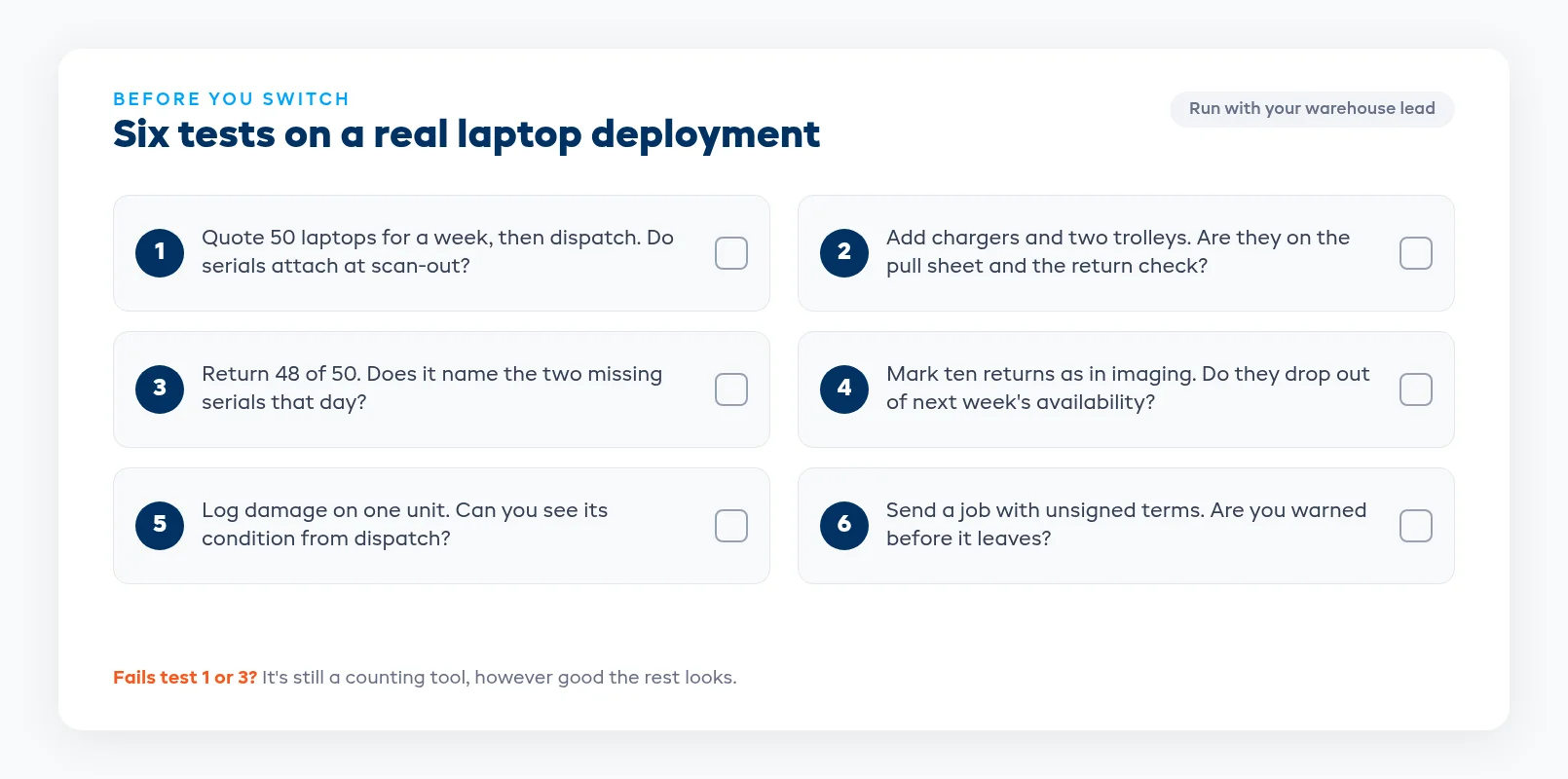
- Quote 50 laptops for a week, then dispatch them. Do the serials attach to the job when they're scanned out?
- Add chargers and two trolleys to the same job. Do they show up on the pull sheet and the return check?
- Return 48 of 50. Does the system name the two missing serials that day?
- Mark ten returned units as in imaging. Do they drop out of availability for next week's booking?
- Log damage on one unit at return. Can you see its condition from when it went out?
- Send the job with unsigned terms. Does anything tell you before the devices leave?
If a system fails the first or third test, it's still a counting tool, however good the rest looks. Everything after that is about how much time it saves your team each week.
EquipDash tracks every laptop, tablet and display by serial, attaches serials at dispatch on bulk bookings, and counts imaging and repairs as downtime so you never promise sixty and ship forty. Accessories sit on the same job, and short returns show up by serial when you scan them back, with plans from $23/mo billed annually. See how it works on our IT and technology rental software page.
FAQ
What should IT equipment rental software do?
It should keep one record per device with its serial, attach serials to the job when units are scanned out, keep accessories on the same job, treat imaging and repairs as downtime, and name any missing units when a return is scanned back. Counted stock is fine for cables and mice, but not for laptops.
Do I need serial number tracking for rental laptops?
Yes. Without serials you only know how many came back, not which ones. Serial tracking tells you which unit went to which client, what condition it was in, and which two machines are missing from a 60-unit return.
How do I stop booking laptops that are still being reimaged?
Treat imaging as downtime on each unit. While a device is in the wipe and reimage queue, it shouldn't count as available. Your calendar then shows what will actually be ready on the day, not just what's physically back on the shelf.
How do I handle bulk bookings like 60 laptops for a conference?
Quote and commit the quantity to one job, then attach the actual serials when units are scanned out at dispatch. The client agrees to a number, the warehouse ships named machines, and every unit is tracked from then on.
How do I track chargers and accessories on IT rentals?
Put them on the same job as the devices. Chargers, hubs, cases and trolleys should appear on the pull sheet and be counted on return. Low-value items can be counted stock instead of serialized, as long as the job records how many went out.
How much does IT equipment rental software cost?
It depends on the system and how many users you need. Some tools publish prices and some only quote after a sales call. EquipDash plans start from $23/mo billed annually, with serial tracking, bulk bookings and imaging downtime included.
in one place