AV Rental Software: What to Look For If You Send Crew as Well as Gear
A client books a PA, two radio mics and a lectern for Thursday's awards night, then asks if you can send someone to run it. You say yes, because that's where the margin is. Now the job needs a desk, a tech who knows that desk, and a van, and only one of those three lives in your rental calendar.
Plenty of AV shops start as dry hire: gear goes out, gear comes back, the client runs it. Then the crewed jobs creep in. A conference wants an A1 on the desk, a wedding wants someone to babysit the projector, a corporate client wants the full load-in, show and strike. Most rental software was built for the first kind of business and quietly falls over on the second. This guide covers what to look for when people go out with your equipment, and the tests to run before you switch. If you're setting up systems for event work in general, our event rental software guide covers the basics.
Dry hire and crewed jobs ask different questions
A dry hire job asks one question: is the gear free on those dates? A crewed job asks four. Is the gear free, is someone with the right skills free, can they get there in time after their last call, and does the quote cover their hours as well as the kit?
If your software only answers the first question, the other three end up in a group chat, a spreadsheet of who's on what, and the memory of whoever does the scheduling. That works until the scheduler is on a job themselves, or until two people promise the same tech to two clients. What fixes it is a system where the crew and the equipment hang off the same job.
So before you look at any feature list, sort last month's jobs into dry hire and crewed. If crewed work is a real share of revenue, treat crew scheduling as a requirement and weigh every option against it first.
Crew and gear on the same job
The single most useful thing AV rental software can do for a crewed business is put the technicians on the same job record as the equipment they're taking. One job, one date range, one place to look. The kit list says what's going, the crew list says who's taking it, and the shifts say when each person is needed.
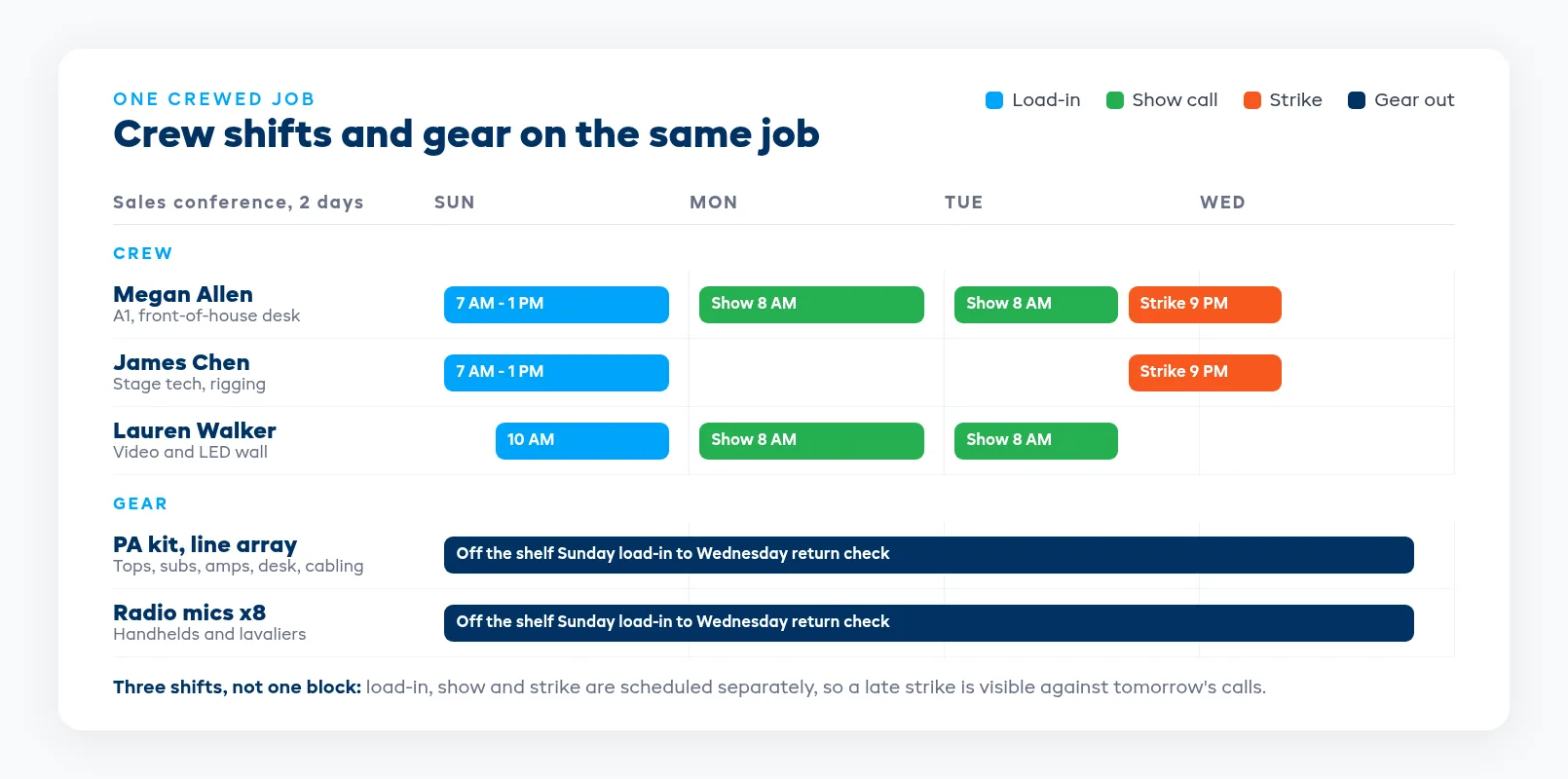
Break each crewed job into the calls your people actually work:
- Load-in. Who's on the van, what time it leaves, and how long the rig takes. A line array in a ballroom isn't a 30-minute job.
- Show call. Who runs the desk, who's on stage, and whether anyone has to stay through the after-party.
- Strike. Often the latest finish of the week, and the call people forget to schedule until the night before.
Separate shifts matter because a tech who works a midnight strike can't sensibly do a 6 AM load-in across town. When load-in, show and strike are one blob on the calendar, you can't see that. When they're separate shifts on the job, you can.
Skills on file, so the right person goes
Not every tech can run every desk. Your A1 who mixes live bands may not be the person you want on a corporate panel with eight lavaliers, and your lighting tech may never have touched the media server. If skills only live in the scheduler's head, the wrong person turns up the day that scheduler is out.
Look for software that keeps skills on each crew member's record and shows them when you assign people to a job. Keep the list short and practical: the desks and consoles they're confident on, rigging work they're trained for, whether they can drive the truck. The goal is that anyone booking crew can tell at a glance who fits the job.
Timesheets belong here too. If you pay crew by the hour or by the call, the hours worked should come from the same shifts you scheduled, so payroll and job costing aren't built from a second set of notes.
Catch the double-booked tech early in the week
The crew problem that costs the most is one person promised to two jobs on the same day, usually discovered when they call from the first venue asking why they're also on the second. Software should flag that clash as soon as the second assignment is made.
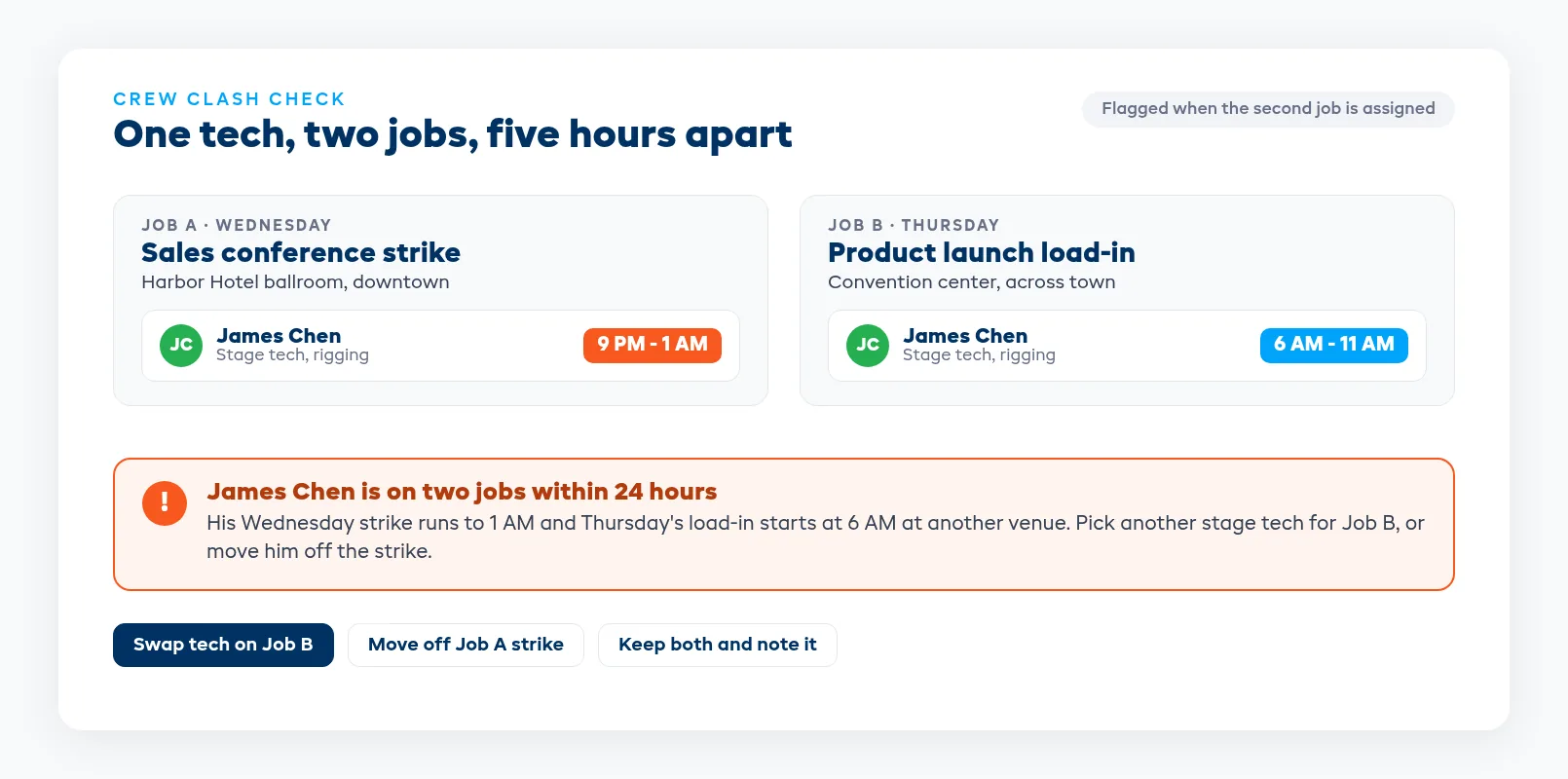
When you test a system, set up exactly this case: one tech on a late strike, then try to put the same person on an early load-in the next morning at another venue. Then try a straight same-day double booking. See whether the software warns you, and where. A warning that only shows up in a report nobody opens won't save you on the night.
The same logic applies to the gear. A console promised to Thursday's conference can't also go to Thursday's wedding, and a radio mic kit that's already committed inside one package can't be quietly promised inside another. If your software checks gear clashes but not crew clashes, you've only solved half the problem.
Kits and pull sheets the warehouse can pack from
Crewed jobs go out bigger than dry hire. The tech needs the spares, the tools, the extra cable runs and the bits the client will never think to ask for. That's why kits matter: build the PA package once, with tops, subs, amps, desk, stage box and cabling, and book it as one item while every component underneath stays tracked on its own.
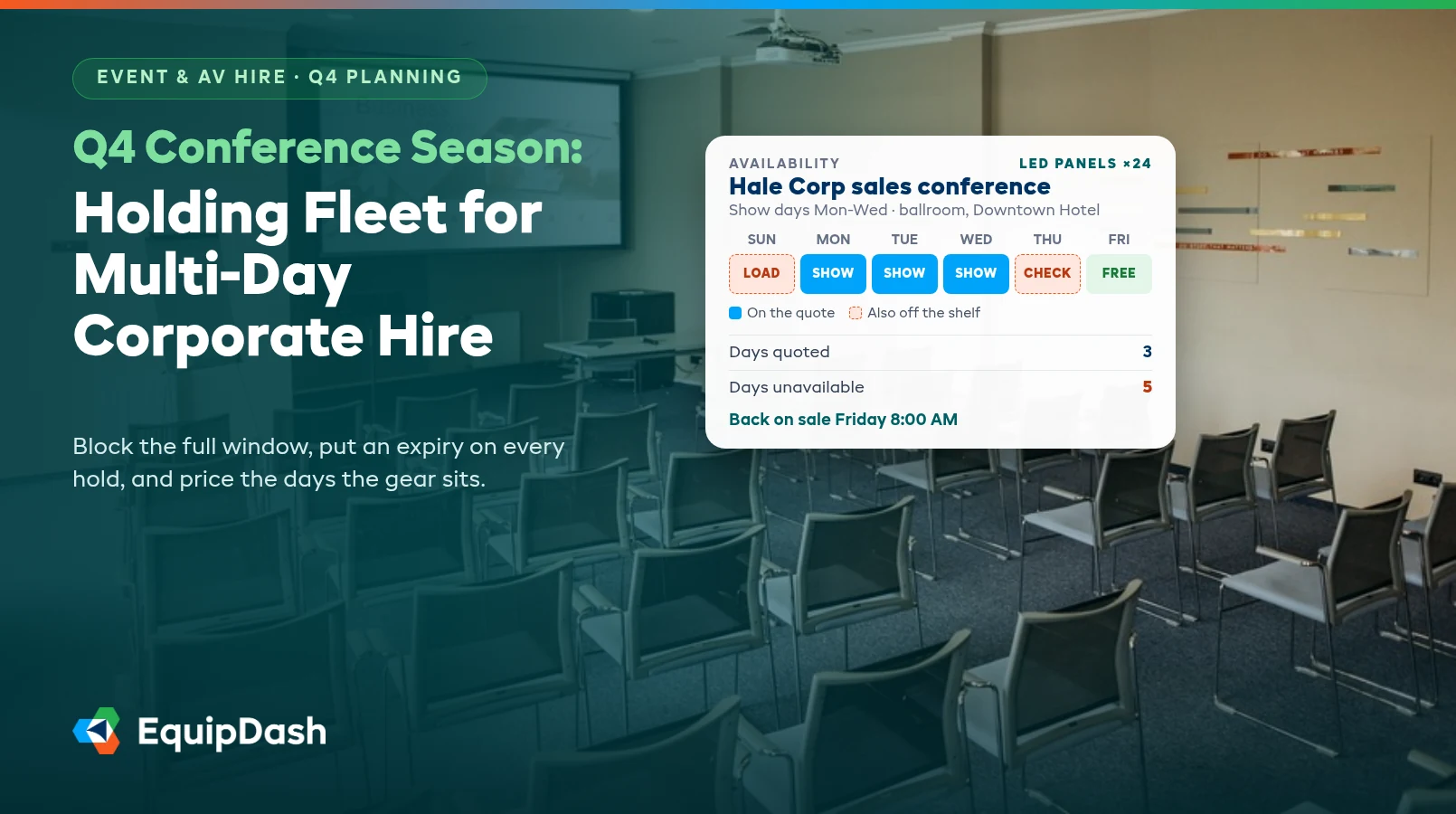
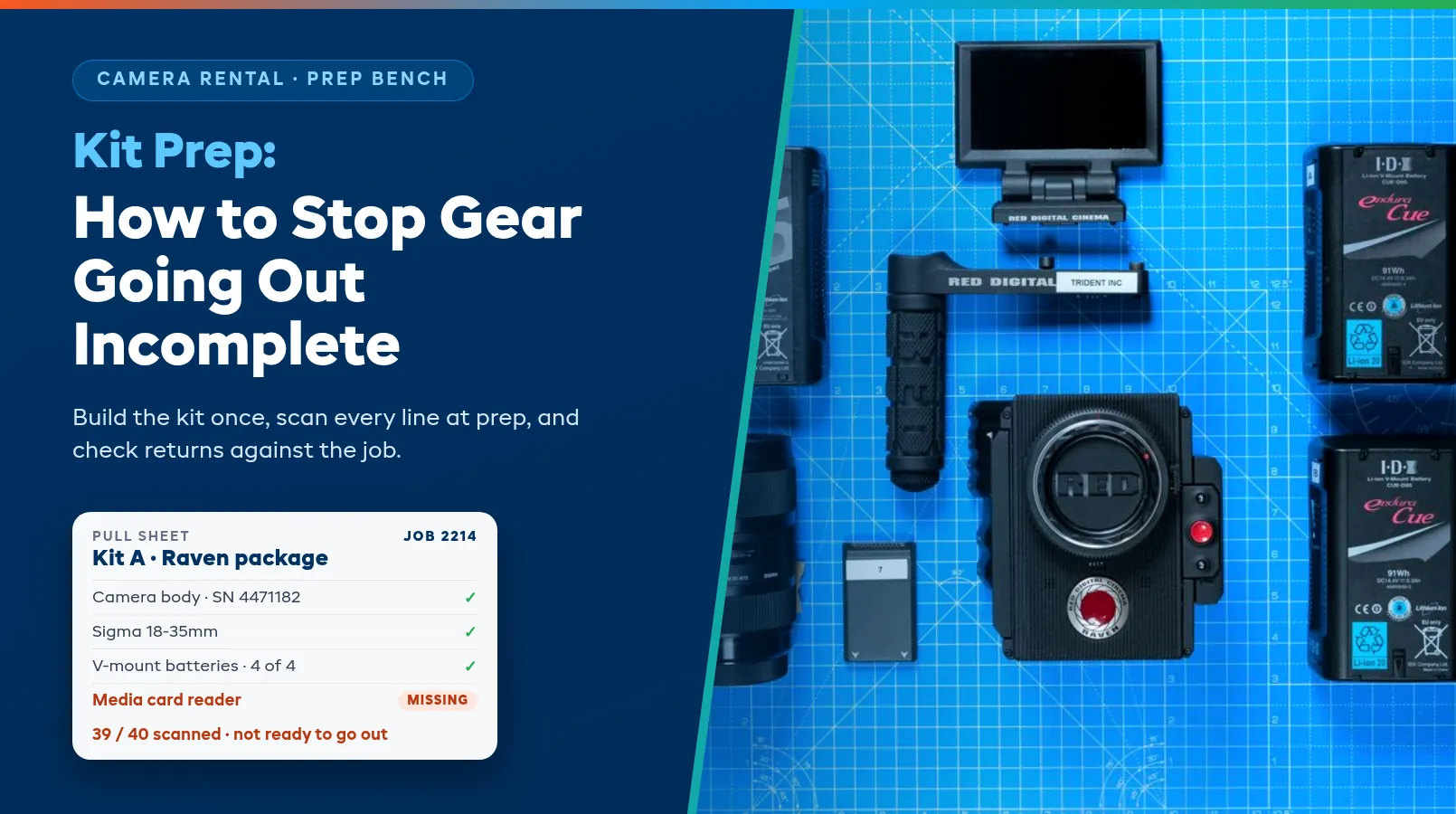
The warehouse should pack from a pull sheet that comes straight from the job, with serials on the expensive items and a check column for everything else. The tech should know the job is complete before the van leaves the yard. Swaps on the day (a different desk, a spare mic pack) should change the sheet rather than live on a sticky note. Our post on holding fleet for multi-day corporate hire covers how long those kits actually sit off the shelf during conference season.
Quotes that price labor and gear together
A crewed quote has two halves: the kit and the people. Clients compare your total against another company's total, so if labor gets added later by hand, you either undercharge or the quote goes out late. Look for quoting that works from live availability for the event dates and lets you price crew hours alongside the gear, using the same rates you'd pay out.
Test it with a real job from last month. Build the quote, add the load-in, show and strike calls, and see how long it takes. Then accept it and check whether it turns into the job without anyone retyping the gear or the crew. Multi-day and weekly rates matter here as well, because conference and festival work rarely runs on a single-day rate. Our guide to event rental quoting and deposits covers getting a quote out the same day and holding the date with a deposit.
Sub-rentals and returns stay on the same job
Crewed work is where sub-rentals pile up. You win a bigger show than your stock covers, so you bring in an extra pair of subs or a second LED processor from another company. That gear has to show on the pull sheet next to your own, go out with your tech, and come back on the return check, or it sits in your warehouse until the other company calls asking for it.
Returns are the other half. After a late strike, cases come off the van at 1 AM and get stacked by the door. Software should let you scan each case back in against the job the next morning, so a short return (the missing mic pack, the DI box that stayed at the venue) shows up that day while the tech still remembers where it went. Faults found on return should go straight to the workshop. Our guide to event rental turnaround and cleaning goes further into blocking returned stock until it's ready to go out again.
Six tests to run before you switch
Run these with whoever schedules crew and whoever runs the warehouse in the room, using real jobs from the last month.
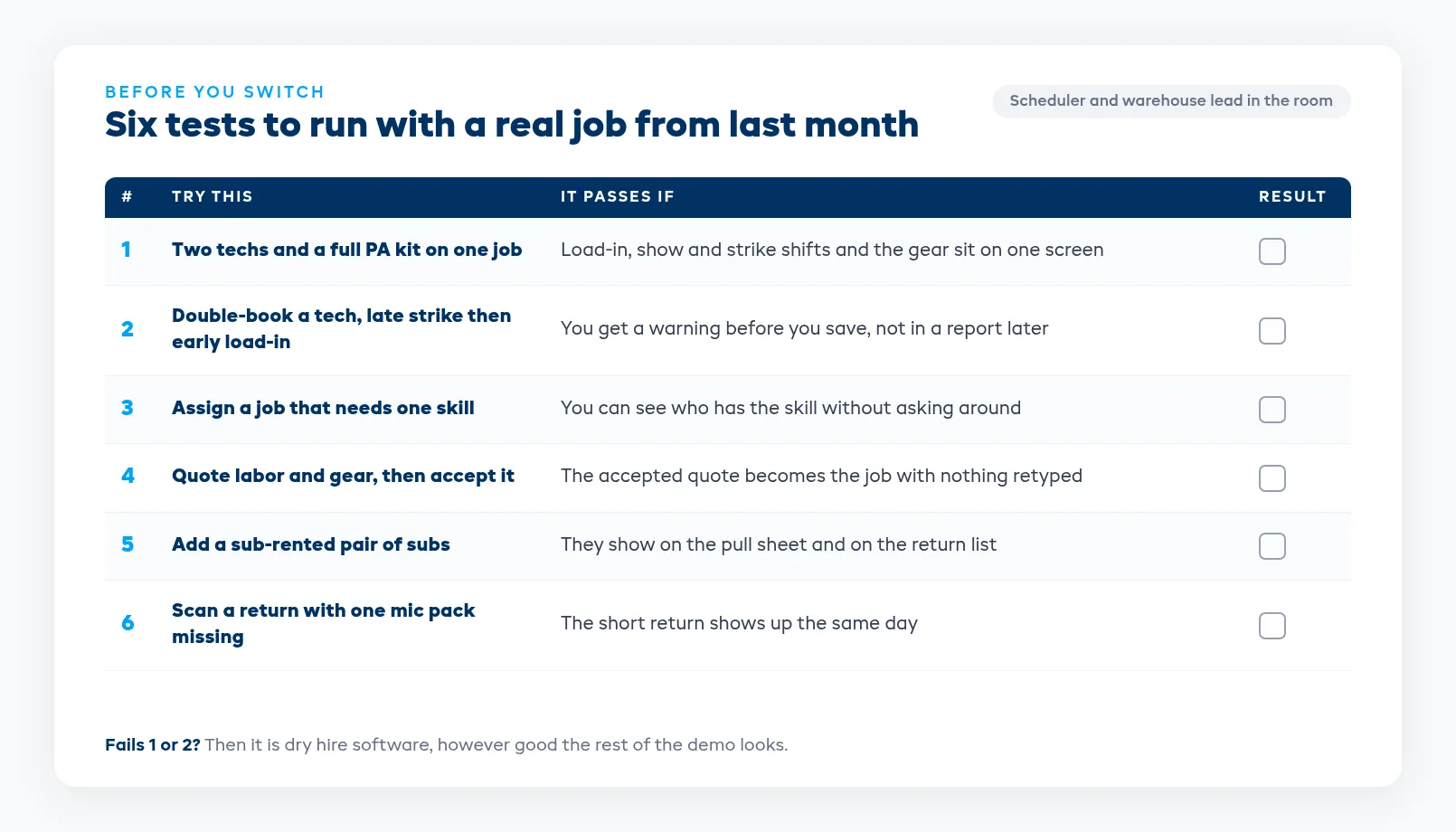
- Put two techs and a full PA kit on one job, with separate load-in, show and strike shifts. Can you see the whole job on one screen?
- Try to double-book a tech across a late strike and an early load-in. Does it warn you before you save?
- Assign a job that needs a specific skill. Can you see who has it without asking around?
- Build a quote with labor and gear, then accept it. Does it become the job without retyping?
- Add a sub-rented item to the job. Does it appear on the pull sheet and the return check?
- Scan a return with one item missing. Do you find out that day?
If a system fails the first two, it's dry hire software, however good the rest looks. Everything after that is about how much time it saves the scheduler and the warehouse each week.
EquipDash puts crew on the same job as the gear, with shifts, timesheets and skills on file, and flags a technician assigned to two jobs on the same day. Kits, pull sheets, quotes from live availability, sub-rentals and scanned returns sit on the same job, with plans from $23/mo billed annually. See how it works for crewed jobs on our AV rental software page.
FAQ
What should AV rental software do if we send crew with the gear?
It should put technicians on the same job as the equipment, with separate shifts for load-in, show and strike, skills on each crew record, and a warning when someone is booked on two jobs at once. Kits, pull sheets, quotes, sub-rentals and returns should all sit on that same job, so nothing lives in a side spreadsheet.
What is the difference between dry hire and crewed AV hire?
Dry hire means the client takes the gear and runs it themselves. Crewed hire means your technicians go with the gear to set it up, run the show and strike it. Dry hire only needs equipment availability. Crewed hire also needs crew availability, skills, shift times and labor on the quote.
How do we stop double-booking technicians?
Schedule crew in the same system as the jobs and let it flag clashes when you make the assignment. Break each job into load-in, show and strike shifts so a late strike and an early load-in the next morning show up as a conflict, not just two jobs on different days.
Should labor be on the same quote as the equipment?
Yes. Clients compare totals, so a quote that adds crew later either undercharges or goes out late. Price the load-in, show and strike calls on the same quote as the kit, and make sure the accepted quote becomes the job without anyone retyping it.
Do AV rental companies need serial number tracking?
Yes, for the expensive items. Consoles, radio mic packs, projectors, LED processors and moving lights should be tracked by serial so you know which unit went to which job and what came back faulty. Cables and consumables can usually stay as counted stock.
How much does AV rental software cost?
It depends on the system and how many users you need. Some AV tools publish their prices and some only quote after a sales call. EquipDash plans start from $23/mo billed annually, with crew scheduling, kits, quotes and returns on the same job.
in one place