Thanksgiving Week Bookings: Capacity Caps and Family-Group Ops
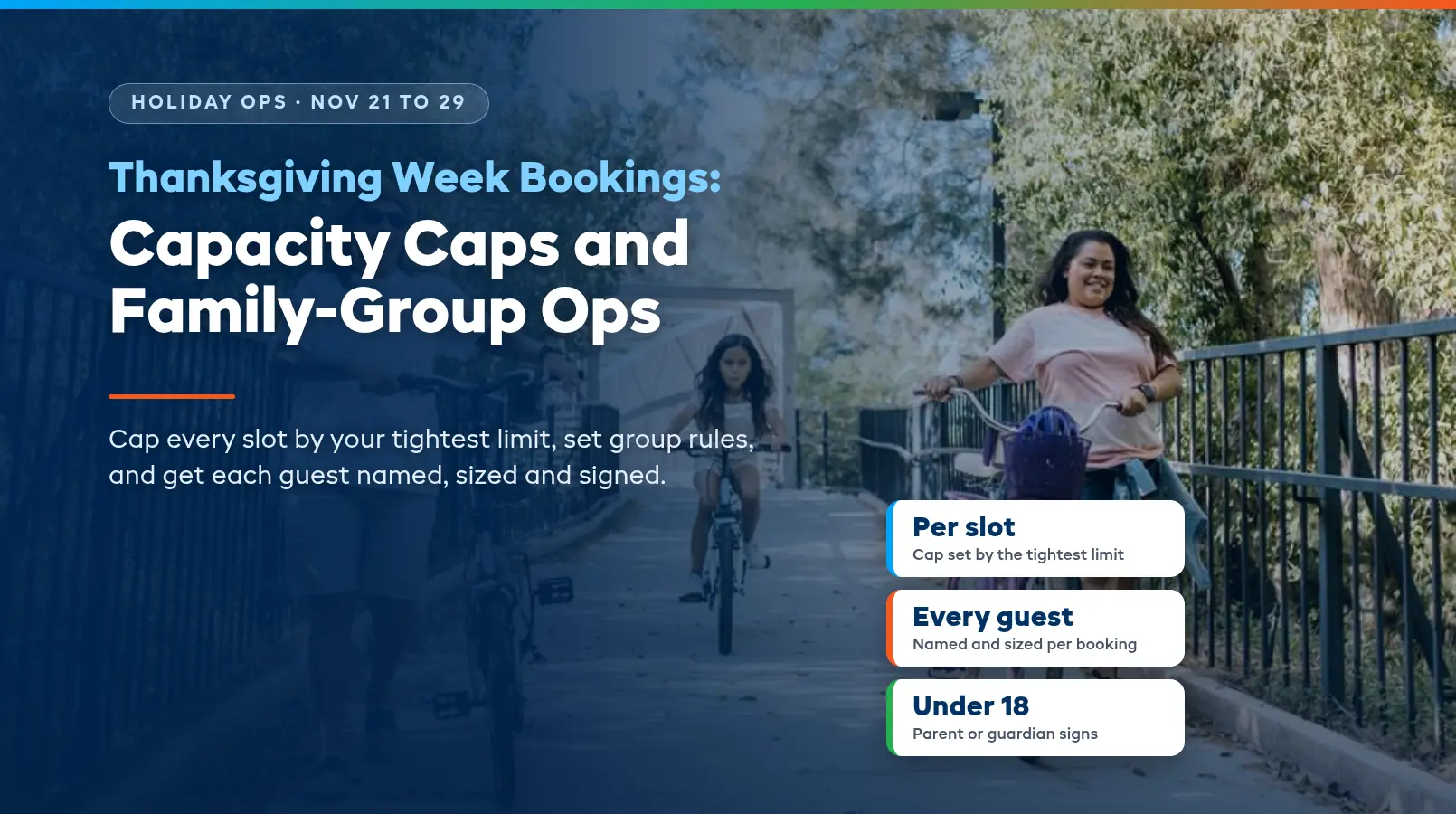
Thanksgiving week brings bookings for nine people instead of two, with ages running from a grandparent to a five-year-old, and most of them want the same Friday morning. Set your hours, slot caps, group rules and waiver plan before those bookings land, and the week runs on your terms instead of the group chat's.
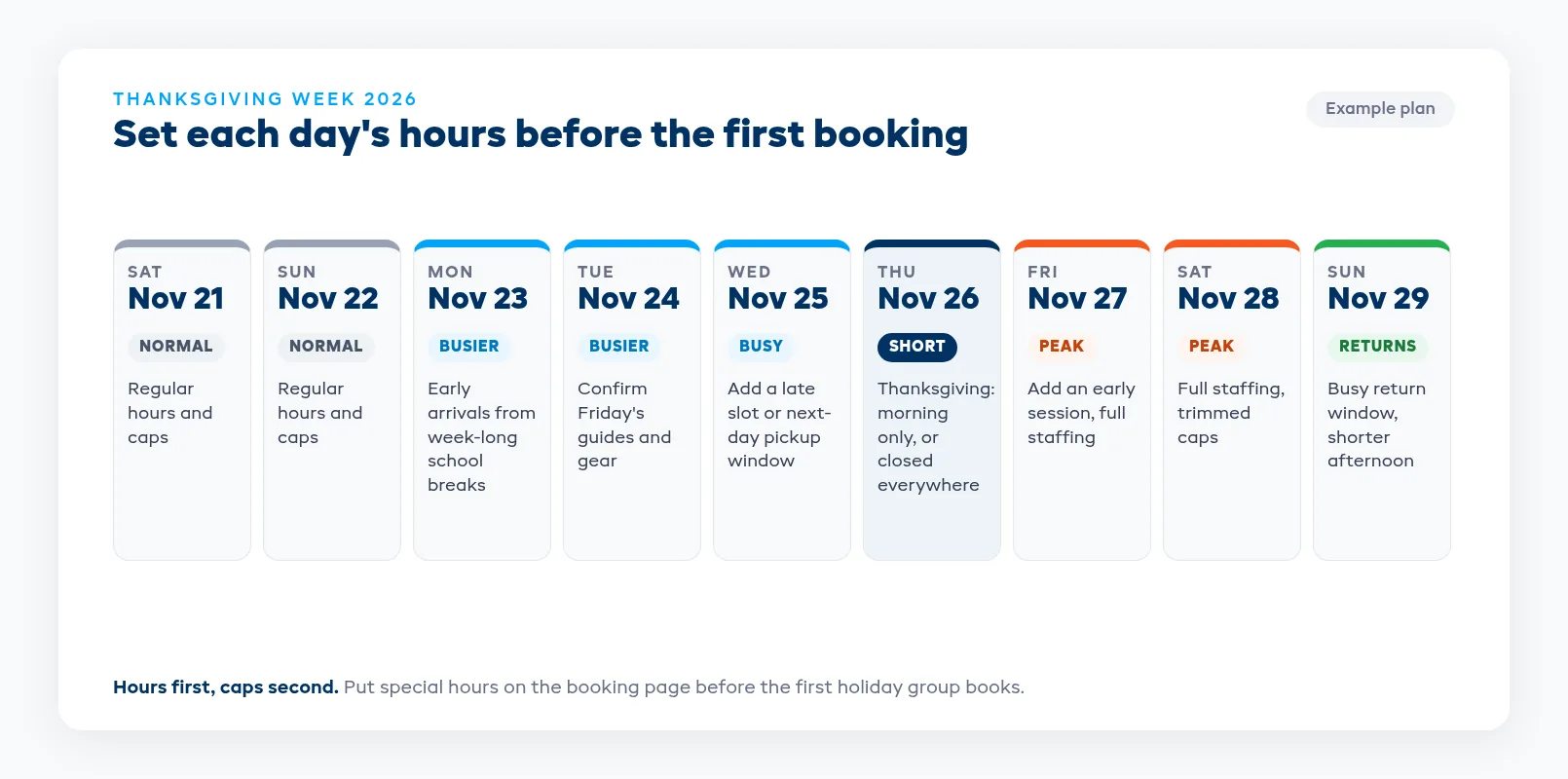
This year Thanksgiving falls on Thursday, November 26. For most rental shops and tour operators, the busy stretch runs from Saturday the 21st to Sunday the 29th, with Wednesday afternoon, Friday and Saturday doing the heavy lifting. Some school districts close for the whole week, so families arrive early and stay late. This guide covers holiday hours, slot caps, group sizing, guest details, waivers for minors, and the day-of calls that decide whether the week feels busy or chaotic. If you're still building your staffing plan, start with the peak season preparation guide and come back here.
Why Thanksgiving week books differently
A normal Saturday is a run of couples and small groups who each made their own booking. Thanksgiving week is family groups, and family groups change the math.
One person books for everyone. The organizer is often the relative who lives nearby. They know your shop, but the eight people coming with them have never been, don't know their sizes, and haven't read your policies.
Ages and abilities mix. One booking can hold a toddler, two teens, a college student home for the break and a grandparent who'd rather walk. Every one of those people needs the right size, the right version of the activity and the right paperwork.
Plans change at the dinner table. Families decide on Thursday night what they're doing Friday. Expect a wave of late bookings, late adds ("can my cousin come too?") and the occasional group that shows up with fewer people than they booked.
Your own team wants the holiday. Staff who'd normally cover a Thursday shift have family plans too. Your real capacity for the week depends on who's working, not just what's on the rack.
Set the week's hours before you set the caps
Caps sit on top of opening hours, so settle the calendar first. Decide each day before you open the week for booking, and change it later only if you have to.
The questions to answer for each day:
- Thanksgiving Day: closed, morning only, or open as normal? A short morning schedule is a middle ground. Families who want an activity before the meal get one, and your team still gets home for theirs. If you close, close on every channel at once.
- Wednesday: extend into the evening? Many families arrive Wednesday afternoon. An extra late slot or a pickup window for next-day rentals takes pressure off Friday morning.
- Friday and Saturday: add sessions or stretch the day? Adding an early session usually beats squeezing more people into existing ones.
- Sunday: shorten the day? Families head home, and returns pile up in the morning. Plan for a quieter afternoon and a busy return window.
Put any special hours on your booking page before the first holiday booking comes in. Changing a slot time after a family of ten has booked it means ten people to tell.
Cap each slot by your tightest limit
The number of people you can take in a slot is set by whatever runs out first. Most operators set caps by the gear count or the seats on the activity, then find out on the day that something else was the real limit.
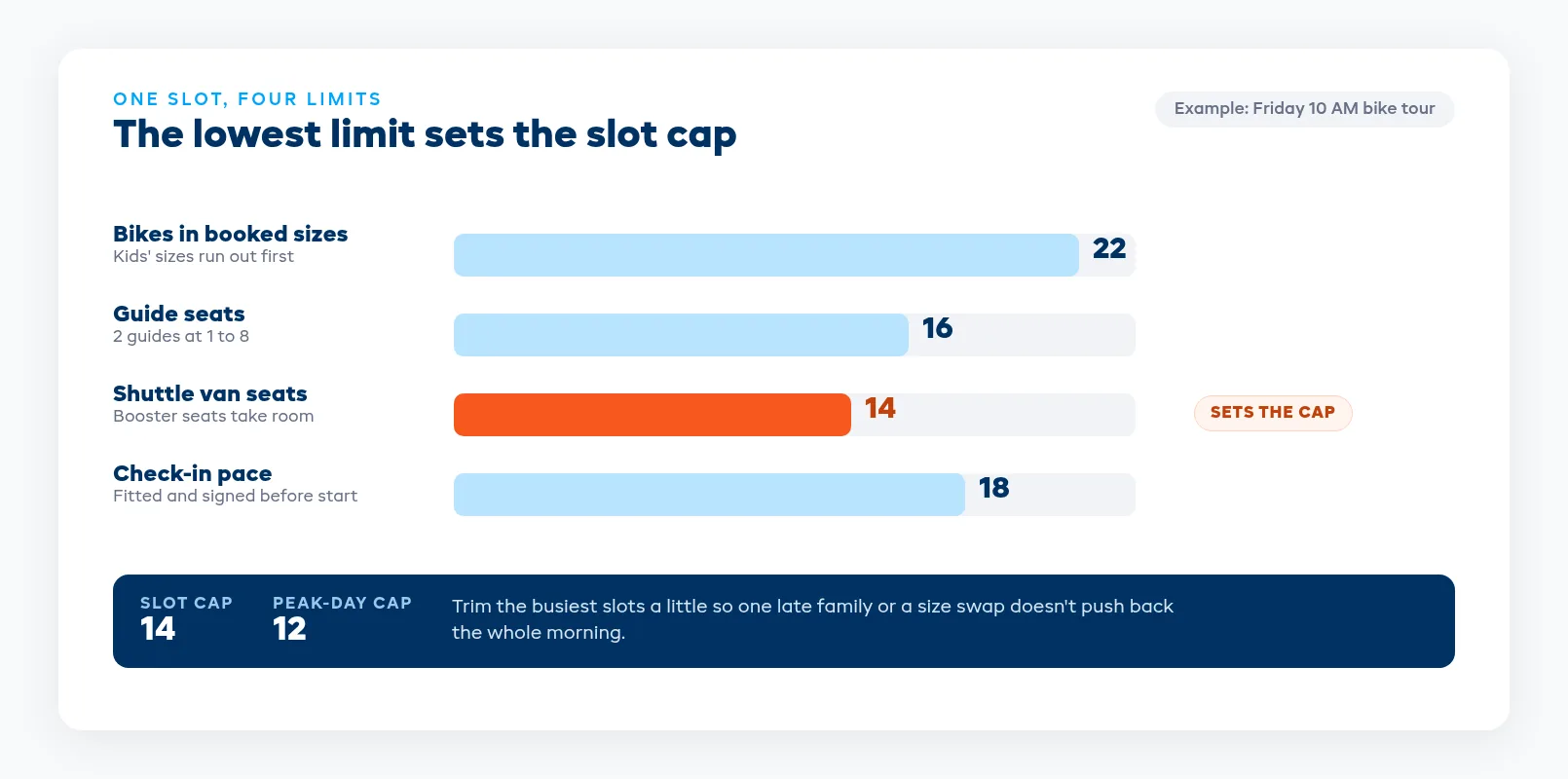
For each busy slot, check the numbers that can run out:
- Gear in the sizes this crowd needs. Family groups skew small. You might have plenty of adult bikes, kayaks or helmets and still run out of youth life jackets, kids' bikes or small helmets by 10 AM. Count by size, not by total.
- Guides or staff at your ratio. If a tour runs one guide to eight guests, two guides means sixteen seats, whatever the van holds. Mixed-age groups may need a tighter ratio.
- Vehicle and transport seats. Shuttle vans, boats and trailers have hard limits, and child seats or boosters can take more room than an adult seat.
- Check-in and fitting pace. How many people can your counter size, sign in and send out in the time before the slot starts? Families with kids take longer per person.
- Parking, launch and staging space. A full lot or a crowded beach launch slows everything down.
Your cap is the lowest of those numbers. On the peak days, trim it a little further so a late arrival or a size swap doesn't push the whole morning back. If gear is shared between rentals and tours, both need to draw from one count, or a walk-up rental can take the kayaks a booked tour is relying on.
Set a cap for the day as well as for each slot. Gear needs turnaround time between bookings, and staff need breaks. A day made of five full slots back to back rarely runs on time.
Decide what one booking can be
Group size is where holiday bookings go wrong. A family of eleven tries to book a slot with nine seats left, or a reunion of twenty books four separate times and expects to go out together.
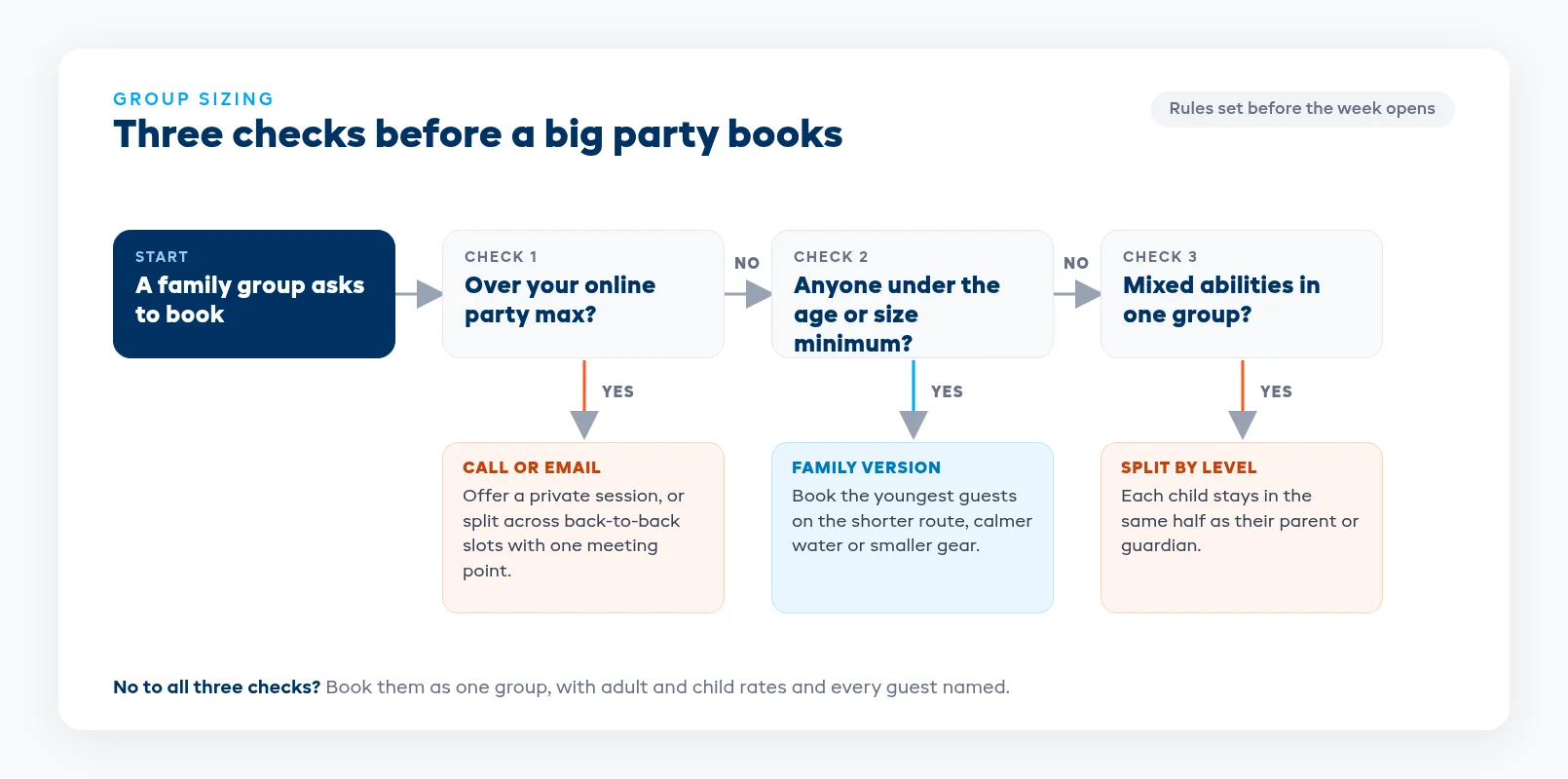
Write these rules down before the week opens:
Set a maximum party size for online bookings. Pick the size one guide, one van or one session can take. Anything larger calls or emails you, so you can place them properly instead of finding out at check-in.
Offer a private session for big groups. Large families often prefer a session of their own. Price it per group or with a minimum headcount, and block it so other bookings can't take the same guide or gear.
Split across back-to-back slots, not across the day. If a group has to split, put the halves in consecutive slots with the same meeting point so they finish close together. Keep each child in the same half as their parent or guardian.
Publish age and size minimums on the booking page. If an activity has a minimum age, height or weight, show it per product and ask for each guest's age at booking. A family-friendly version of the activity (shorter route, calmer water, smaller bikes) gives you somewhere to put the youngest guests.
Price adults and children separately. Clear adult and child rates stop the "do kids count?" calls and make it obvious who's on the booking.
For large group bookings, take a deposit when they book and the balance before the day. The deposits and partial payments guide covers how much to take upfront and how to chase the rest without a spreadsheet.
Get every guest's details before the day
The organizer's name and card aren't enough. On the day, you need to know who each person is, what size they need, and whether their paperwork is done.
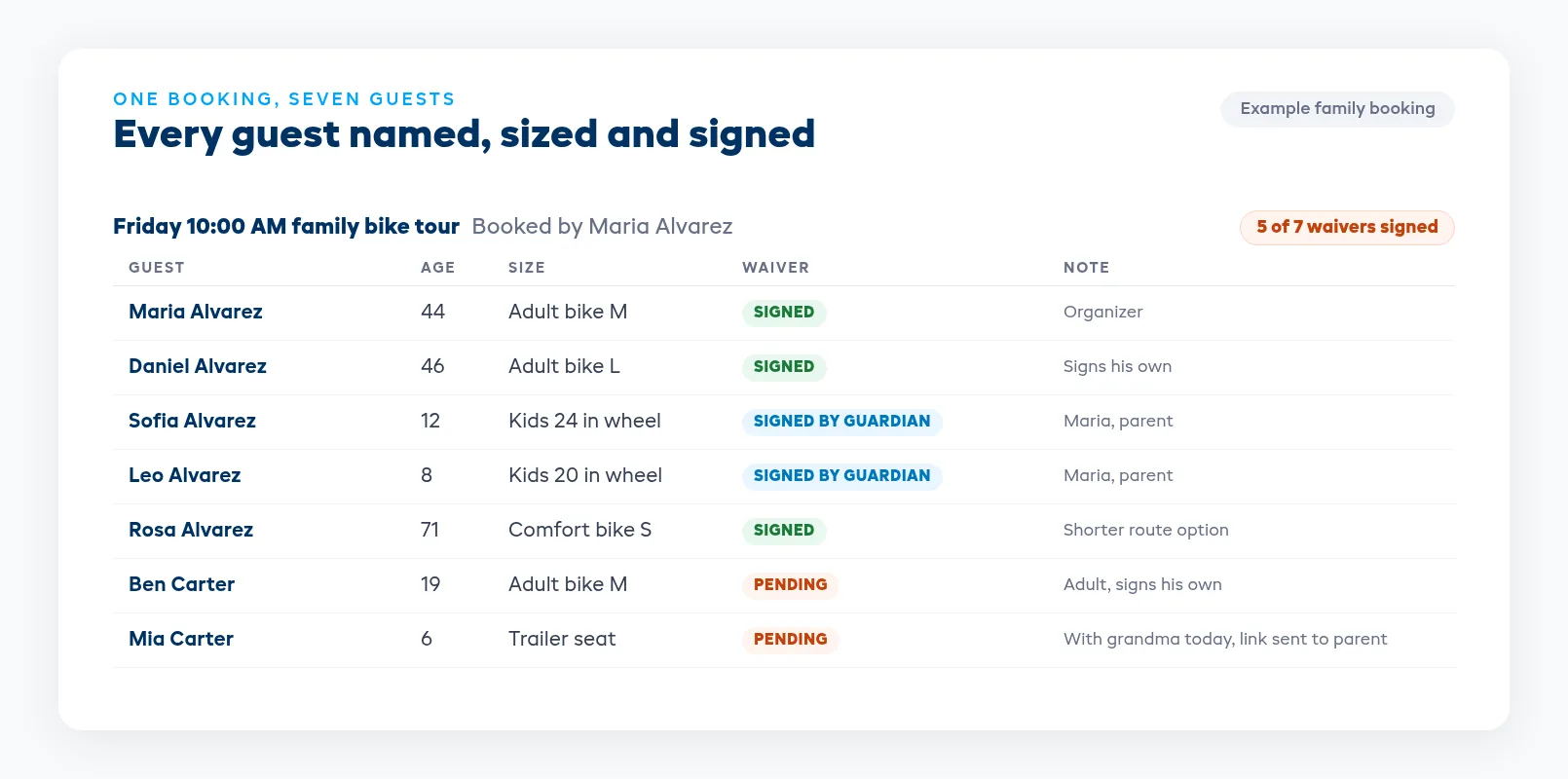
Ask for the details per guest, not per booking:
- Name and age for every person
- Sizes or measurements for whatever you fit (shoe size, height, weight range, helmet size)
- Skill or comfort level if your activity has options
- Anything a guide should know, such as a medical note or a non-swimmer
Send a message two days before the booking with a link to fill in anything missing and sign waivers. Send a shorter reminder the evening before with the meeting point, what to wear and when to arrive. Holiday guests are often staying with relatives and may not have their own transport, so give the address clearly and say where to park.
If you pre-pack gear by size, those answers let your team set out each family's gear the night before. A family that arrives to a labeled pile is on the water or the trail while the walk-in group is still being fitted.
Plan waivers for minors and mixed families
Waivers get harder when the people in a group aren't all from one household. Thanksgiving groups are full of kids who arrive with a grandparent, an aunt or a family friend.
Every adult signs their own waiver. That includes the college student who just turned 18. One adult signing for a whole group of adults doesn't cover the others.
A parent or legal guardian signs for each minor. A grandparent or aunt bringing the kids for the morning may not be the child's legal guardian. Decide your policy in advance and send the waiver link to the actual parent before the day, so they can sign even if they're not coming.
Check the rules where you operate. Who can sign for a minor, and how much a parent's signature holds up, varies by state. Ask your attorney and your insurer what your waiver needs to say for minors, and don't change it the week before the holiday.
Hold the start until the roster is complete. Gear doesn't go out and the activity doesn't start until every person on the booking shows a signed waiver. A tablet at the counter for last-minute signers keeps the line moving.
The digital waivers guide covers setting up waivers that go out with the booking confirmation and attach to the booking when signed.
Run the week: check-in, adds and no-shows
Stagger arrival times. Ask large groups to arrive earlier than small ones, and give each booking its own check-in time if your counter is the bottleneck. One person from each group handles payment while the rest go straight to fitting.
Handle late adds against the cap. When the organizer calls Friday morning to add two cousins, add them only if the slot still has room under the cap, the gear in their sizes is free, and they can sign before the start. Otherwise offer the next slot. Keep a waitlist for full slots, because holiday plans change and cancellations do come in.
Write a partial no-show rule. A group of eight that shows up with six is common this week. Decide in advance whether you charge for the full booking, the deposit only, or nothing inside a set notice window, and put it in the booking confirmation.
Have a weather plan. A wet Friday with a full calendar is when a weather policy earns its keep. The rain and weather policy guide covers when to make the call and what to offer instead.
Brief your team each morning. Five minutes on the day's biggest groups, the slots at cap, any minors waiting on a waiver, and who's covering breaks.
After the week
Before the next holiday rush, spend half an hour on what happened. Which slots sold out first and how early? Where did lines form? Which sizes ran out? Which caps were too high or too low? Christmas and New Year's week bring the same kind of family groups, so make the changes while the week is still fresh.
Ask the families who had a good day whether they want the same week next year, and note it on their customer record so you can reach them first in the fall.
Where EquipDash fits
EquipDash lets you set the seats per session. It stops selling when a session is full and shows customers the seats left online. Turn on Needs a guide and a session sells only while enough guides are free. You can price per participant with adult, child and senior rates, add your own rate types, or charge one price per group.
Rental stock is counted by size, and the sizes and counts customers see on your booking page come straight from that stock. The same gear can be shared between rentals and tours, so a walk-up rental takes seats off a tour that uses the same kayaks. Closed dates can't be booked on any channel, you can set special hours for a date range, and adding a closure never cancels bookings you already have.
On a group booking, you add each person, and every guest signs their own waiver and answers their own form questions, such as a size or skill level. With digital waivers, a parent or guardian signs on behalf of a minor, with their details recorded. Guides see each guest's answers and waiver status on the session manifest.
Deposits can be a percentage or a set amount, with a payment link for the balance, and the waitlist (on the Pro plan) emails everyone waiting when a spot opens. Plans start from $23/mo billed annually, and you can compare them on the pricing page.
FAQ
When should we set our Thanksgiving week hours and caps?
Set them before you open the week for booking, ideally by early November. Family groups book early to lock in a day together, and changing slot times or caps after a large group has booked means contacting every guest on that booking.
How do we set a capacity cap for a busy holiday slot?
Use the lowest of your limits for that slot: gear in the sizes you need, guides at your ratio, vehicle or boat seats, check-in pace and staging space. On the peak days, trim that number a little so a late arrival or a size swap doesn't delay the whole morning.
Can a grandparent or aunt sign a waiver for a child?
Usually only a parent or legal guardian can sign for a minor, but the rules vary by state. Set your policy with your attorney and insurer, and send the waiver link to the child's parent before the day so it's signed even if the parent isn't coming.
What maximum party size should we allow online?
Set it at the size one guide, one vehicle or one session can take. Larger groups should call or email so you can offer a private session or split them across back-to-back slots, with each child kept in the same half as their parent or guardian.
Should we open on Thanksgiving Day?
Open only if you have staff who want the shift and enough bookings to justify it. A short morning schedule is a middle ground: families get an activity before the meal and your team gets home for theirs. Whatever you decide, apply it on every booking channel.
What do we do when a family shows up with more people than they booked?
Add the extra guests only if the slot still has room under your cap, gear in their sizes is free, and they can sign a waiver before the start. If not, offer them the next slot or a place on the waitlist rather than going over the cap.
in one place