FareHarbor vs Checkfront: Which Is Better? (2026)
FareHarbor vs Checkfront: Which Is Better? (2026)
FareHarbor and Checkfront are often shortlisted together because both can sell tours, activities, and equipment rentals. They take very different approaches, though. FareHarbor is a consultative platform with strong distribution, managed onboarding, and pricing that is usually discussed during the sales process. Checkfront puts a public price on its main plan and gives operators a flexible booking engine for rentals, tours, and add-ons.
The right choice depends on what you need to protect: marketplace reach, predictable software cost, rental depth, setup speed, or day-to-day simplicity. This guide compares the two on the things that affect a real operator's week, not just the feature list.
Still comparing the wider market? Start with our equipment rental software comparison or see the best FareHarbor alternatives.
Quick Comparison Table
| FareHarbor | Checkfront | |
|---|---|---|
| Built for | Tours, activities, attractions, and rentals | Tours, activities, accommodations, and rentals |
| Best for | Operators that value distribution and guided onboarding | Operators that want broad booking rules and a published entry price |
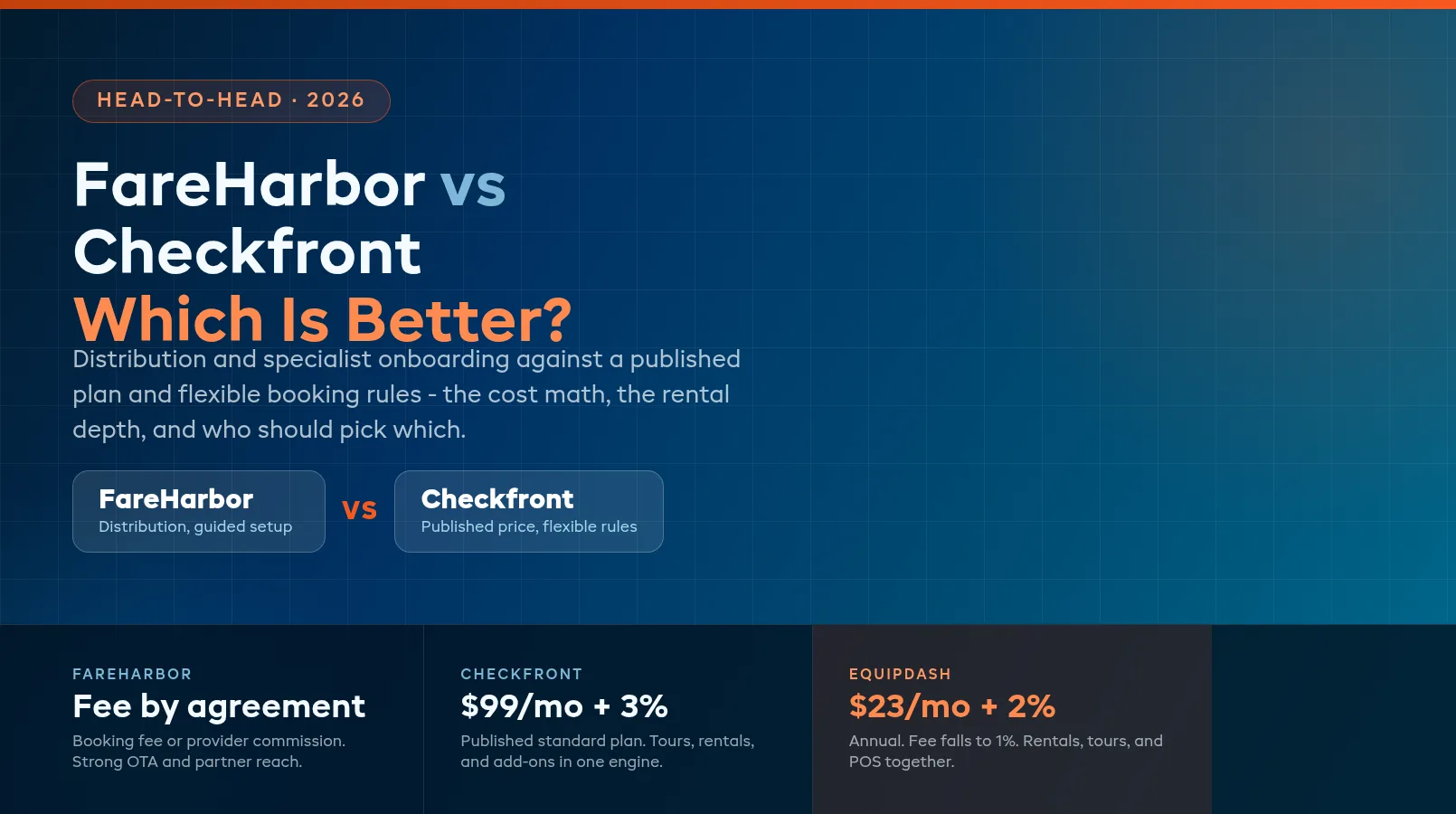
| Pricing model | Booking fee or provider-paid commission, depending on agreement | $99/month + 3% online booking fee on the standard public plan; regional variations apply |
| Rental tools | Resources, availability, cleaning blocks, waivers, card holds, and reporting | Real-time availability, asset allocation, rental rules, add-ons, and waivers |
| Distribution | Strong OTA and partner network | OTA and partner integrations, including major activity channels |
| Setup | Specialist-led onboarding | Self-serve setup with support options |
| Support | 24/7 support is advertised | Help center and support channels; plan and region affect service |
| Best fit | High-volume tour and activity businesses | Mixed operators that want flexible booking configuration |
Both platforms can stop a basic double booking. The difference is what happens around that booking: how you acquire it, what it costs, how staff run the day, and how deeply the system understands your gear.
Features Comparison
Booking, capacity, and inventory
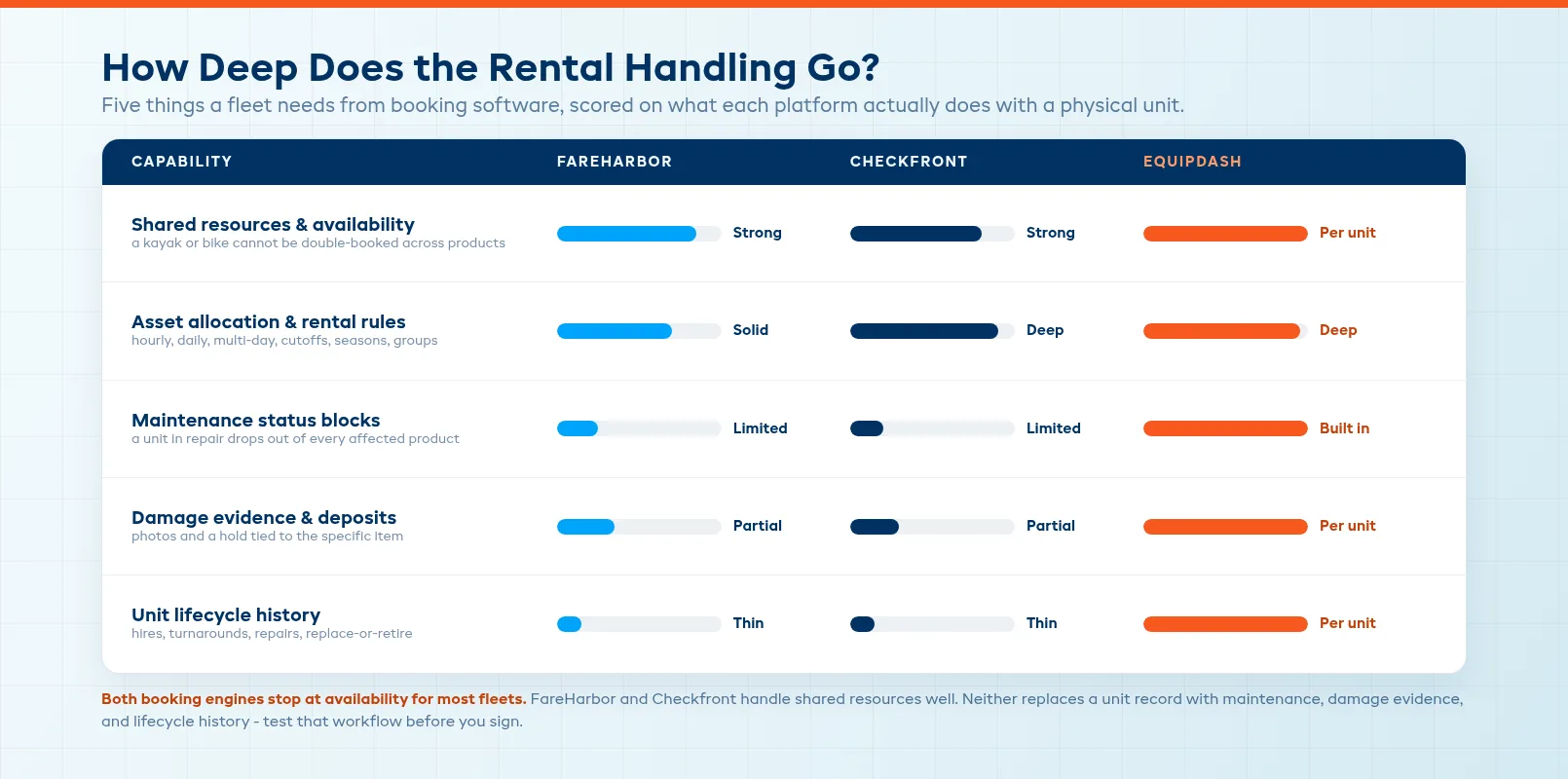
FareHarbor uses resources to connect limited equipment, vehicles, guides, and spaces to the activities that use them. A kayak, guide, or seat can be shared across offerings and blocked when it is already committed. Operators can add cleaning or turnaround blocks and view use across calendars and locations.
Checkfront also offers real-time availability and automated asset allocation. It supports hourly, daily, multi-day, and time-slot products, plus rules for cutoffs, capacity, seasons, groups, and holidays. Its strength is configuration: you can express a complicated rate card without building a separate workaround for every product.
That does not make the platforms identical to a fleet management system. If you need a full history for each unit, maintenance status, damage evidence, and a check-in workflow tied to a serial number, test the exact process in a trial or demo. A product page saying “inventory” can still mean a quantity counter rather than a unit record.
Tours, manifests, and guest operations
FareHarbor is strongest when the business revolves around scheduled experiences. Its booking flow, manifests, crew assignment, capacity controls, transportation options, and distribution tools are built around getting guests onto the right activity at the right time. The platform also supports rentals, so an operator can share gear between a tour and a separate hire product.
Checkfront covers the same core tour workflow: online booking, capacity, staff reservations, payments, waivers, notifications, manifests, and reporting. It also gives mixed operators room to sell accommodation or other bookable products from the same account. That range is useful when one business has several product types.
The practical question is not whether either platform can create a tour. It is how many exceptions your staff must handle after the booking arrives. Ask both vendors to demonstrate a late return, a weather reschedule, a partial refund, a guide swap, a shared kayak fleet, and a customer who changes the date twice.
Distribution and direct bookings
FareHarbor makes distribution a central part of its offer. Its network and OTA connections can help a tour operator reach customers who would not find a local website on their own. The trade-off is that channel economics deserve close attention. FareHarbor's public terms describe customer-paid booking fees or an alternative provider-paid commission, with the specific provider rate communicated in the agreement. Its distribution network publishes separate rates for some partner bookings.
Checkfront also connects with major OTAs and partners. Its pitch is less about being the distribution network and more about giving you control over the booking engine, products, rules, and customer flow. If most of your demand is already direct, that can matter more than another channel connection.
Build a channel table before you choose. List direct website, phone, counter, partner, and OTA bookings. Then write down who pays the fee, when the money arrives, what happens on a refund, and whether the customer record comes back to you. The cheapest-looking plan can become expensive when every successful booking carries a percentage.
Setup and ease of use
FareHarbor takes a specialist-led approach. That is helpful when your catalog, locations, resources, and distribution need careful configuration. It can also mean more vendor involvement and a longer path from contract to a booking flow that staff trust.
Checkfront gives operators more direct control over setup. That is a benefit for a team that wants to move quickly and already understands its pricing rules. It can become a burden when the catalog is large or when no one has time to maintain the logic behind every season, add-on, and resource.
Do not judge setup from the sales demo. Put one real product into each platform. Include availability, a waiver, a deposit, a date change, an add-on, and a return window. Time how long it takes a new staff member to find the booking and understand what must happen next.
Pricing Comparison
FareHarbor pricing
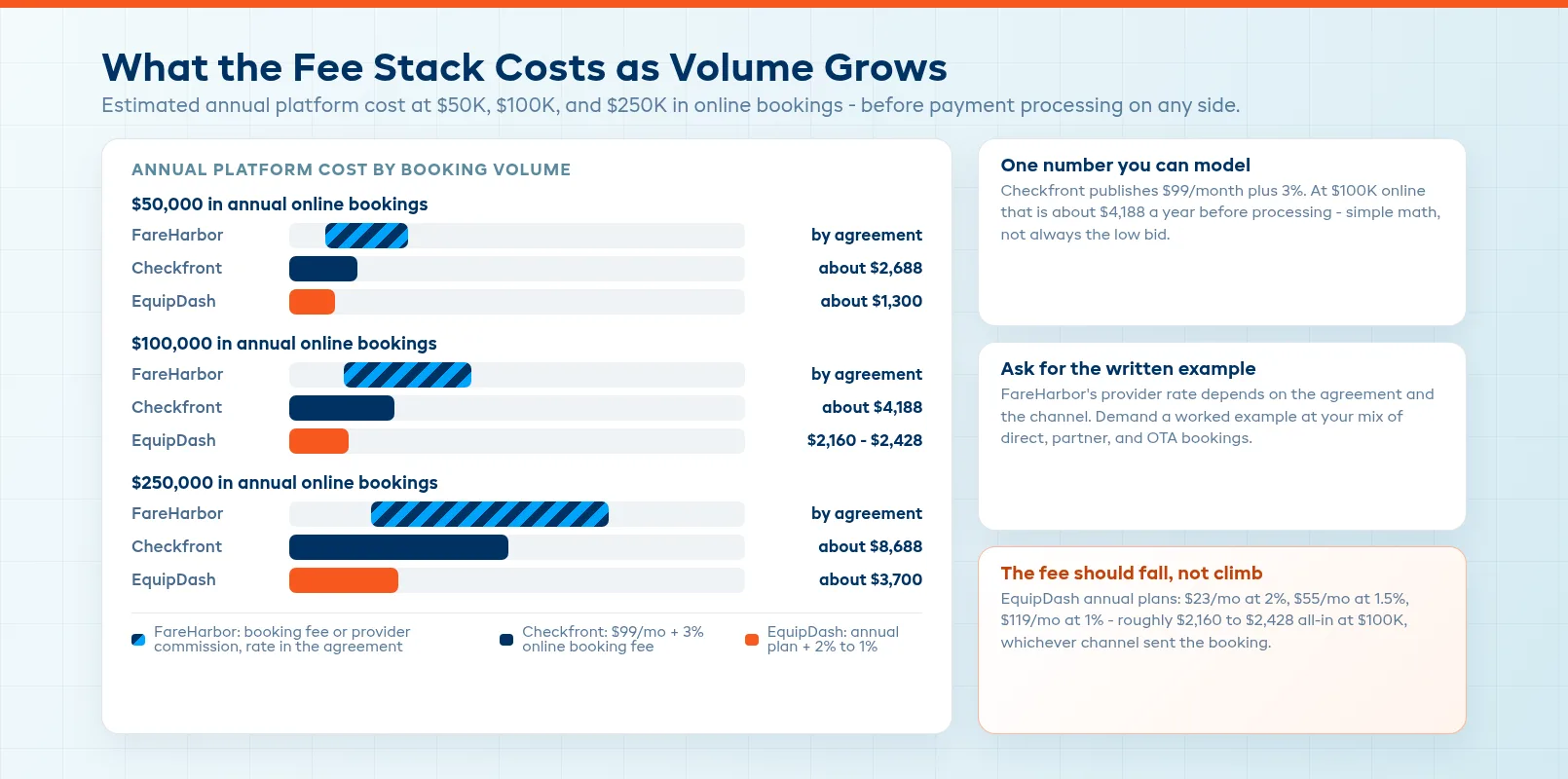
FareHarbor does not publish one universal provider price for every market. Its terms describe two broad structures: a booking fee charged to the customer, or a provider-paid commission under separate commission terms. The exact rate, services, payment setup, and any additional products belong in your agreement.
That model can work well when the platform's distribution and support produce bookings you could not have won alone. It is harder to forecast when you are comparing a percentage of revenue with a flat subscription. Ask for a written example at your actual booking volume, including direct bookings, partner bookings, refunds, chargebacks, and any API or add-on charges that apply to your market.
Checkfront pricing
Checkfront's public pricing page currently lists a standard plan at $99 per month plus a 3% online booking fee, with the option to absorb that fee or pass it to the guest. Pricing can vary by region and currency. Checkfront also documents subscription, online-booking-fee, managed, and legacy plan paths, so confirm which plan is available to your business before comparing totals.
At $100,000 in online bookings, 3% is $3,000 before the monthly subscription. Add $1,188 in annual subscription cost and the headline total is about $4,188, before payment processing and any other business costs. That is simple to model, but not necessarily low. A direct-booking business should compare it with a flat-rate alternative using its real mix of online and offline bookings.
EquipDash as a third option
EquipDash is built for operators that sell both rentals and tours and want the same system to understand the two sides. Annual plans start at $23 per month for Starter with a 2% platform fee, $55 per month for Growth with a 1.5% fee, and $119 per month for Pro with a 1% fee. At $100,000 in annual bookings, the annual-billing totals are roughly $2,276, $2,160, and $2,428 respectively before payment processing.
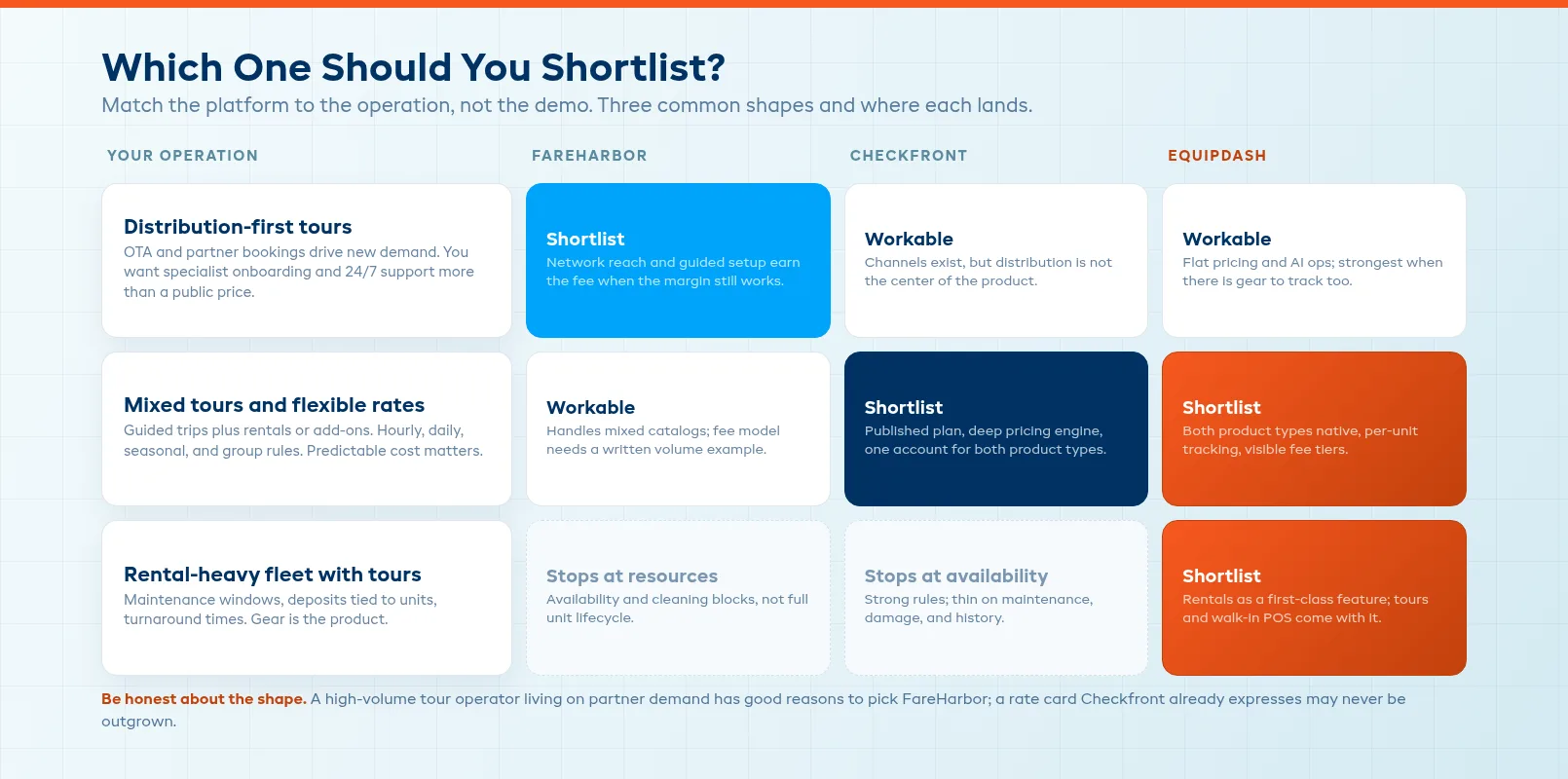
The fit is not automatic. An operator that needs a large distribution network first may prefer FareHarbor. A team that already has Checkfront configured and is happy with its cost may have no reason to move. EquipDash is worth a look when you need per-unit rental operations, tours, waivers, payments, and staff workflows in one dashboard without forcing the rental side into a simple quantity count.
Best For: When to Choose Each
Choose FareHarbor if
- Partner and OTA distribution are a major source of new demand.
- You want specialist help setting up a complex tour or activity catalog.
- 24/7 support and a managed relationship matter more than a public price.
- Your operation is primarily tours, activities, or attractions, with rentals as a supporting product.
- You have modeled the fee on direct, partner, and OTA bookings and the margin still works.
Choose Checkfront if
- You want a published starting price and a flexible booking engine.
- Your business mixes tours, rentals, add-ons, or other bookable products.
- You need hourly, daily, multi-day, seasonal, and group pricing in one system.
- Your team can own setup and ongoing catalog maintenance.
- You have tested the inventory and maintenance workflows against the way your shop actually operates.
Choose a third option if
- You need deeper rental operations than a booking calendar provides.
- Tours and equipment hire share staff, stock, customers, and payments.
- You want pricing that stays visible as booking volume grows.
- Your team wants automation for waiver follow-ups, reports, confirmations, and late returns instead of another manual queue.
A Practical Buying Checklist
Before signing, run the same six tests in both systems:
- Book a tour that uses a shared piece of equipment.
- Book that equipment separately during an overlapping time window.
- Put the unit into maintenance and confirm that every affected product updates.
- Change the date, refund part of the order, and record the reason.
- Send a waiver, collect a deposit, and show staff where the status appears.
- Export the booking, fee, payout, and customer data without asking support to do it.
Then run the cost model at last year's volume and this year's target. Include online, offline, direct, partner, and OTA bookings. The best platform is the one whose cost and workflow still make sense on your busiest Saturday, not the one with the longest feature page.
FAQ
What is the main difference between FareHarbor and Checkfront?
FareHarbor puts more emphasis on distribution, specialist onboarding, and support for tour and activity operators. Checkfront emphasizes a flexible booking engine, broad product types, and a public subscription-plus-online-booking-fee model. Both support tours and rentals, so the deciding factor is usually channel economics, setup ownership, and the depth of rental workflow you need.
Is FareHarbor cheaper than Checkfront?
There is no universal answer because FareHarbor's provider-paid rate depends on the agreement and the booking channel. Checkfront's public standard price is $99 per month plus a 3% online booking fee, with regional variations. Compare both against your actual booking mix, including direct, offline, partner, and OTA reservations, rather than comparing the monthly headline alone.
Does FareHarbor handle equipment rentals?
Yes. FareHarbor supports rental inventory, shared resources, availability calendars, cleaning blocks, waivers, card holds, and reporting. Confirm that its resource and equipment workflow matches your needs for unit-level maintenance, damage evidence, and check-in and check-out before signing.
Is Checkfront good for equipment rental businesses?
Checkfront can be a good fit for small and mid-sized rental operations that need real-time availability, hourly or daily rules, asset allocation, add-ons, payments, waivers, and online booking. A larger fleet should test unit-level maintenance, damage tracking, turnaround time, and reporting in a live workflow rather than assuming a quantity-based inventory view will be enough.
Which is easier to set up, FareHarbor or Checkfront?
FareHarbor provides a more guided, specialist-led setup. Checkfront gives operators more direct control, which can be faster for a simple catalog and more work for a complex one. Ask both vendors to configure one real tour, one rental, a shared resource, a waiver, a deposit, a date change, and a refund before you judge setup speed.
What is an alternative to both FareHarbor and Checkfront?
EquipDash is an alternative for operators that need tours and per-unit equipment rentals in one system. It combines booking, inventory, payments, waivers, staff workflows, and automation, with annual plans from $23 per month and platform fees that decline by tier. It is best evaluated by running the same shared-resource and maintenance tests against your own operation.
in one place