Peek Pro vs Checkfront: Which Is Better? (2026)

Peek Pro vs Checkfront: Which Is Better? (2026)
Peek Pro and Checkfront get shortlisted together because they sit on the same shelf and solve the same problem from opposite ends. Peek Pro is a tours-and-activities platform built around marketplace distribution and a commission you pay per booking. Checkfront is an older, broader platform that handles tours and equipment rentals in one system and charges a tiered monthly subscription instead. One scales its cost with your revenue; the other scales it with your plan. One is polished and narrow; the other is flexible and showing its age. This guide runs the features, the real cost math at your volume, and who should pick which - plus a third option if gear rental is a real slice of what you sell.
Weighing one of these against an all-in-one platform? See the direct head-to-heads in our EquipDash vs Peek Pro comparison and EquipDash vs Checkfront comparison - or score the whole field in the best Peek Pro alternatives and best Checkfront alternatives guides.
Quick Comparison Table
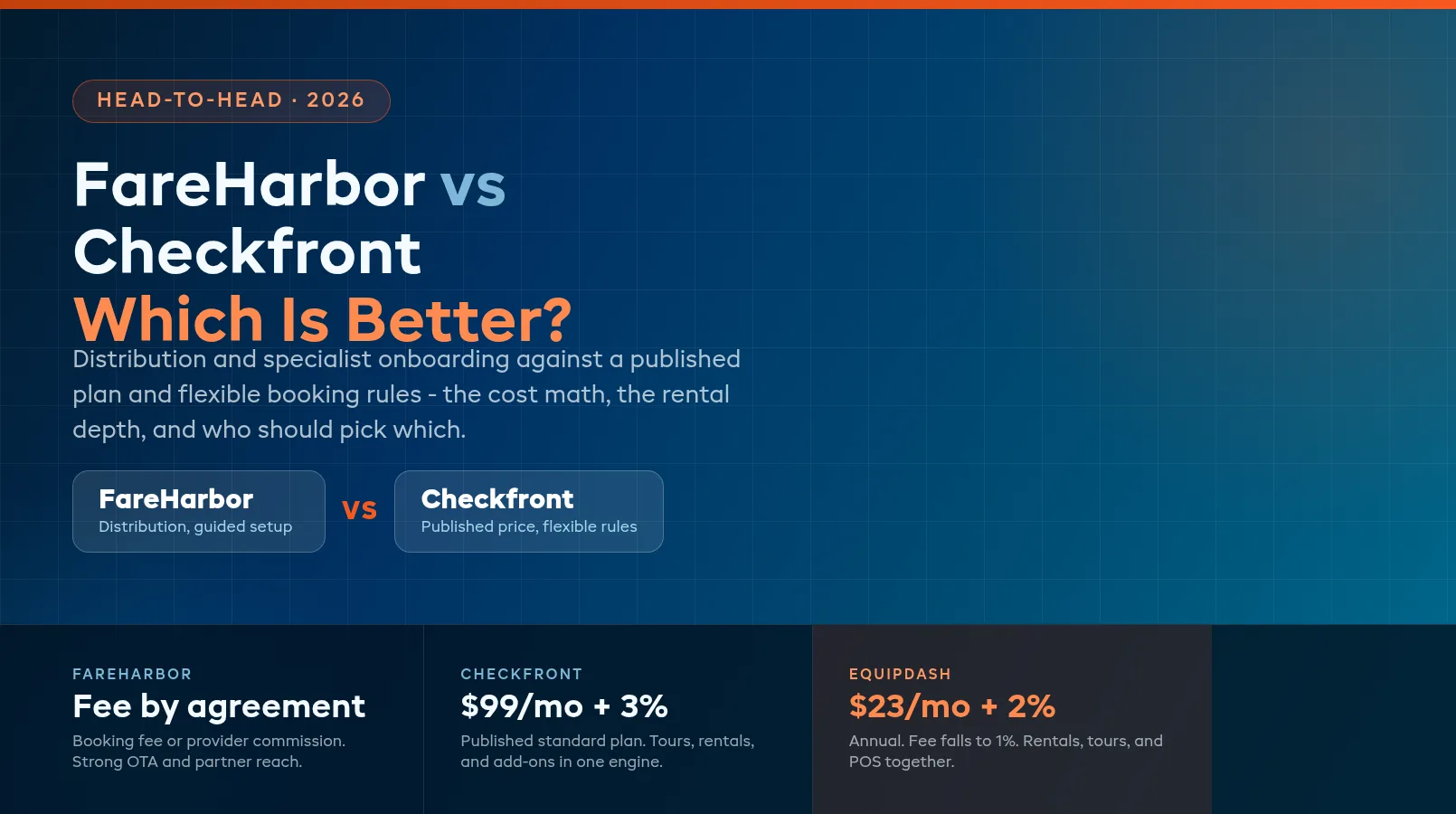
The head-to-head at a glance. Peek Pro keeps its exact rate behind a sales call, so its column reflects what operators consistently report; Checkfront sells tiered plans whose price moves with booking volume and staff seats.
| Peek Pro | Checkfront | |
|---|---|---|
| Built for | Tours and activities | Tours, activities, and rentals |
| Best for | Marketplace-driven tour operators | Mixed tour-and-rental operators on a budget |
| Pricing model | Commission per booking, ~3-6% reported | Tiered subscription, from ~$100/mo reported |
| Monthly software fee | None at entry | Rises with volume and seats |
| OTA connections | Viator, GetYourGuide, Tripadvisor and more | Major OTAs supported |
| Equipment rentals | Minimal | Yes - basic per-item tracking |
| Pricing rules | Solid for tours | Very flexible: hourly, daily, seasonal, group |
| Interface | Modern, polished | Dated, cluttered |
| Ease of setup | Guided, fast for tour catalogs | Slow - setup commonly runs into weeks |
| Marketing tools | Built-in email and upsell suite | Basic |
| Support | Phone and chat, advertised round the clock | Help center, email and chat in business hours |
Both are proven platforms with thousands of operators. The difference is which of their limits you will hit first: Peek Pro's when you start renting gear, Checkfront's when your team gets tired of the interface.
Features Comparison
Day to day - departure schedules, capacity caps, cutoffs, manifests, online payments - the two are closer than either sales team admits. The differences that decide the choice are distribution, rental handling, pricing flexibility, and how much the software gets out of your way.
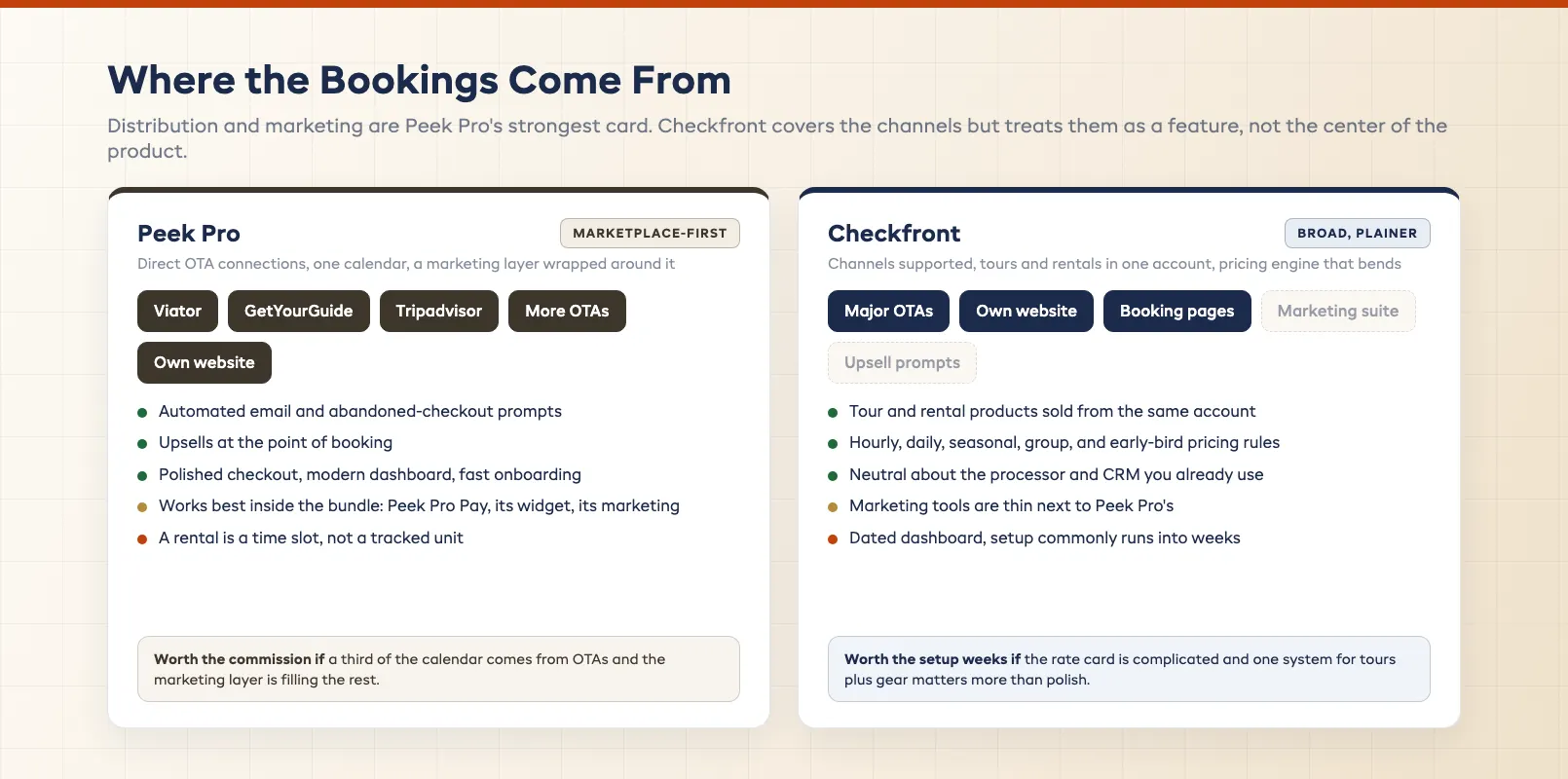
Distribution and marketing. Peek Pro's strongest card. It connects directly to Viator, GetYourGuide, Tripadvisor and other marketplaces, pulls those bookings into one calendar, and wraps a marketing suite around them - automated email, abandoned-checkout prompts, upsells at booking. If a third of your calendar comes from OTAs, that plumbing is worth real money. Checkfront supports the major channels too, but distribution is a feature rather than the center of the product, and the marketing tools around it are thin.
Equipment rentals. Checkfront's strongest card, and the reason it appears on rental operators' shortlists at all. It can sell a kayak tour and a kayak hire from the same account, with per-item availability so two customers cannot book the same ten boards on overlapping windows. It is basic - no maintenance scheduling, no damage tracking against a specific unit, no lifecycle history - but it exists. Peek Pro treats a rental as another time slot. That works for "rent a paddleboard for two hours" until the day you have twelve boards, three are out for repair, and the calendar does not know.
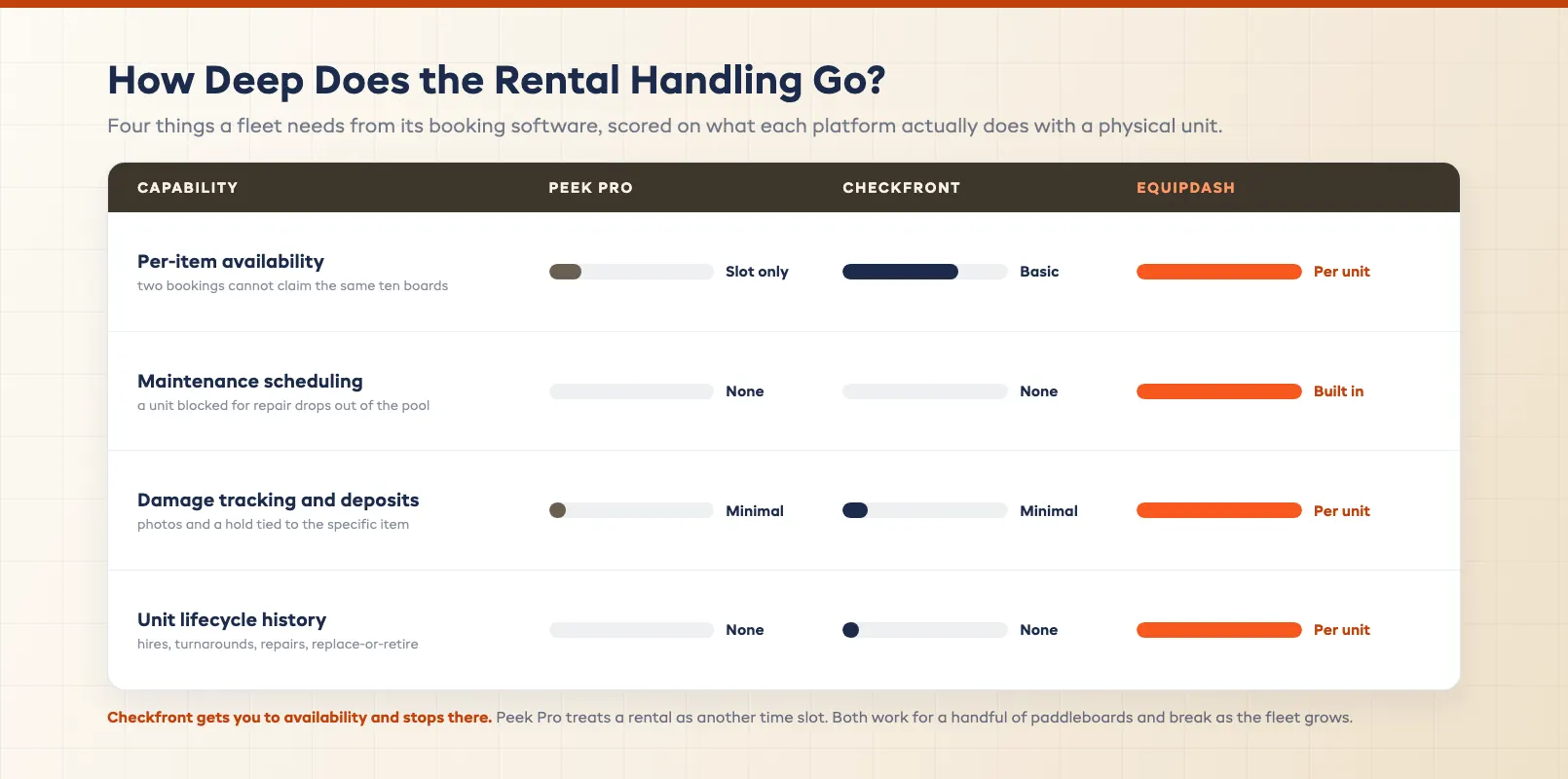
Pricing rules. Checkfront again. Hourly, daily, per-person, seasonal, group tiers, early-bird windows, add-ons - its pricing engine handles configurations that would take workarounds elsewhere. Peek Pro covers what a tour catalog needs and covers it cleanly, but a business with fifteen pricing scenarios across rentals and tours will find its edges.
Interface and setup. Peek Pro, and it is not close. The dashboard is modern, the mobile experience holds up, new staff find their way around in a shift, and onboarding for a tour catalog is guided and quick. Checkfront's interface has not kept pace: the dashboard is cluttered, common tasks take too many clicks, mobile is inconsistent, and setup - products, pricing rules, availability, widgets - is the part operators complain about most. Weeks of configuration is the norm rather than the exception, and the flexibility that makes the pricing engine good is exactly what makes the setup slow.
The ecosystem question. Peek Pro works best when you take the bundle - Peek Pro Pay for processing, its widget, its marketing. Inside that bundle it is smooth; step outside it to plug in your own processor or CRM and the seams show. Checkfront is more neutral about what surrounds it, which suits operators with tools they intend to keep.
Where both fall short. Neither runs a walk-in point of sale as a first-class feature, neither tracks gear at the depth a serious rental fleet needs, and neither has an AI layer - reporting, waiver chasing, and follow-ups stay manual as you grow.
Pricing Comparison
The two models behave differently as you grow, and the headline numbers hide most of it.
Peek Pro has no monthly software fee at entry. Instead it charges a commission on every booking - reported by operators at roughly 3% to 6%, negotiated in a sales call and shaped by your volume - with the option to pass some or all of it to the customer at checkout. Your software line reads close to zero; your effective cost tracks your revenue exactly, and the rate you get is the rate you argued for.
Checkfront sells tiered monthly plans, typically reported from around $100 a month at entry and rising into the several hundreds as booking volume and staff seats push you up a level. The rate is published and predictable, but a good season can move you up a tier whether or not margin followed - and payment processing fees sit on top of every plan.
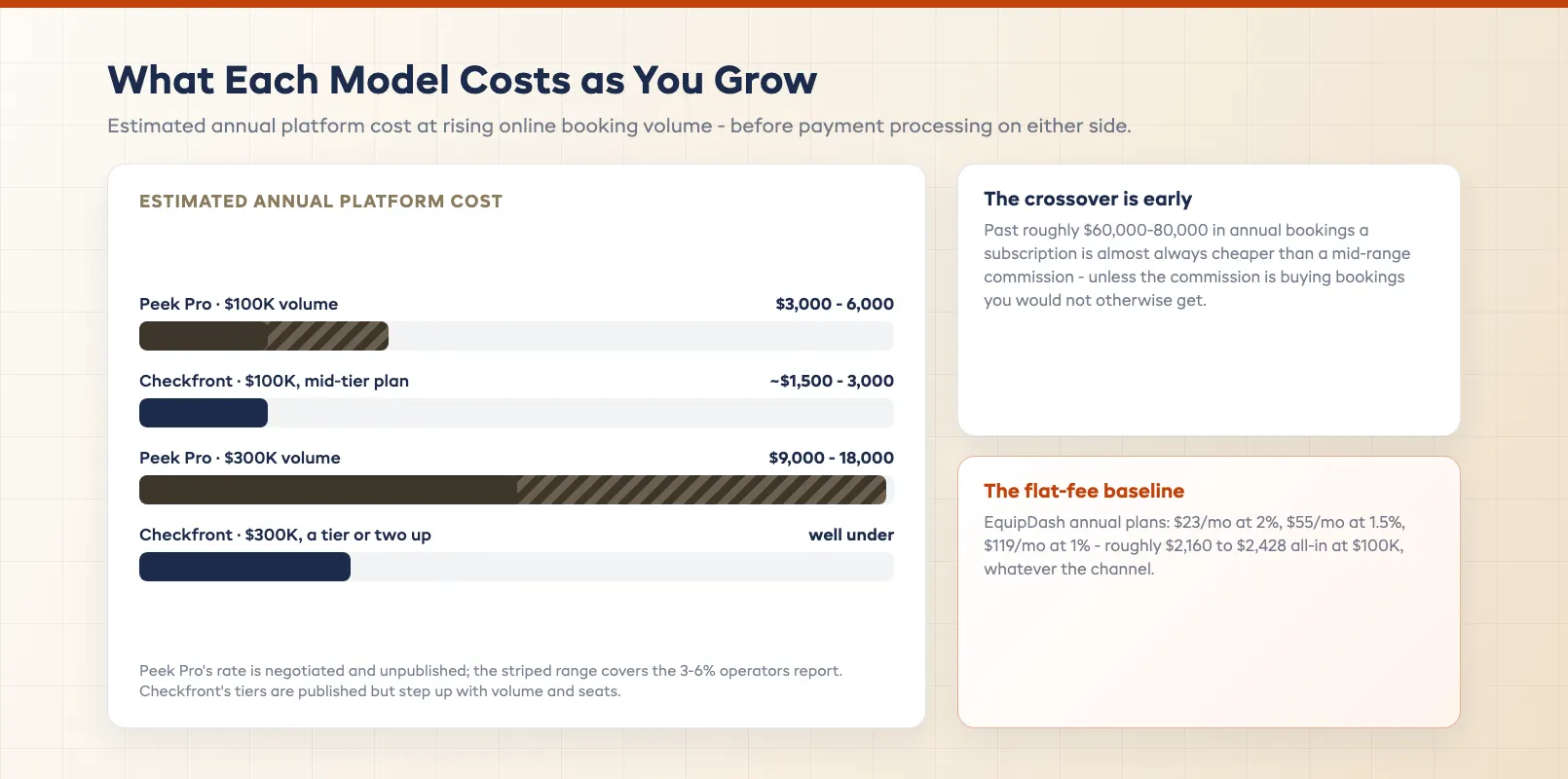
Run the math at real volumes. At $100,000 in annual online bookings, Peek Pro's commission lands somewhere between $3,000 and $6,000 depending on the rate you negotiated - paid by you, by your customers, or split. Checkfront at that volume is usually a mid-tier plan: $1,500 to $3,000 a year in subscription, plus processing. At $300,000, Peek Pro's take grows to $9,000-18,000, while Checkfront's plan cost typically climbs a tier or two but stays well under that. The crossover is early: past roughly $60,000-80,000 in annual bookings, a subscription is almost always cheaper than a mid-range commission, and the gap widens every season after.
The counterweight is what the commission buys. If Peek Pro's marketplace connections and marketing suite bring in bookings you would not otherwise have had, the fee on those bookings is a cost of sale, not a software cost. Be honest about how many of your bookings that describes. Whichever you pick, get the rate in writing, and run last season's actual numbers through both before you sign.
Best For: When to Choose Each
Neither platform is simply "better." They are tuned for different operations.
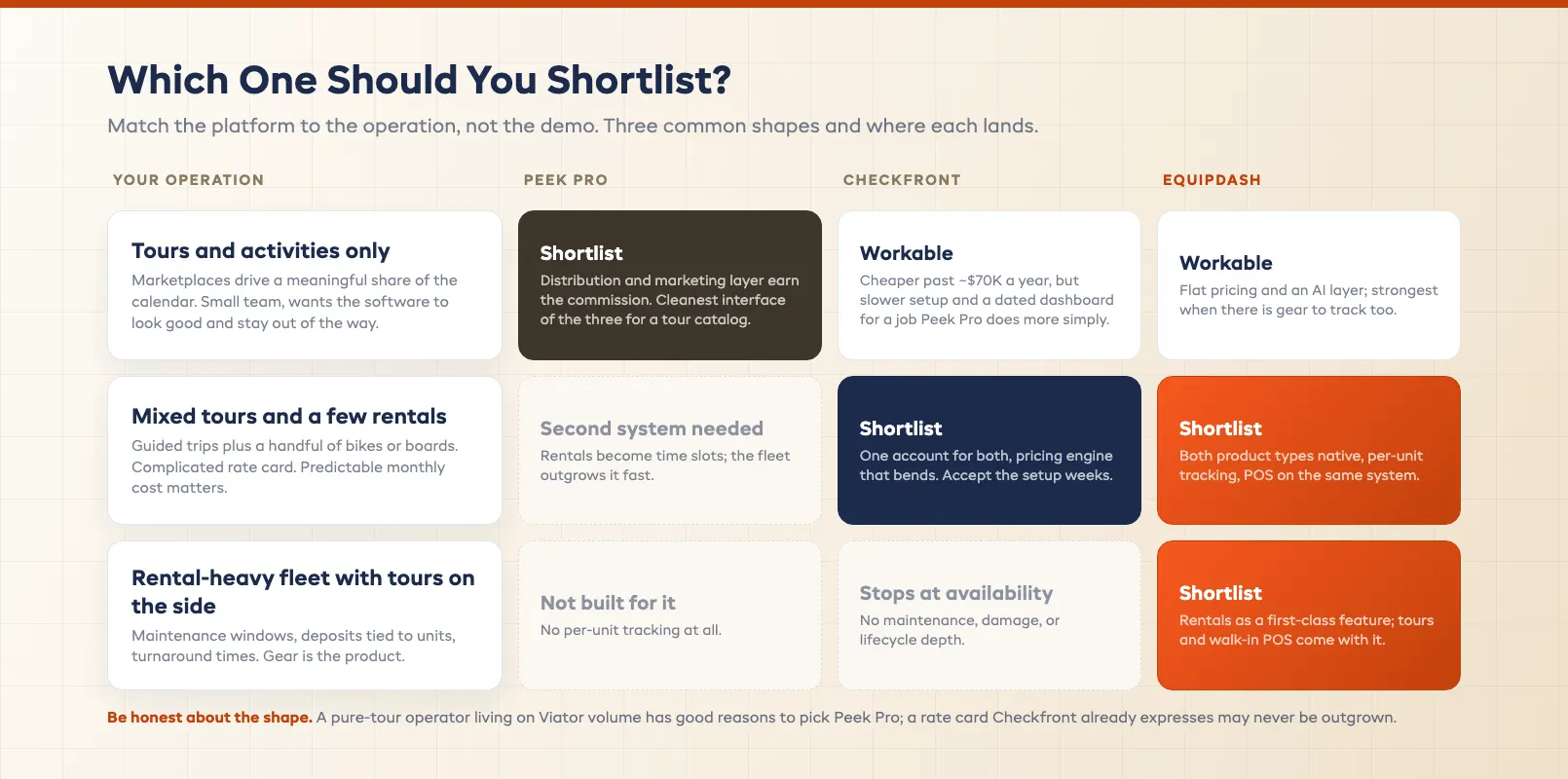
Choose Peek Pro if you run tours and activities only, marketplaces drive a meaningful share of your calendar, and you want the software to look good and stay out of the way. The commission stings as you scale, but you are paying for distribution and a marketing layer that Checkfront does not match, and a small team gets more done in a cleaner interface.
Choose Checkfront if you sell tours and rentals from the same counter, your pricing is complicated, and predictable monthly cost matters more than polish. You will spend longer setting it up and longer training staff, but you will have one system instead of two, and a rate card that can express what you actually charge.
Choose neither if rentals are a serious part of the business rather than a sideline. Peek Pro cannot track them; Checkfront tracks them at a depth that stops at availability. A fleet with maintenance windows, damage deposits tied to a unit, and turnaround times needs software that treats the gear as the product, not as a slot on a calendar.
A Third Option: Rentals + Tours, Built for Both
If your business sells guided experiences and equipment hire under one roof, Peek Pro leaves you running two systems and Checkfront leaves you running one that does half the rental job. That is the gap an all-in-one platform closes.
EquipDash was built for operators who do both. The calendar that schedules the 9am kayak tour also tracks which boards are out, which came back, and which is blocked for a fin repair before the next hire. Rentals get per-unit tracking, check-in and check-out with photos, maintenance windows, and deposits tied to the specific item; tours get schedules, capacity, manifests, and waivers; a walk-in point of sale sits on the same system. One booking flow, one customer record, one dashboard. Dash AI adds the automation layer neither platform has - ask it for a revenue report, let its agents chase unsigned waivers and late returns.
The pricing is public and flat, which already separates it from a negotiated commission or a tier that jumps when you have a good month: annual plans start at $23/mo with a 2% platform fee (Starter), then $55/mo at 1.5% (Growth) and $119/mo at 1% (Pro) - the fee falls as you grow instead of scaling with every sale. At $100,000 in annual bookings that is roughly $2,160 to $2,428 all-in, one rate regardless of where the booking came from. See the full breakdown on the pricing page.
Be honest about the fit: a pure-tour operator living on Viator volume has good reasons to pick Peek Pro, and an operator with a rate card Checkfront already expresses may never outgrow it. But if gear is part of the picture, a platform that treats rentals as a first-class feature beats forcing them through software that does not. Already decided to move? The Peek Pro migration guide and Checkfront migration guide walk through the switch step by step.
FAQ
What's the main difference between Peek Pro and Checkfront?
Scope and pricing model. Peek Pro is a tours-and-activities platform built around marketplace distribution and a built-in marketing suite, charging a commission per booking that operators report at roughly 3-6%. Checkfront handles tours and equipment rentals in one system with a very flexible pricing engine, charging a tiered monthly subscription reported from around $100 a month. Peek Pro is the more polished product; Checkfront is the broader one.
Is Peek Pro or Checkfront cheaper?
Below roughly $60,000-80,000 in annual online bookings, Peek Pro's no-monthly-fee model usually costs less. Above that, Checkfront's subscription is almost always cheaper: at $100,000 a year Peek Pro's commission runs $3,000-6,000 while a mid-tier Checkfront plan is typically $1,500-3,000 plus processing, and the gap widens with volume. Run last season's real numbers through both, and count the bookings Peek Pro's marketplace connections actually bring in before deciding.
Can Peek Pro handle equipment rentals?
Only in a limited way. Peek Pro treats a rental as a time slot rather than a tracked unit, so there is no per-item availability, no maintenance scheduling, and no damage deposit tied to a specific piece of gear. That works for a handful of paddleboards sold by the hour and breaks down as the fleet grows. Rental-heavy operators generally need a second system alongside it.
Is Checkfront good for equipment rental businesses?
It is one of the few tour platforms that handles rentals at all, with per-item availability and flexible hourly, daily, and seasonal pricing rules. The depth stops there - no maintenance windows, no damage tracking against a unit, no lifecycle history - and the interface and setup are the parts operators complain about most. For a small mixed tour-and-rental operation it is workable; for a serious rental fleet it is thin.
Which platform is easier to set up?
Peek Pro. Its onboarding for a tour catalog is guided and quick, and the modern interface means new staff are productive within a shift. Checkfront's setup - products, pricing rules, availability, and booking widgets - is notoriously slow, with operators commonly reporting weeks of configuration, and its dated dashboard makes staff training take longer than it should.
Is there an alternative that handles tours and rentals together?
Yes. EquipDash manages guided experiences, per-unit equipment rentals, and a walk-in point of sale in one system - one calendar, one customer record, one dashboard. Annual plans start at $23/mo with a platform fee that drops from 2% to 1% as you move up tiers, and the fee is the same whichever channel the booking came from.
in one place