Best Checkfront Alternatives & Competitors (2026)
Prefer a direct head-to-head? See our EquipDash vs Checkfront comparison. Already switching? Skip to the migration guide.
Checkfront costs $99 a month plus 3% on every online booking, according to its pricing page. It books guided activities and gear rentals in one account, which few systems do, so the Checkfront alternatives worth your time match that and cost less at your volume.
We make EquipDash, one of the options below. We read the other vendors' sites on November 15, 2026, but haven't run them in a live shop, so where a site is silent you get the question to ask.
The scores come from our equipment rental software comparison. On a tour-first system? See our FareHarbor alternatives, Peek Pro alternatives, Rezdy alternatives, TripWorks alternatives, and Xola alternatives guides.
In this guide:
- What Checkfront Does Well
- Common Reasons for Switching
- Top Checkfront Alternatives Compared
- What It Costs at $100,000 a Year
- Alternative-by-Alternative Reviews
- Migration Tips
- FAQ
What Checkfront Does Well
If you sell guided activities and rentals, your staff know Checkfront, and the 3% doesn't hurt, staying put is a fair call.
Both tours and rentals in one platform. Checkfront sells an item by the day, by the night, in time slots or as flextime. A two-day bike rental, a 9 a.m. guided paddle and a guided hike with rented trekking poles all live in one account.

Seasonal and dynamic pricing. Checkfront adjusts prices or availability by season, such as peak, off-peak or closed periods, and adds dynamic pricing and product bundles, so a winter rate and a summer rate can sit on one activity.
OTA channel distribution. Checkfront connects to Google Things to Do, Viator and GetYourGuide, and says it reaches 20,000+ resellers with no extra Checkfront fee.
Waivers, reminders and a daily manifest. Its features page lists online waivers in the booking flow and a daily manifest of who's showing up when, and its pricing page adds automated email and SMS reminders and review requests.
Help articles and 24/7 support. Checkfront has been around since 2010, so most how-do-I questions already have an article, and its pricing page promises 24/7 expert support.
Common Reasons for Switching
The 3% on online bookings. At $100,000 a year booked online, that's $3,000 on top of $1,188 in subscription if you absorb it. Pass it to guests and a $95 half-day hike shows a fee line at checkout, and California requires the full price up front.
The admin on a phone. Checkfront offers a demo, not a free trial, so on the call have them cancel a no-show from a phone, as a guide would at the trailhead, and count the taps. Then build one of your real activities and time it: a Saturday hike capped at 12, or at your permit's group limit, that stops selling the night before.
Rebuilding your catalog. Re-entering 40 departures, seasonal rates and permit caps by hand takes evenings, so ask who does the data entry. If it's you, do it in your dead weeks.
Who answers on a Saturday. A help article won't fix a widget that dies at 7 a.m. on a sold-out holiday Saturday. Call each vendor's support line on a weekend morning during your demo or trial week.
No AI assistant. Checkfront automates reminders, review requests and waiver steps, and its site doesn't mention an AI assistant. What stays manual is moving the 2:30 departure when lightning builds at 2 p.m. and telling all 14 guests, chasing the three who haven't signed, and checking tomorrow's guide still holds a current first aid card.
Gear beyond the count. Checkfront's features page covers assets, capacity limits and availability, but not maintenance scheduling, damage tracking or serial numbers. A hiking company renting poles and bug nets mostly needs a bent pair pulled off the shelf; a 40-bike shop needs the service history.

Top Checkfront Alternatives Compared
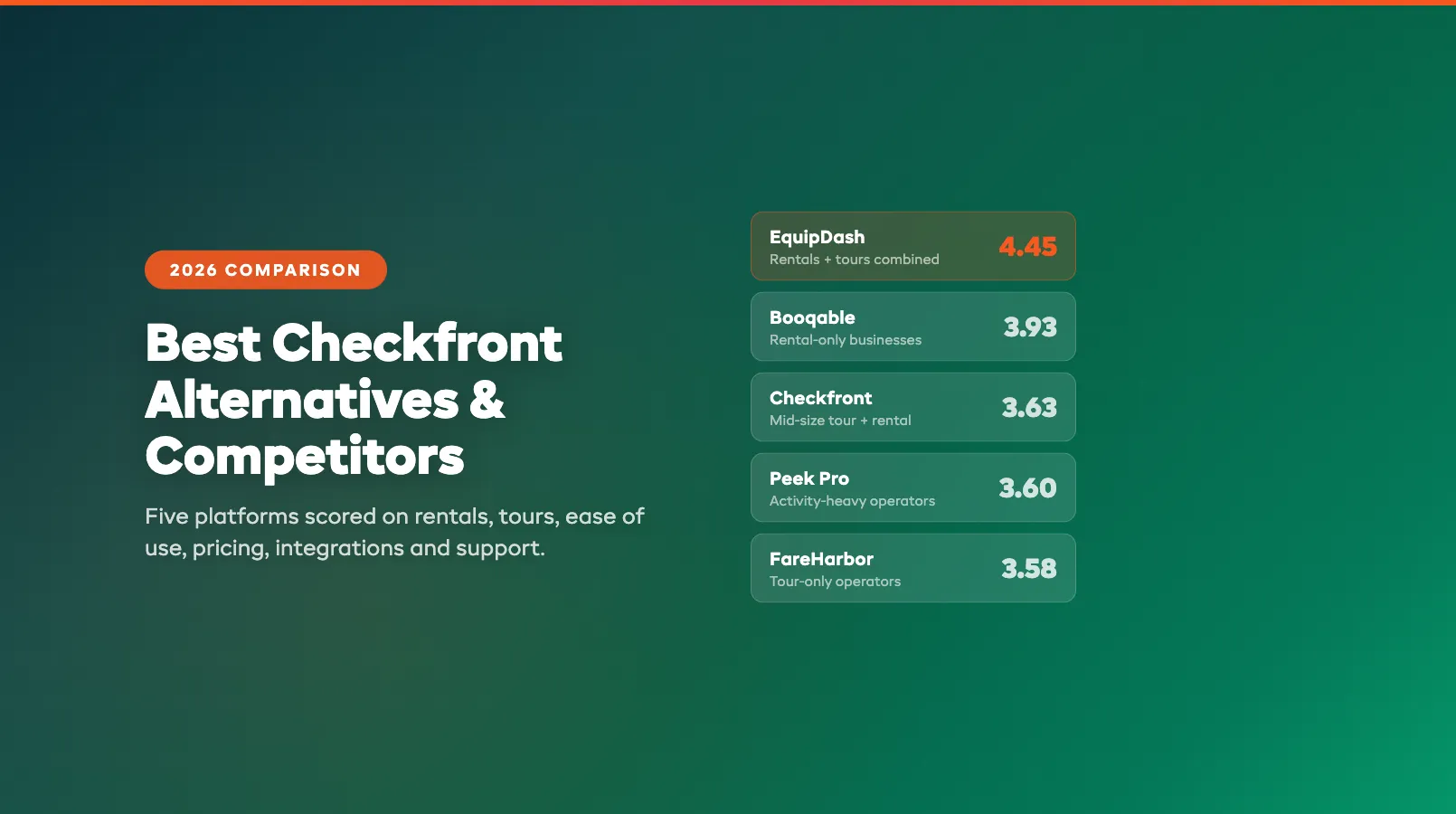
We scored the other vendors from their public pages; the EquipDash row is our own claim, so check it on the trial. The weights come from our comparison post, written for rental shops: rentals 25%, ease of use 20%, tours, pricing and support 15% each, integrations 10%.
| Platform | Best for | Rentals | Tours | Ease of use | Pricing | Integrations | Support | Overall |
|---|---|---|---|---|---|---|---|---|
| EquipDash | Rentals + tours combined | 4.5 | 4.5 | 4.5 | 4.5 | 4.0 | 4.5 | 4.45 |
| Booqable | Rental-only businesses | 4.5 | 2.0 | 4.5 | 4.0 | 4.0 | 4.0 | 3.93 |
| Checkfront | Mid-size tour + rental | 3.5 | 4.0 | 3.5 | 3.5 | 4.0 | 3.5 | 3.63 |
| Peek Pro | Activity-heavy operators | 2.5 | 4.5 | 4.0 | 3.0 | 4.5 | 4.0 | 3.60 |
| FareHarbor | Tour-only operators | 2.5 | 5.0 | 3.5 | 3.0 | 4.5 | 4.0 | 3.58 |
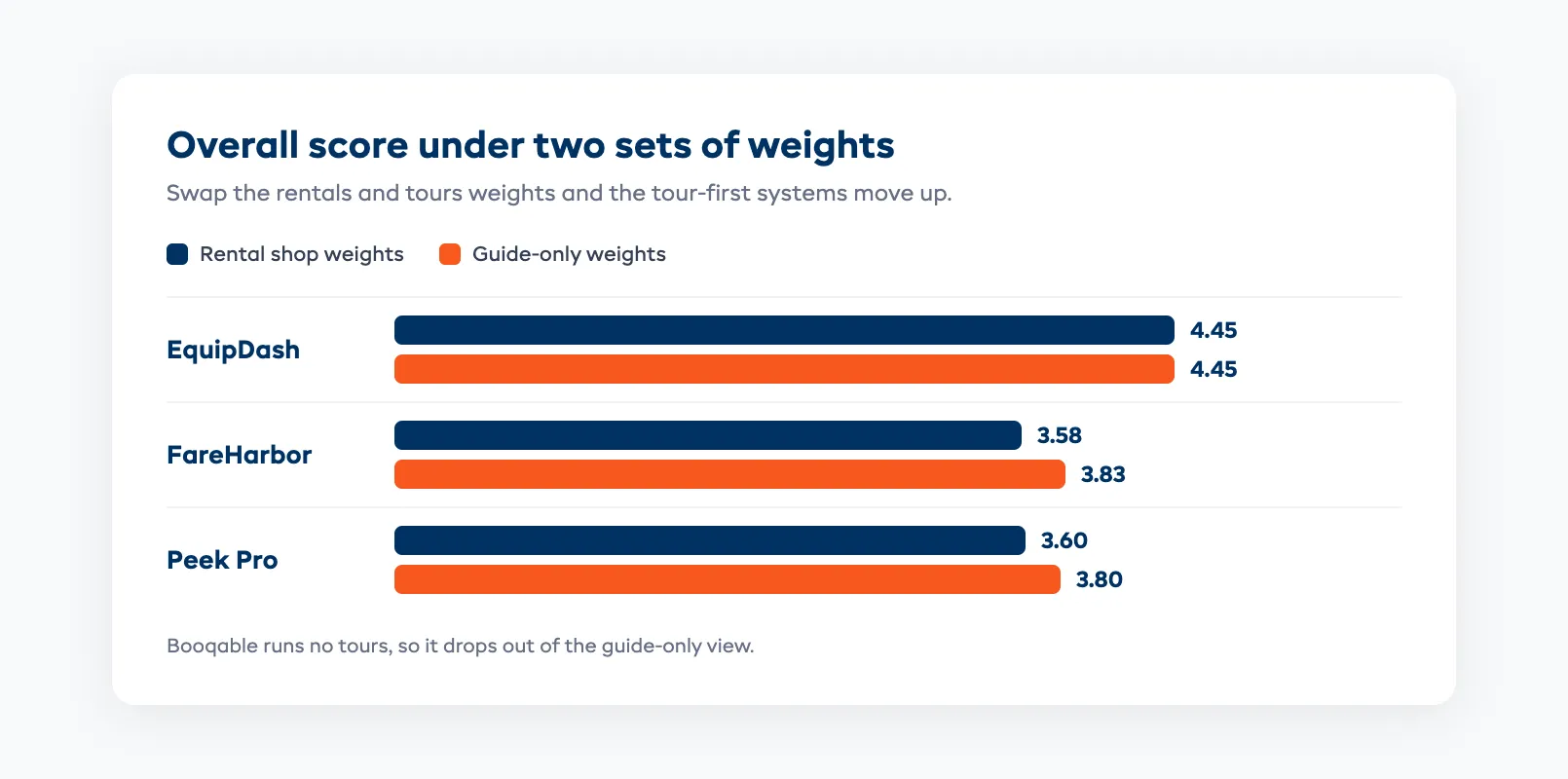
If you only guide, swap the rentals and tours weights: FareHarbor rises to 3.83 and Peek Pro to 3.80, and EquipDash stays at 4.45. Booqable runs no tours, so strike its row.
What It Costs at $100,000 a Year
Published fees on $100,000 a year in online bookings, with you paying the booking fee. EquipDash's lower figure is billed yearly, the higher monthly. Growth covers 10 team members; past that, read the Pro row.
| Software | Subscription per year | Booking fee you pay | Yearly total |
|---|---|---|---|
| EquipDash Growth | $660-$828 | $1,500 (1.5%) | $2,160-$2,328 |
| EquipDash Starter | $276-$348 | $2,000 (2%) | $2,276-$2,348 |
| EquipDash Pro | $1,428-$1,788 | $1,000 (1%) | $2,428-$2,788 |
| Checkfront | $1,188 | $3,000 (3%) | $4,188 |
| Booqable (rentals only) | $348-$2,244 | None | $348-$2,244 |
FareHarbor may charge its fee to the guest, and Peek Pro doesn't publish rates. Pass the booking fee to guests and you pay only the subscription.
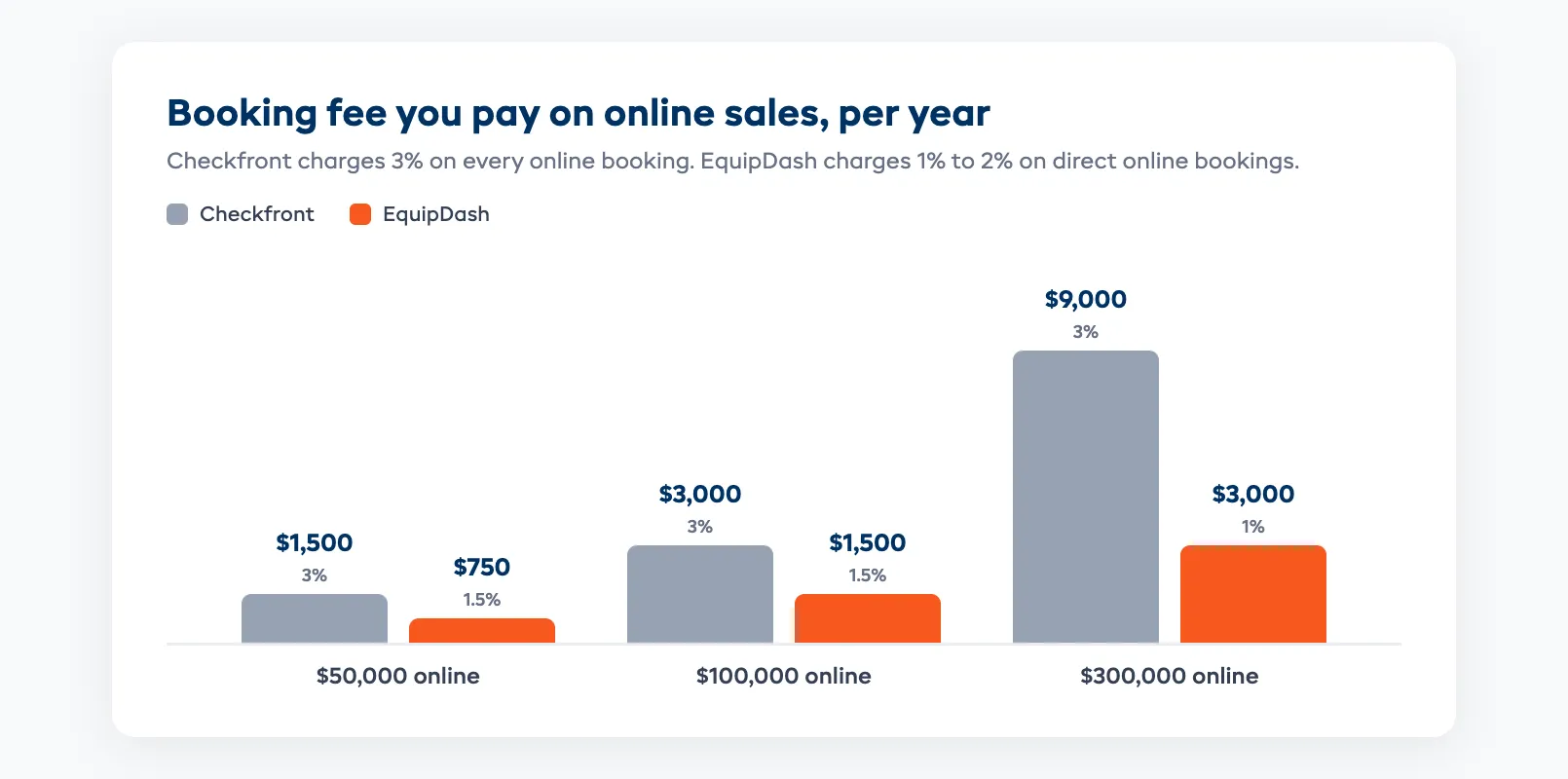
At $50,000 online, Checkfront's 3% is $1,500 and Growth's 1.5% is $750. At $300,000 it's $9,000 against Pro's $3,000.
Checkfront and EquipDash Growth and Pro charge no fee on Viator or GetYourGuide bookings (Checkfront's pricing FAQ), so if half your sales come through them, their commission dwarfs both fees.
Card processing comes on top everywhere. EquipDash takes payments through your own Stripe account, at Stripe's standard US rate of 2.9% + 30 cents, about $3,200 on $100,000 at a $95 average booking.
For Checkfront's card rate, read its payments pricing article. Outside the US, ask each vendor for its card rate, local-currency pricing and whether tax goes on top.
Alternative-by-Alternative Reviews
EquipDash: Best for Operators Who Rent and Tour
EquipDash books guided activities and gear rentals from one stock count. Say you own 30 pairs of trekking poles and the 9 a.m. hike books 12: the counter can rent 18 until the group is back, because each activity's gear list reserves from the same pool.
For a guided hike:
- Each departure has its own capacity, and online sales close at a notice time you set, such as 12 hours out.
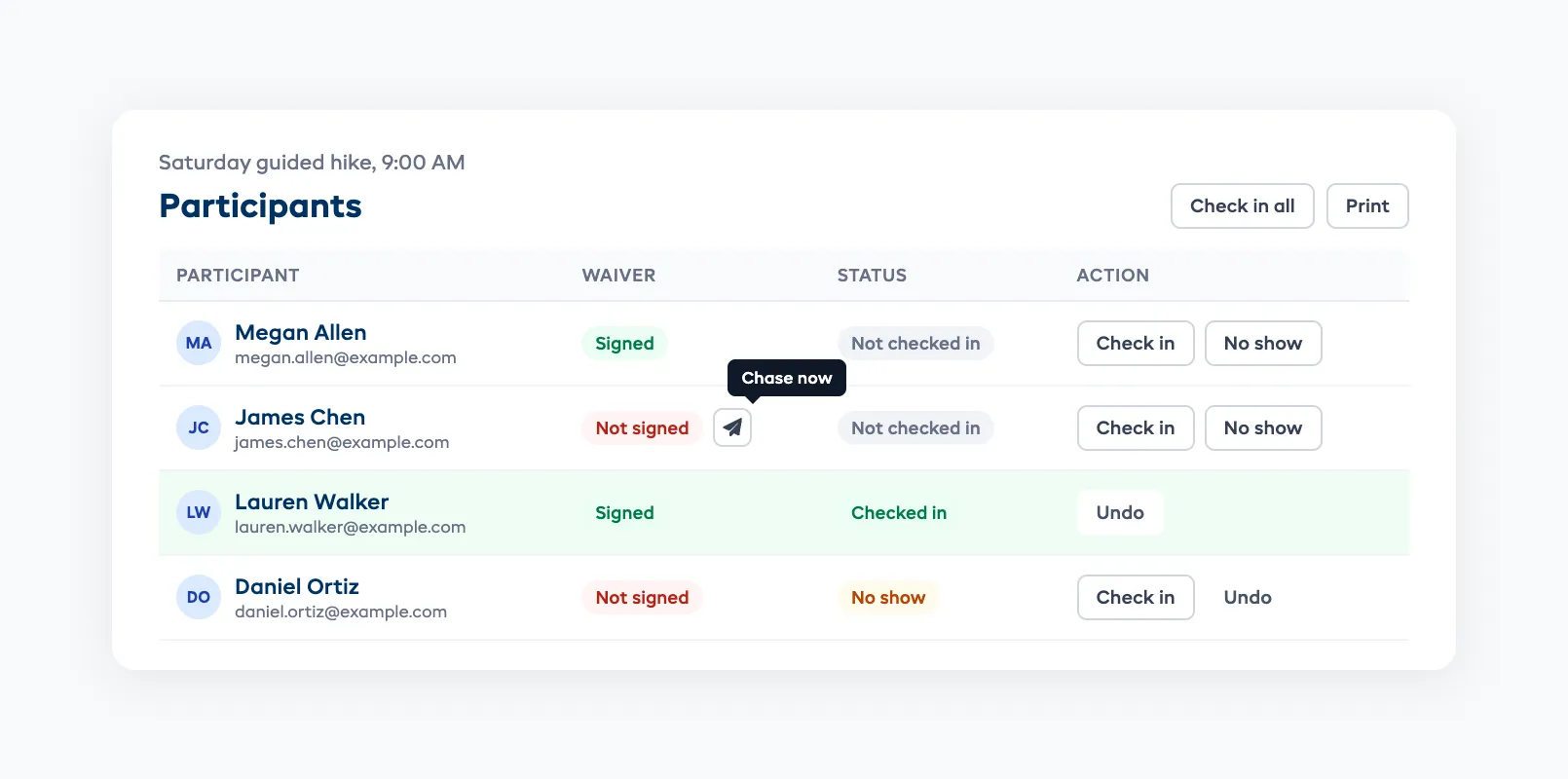
- The manifest lists names, phones, booking answers such as an emergency contact, and each waiver as Signed, "Opened, not signed" or Not signed. From the session, a Chase now button resends the link to anyone who hasn't signed. Marking a guest No show stops their reminders.
- Unsigned guests get reminders by email, text or both, on your schedule, until they sign or the reminders you set run out. Your current waiver, even a scanned paper one, is read into the form builder for you to approve.
- Guide profiles store each certification and its expiry date: Wilderness First Aid, CPR, Remote Area First Aid entered under First Aid, or anything under Other. You can upload a scan of the card to the guide's documents. Admins get a weekly email of cards lapsed or lapsing within 30 days.
- When storms build, ask Dash AI to move the 2 p.m. departure to tomorrow at 9 a.m.; every booking moves at once, and each guest gets an email (and a text if SMS is on) with a link to pick another slot.
- Weather rules watch an hourly forecast for thunderstorms, heat, rain or wind and alert your team when your limit is crossed; nothing closes until someone confirms. Smoke, fire closures and flash-flood warnings stay your call.
- Viator and GetYourGuide bookings come in through a direct connection on Growth and Pro, with 0% EquipDash fee. A seat sold on your site is pushed to both, and an OTA cancellation frees the seat.
On the rental side, items are tracked by serial number or QR code, with a service interval in days or rentals. A bike logged as damaged on return drops out of online availability until it's fixed.
We're newer than Checkfront, so there are fewer independent reviews; ask for two customers near you who've run a full season, and call them. Seasonal and dynamic pricing are Pro only, where Checkfront's pricing rules come in its one plan.
Pricing: Starter $29/mo, or $23/mo billed yearly, for up to 2 team members, 20 rental products and 10 experiences, without waivers, Dash AI, OTA connections, guide certification tracking, barcode scanning or maintenance tracking; Growth $69/mo ($55 yearly) for up to 10; Pro $149/mo ($119 yearly) with no team limit. Platform fee: 2% / 1.5% / 1% on direct online bookings only, which you can pass to customers. 21-day free trial, no card; see pricing.
FareHarbor: Best for Tour-Only Operators
FareHarbor has belonged to Booking Holdings since 2018 and is built for set departures.
Under FareHarbor's provider terms (section 1.3), FareHarbor may charge the booking fee to the guest, and commission rates are agreed separately (Annex 1), so ask which model you'd be on. You pay a separate processing fee on payments (section 1.4), and neither rate is published.
Where it differs from Checkfront:
- Its Lightframe booking window opens over your own site, so guests pay without leaving your page.
- 24/7 support by phone or email, per its homepage. Ask who picks up at 6 a.m. on a Sunday when your trailhead shuttle double books.
- Rentals sit inside a tour system: it shares equipment across products and takes card holds, so test hourly counter rentals.
- The terms don't promise a data export when you leave, so ask now whether you can download every past guest with an email.
If you're already on it, the guest-paid fee is the reason to stay. Move only if you rent gear by the hour or guests balk at the fee line, since leaving means reconnecting each OTA product (step 5).
Peek Pro: Best for Activity-Heavy Tour Operators
Peek Pro, whose own examples are escape rooms, zip lines and food tours, prices by quote, on commission, so get your rate in writing before comparing it with Checkfront's 3%. Its site pitches AI-powered dynamic pricing within a floor and ceiling you set, and AI tools for staff scheduling and daily reports.
What it adds over Checkfront:
- Upsells and add-ons at the counter and in the guest's booking portal.
- Dynamic pricing. Skip it unless your peak departures sell out most weekends, because a half-full 9 a.m. hike has nothing to raise.
- Deposits, card holds and photo records for equipment.
- OTA and reseller connections. Ask whether a seat sold on your site closes on Viator and GetYourGuide, and how fast.
Booqable: Best for Rental-Only Businesses
Booqable is built for gear rental, and its pricing page doesn't mention tours or OTAs. Plans run from $35/mo ($29 yearly) to $187/mo ($149 yearly), plus a Custom plan starting at $349, with no commission on bookings and a 14-day free trial.
What it does better for rental shops:
- Maintenance downtime scheduling on Grow and Scale.
- Barcode and QR scanning, as a paid add-on.
- Live availability on WordPress, Shopify and Squarespace sites.
- Bo, an AI rental assistant, on every plan.
Migration Tips
Start with next season's bookings: export every one with money on it for the next six months.
Then pick the quietest week of your year, such as November in Maine.
1. Export your product catalog. EquipDash's "Import from my old system" reads your Checkfront booking page (paste its link) or a CSV export, and drafts items, prices, seasons, policies, deposits and meeting points for you to approve.
2. Export customer data. In Checkfront, open Booking Index or Customers, choose Export and save as CSV.
Ask the new vendor in writing what happens to future bookings with deposits, signed waivers (including past records in Smartwaiver or another waiver tool) and gift certificates (gift vouchers in Australia). EquipDash imports gift card balances from a CSV; keep your own copy of signed waiver PDFs.
3. Set up the new platform in parallel. Don't cancel Checkfront on day one. Push a test booking through every product, waiver and confirmation email included.
Two live systems can both sell the last seat, so close each future date in Checkfront before you open it in the new one, and check Viator and GetYourGuide show it closed too.
4. Migrate your booking widget. Swap it the evening after the last group is back, so you're there for the first morning.
5. Reconnect OTA channels. Your supplier relationship is with Viator and GetYourGuide, not Checkfront. Reconnect each product on a day with no departures, check each sells from one system only, and ask Viator whether the switch affects the listing your reviews sit on.
6. Keep Checkfront until its last booking has run. Guests who paid through Checkfront change and refund there, so whoever works the desk needs both logins until then.
Coming from a paper book, calendar or spreadsheet. A spreadsheet saves as a CSV the import reads; a paper book has nothing to export. EquipDash's concierge setup, free for a limited time (normally $500), has a person import your products, customers and pricing, connect Stripe and embed your booking widget. Events synced in from Google Calendar only block time and don't become bookings, so ask how your existing bookings come across.
Timeline: Our pricing page says most shops take bookings within 2 business days of concierge setup, not counting OTA reconnection.
Frequently Asked Questions
What are the biggest Checkfront frustrations? The 3% online fee on top of $99 a month ($9,000 a year at $300,000 online) and setup time on a big catalog. Test the admin on a phone during the demo. Its site doesn't mention an AI assistant or damage tracking.
Which Checkfront alternatives offer a more modern interface? Of the tools here, EquipDash (21-day free trial) and Booqable (14 days) let you judge the admin yourself before any sales call; Checkfront offers a demo and Peek Pro prices by quote. In each, build one real activity and time it.
Can I migrate from Checkfront without losing my booking data? Mostly. Export Booking Index and Customers as CSV, ask in writing how future bookings with deposits, signed waivers and gift certificates come across, and keep Checkfront until its last booking has run.
Is Checkfront good for equipment rental businesses? For booking rentals, yes: it sells items by the day, by the night, in time slots or as flextime. Its site doesn't mention maintenance scheduling, damage tracking or serial numbers, so test those if you rent dozens of bikes or boards.
in one place