The Two Minutes at Handover That Win a Damage Claim
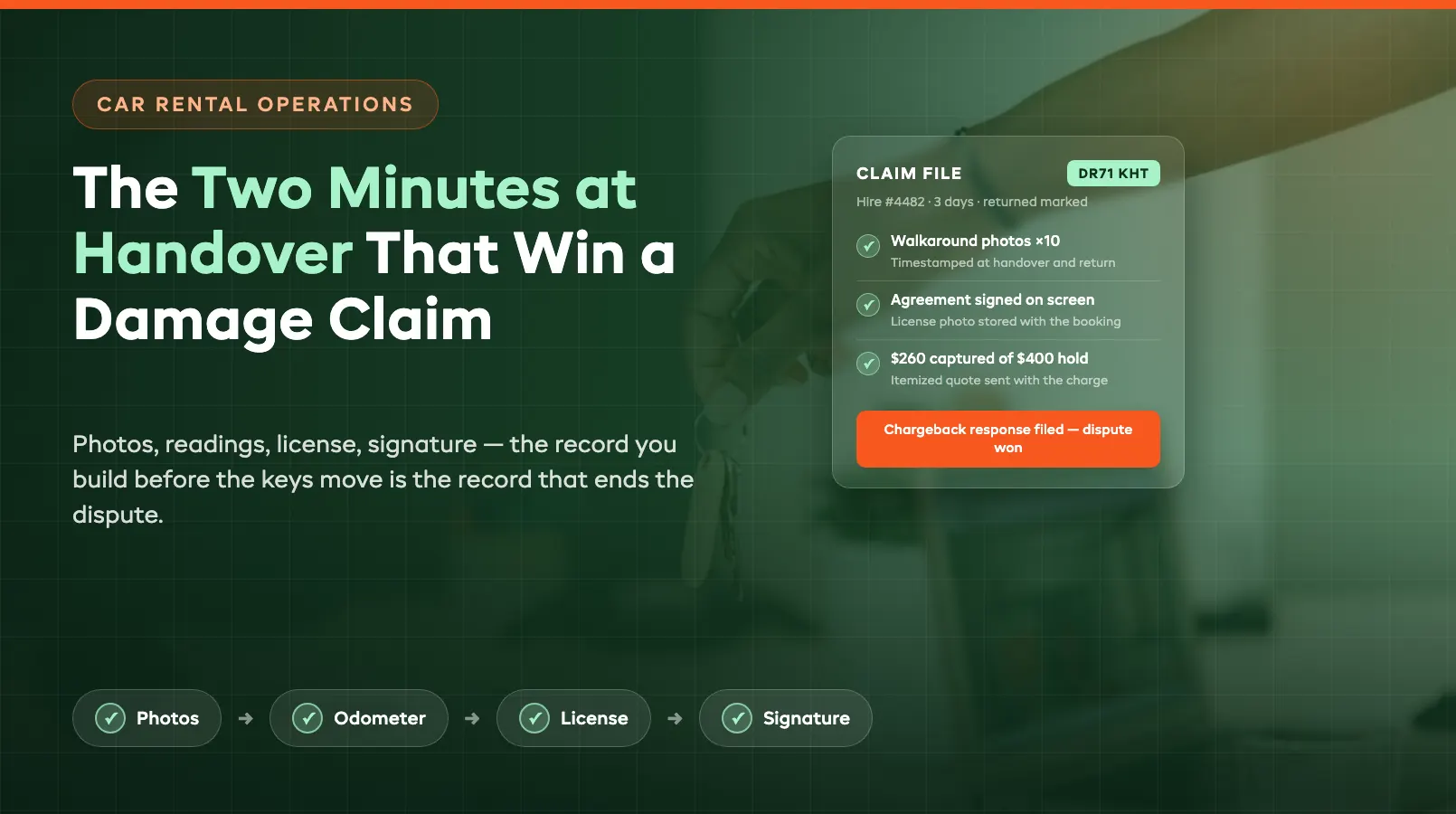
A damage claim is not decided when the customer disputes the charge. It is decided weeks earlier, in the two minutes before the keys moved. The operator who walks around the car with a camera, records the odometer, captures the license, and gets a signature on screen has a file that wins the argument on its own. The operator who did a quick glance and a handshake has a story, and card issuers, insurers, and angry customers do not pay out on stories.
Independent fleets feel this harder than the majors. One disputed $600 panel repair is noise to a national brand; to a twelve-car operation it is the margin on a week of hires, plus the hour you spend writing an email you already know you will lose. The fix is not being tougher in disputes. It is a car rental damage inspection routine so consistent that by the time a dispute starts, the evidence has already ended it. This post walks through that routine end to end: what to photograph, what to record, what to sign, and how to charge from the record when a car comes back marked. It assumes the kind of tooling covered in our guide to software for independent car fleets: a system where photos, readings, and signatures all land on the booking instead of scattering across phones and drawers.
What to Photograph and Why
The photo set is the spine of the whole record. Not because photos are hard to take, everyone has a camera in their pocket, but because photos taken systematically are rare, and systematic is what makes them evidence. A random snap of "the good side" proves nothing. A complete walkaround, shot the same way on every hire, timestamped, and stored against the booking, proves the condition of the entire vehicle at a specific moment. That is the difference between a photo and a vehicle condition report.
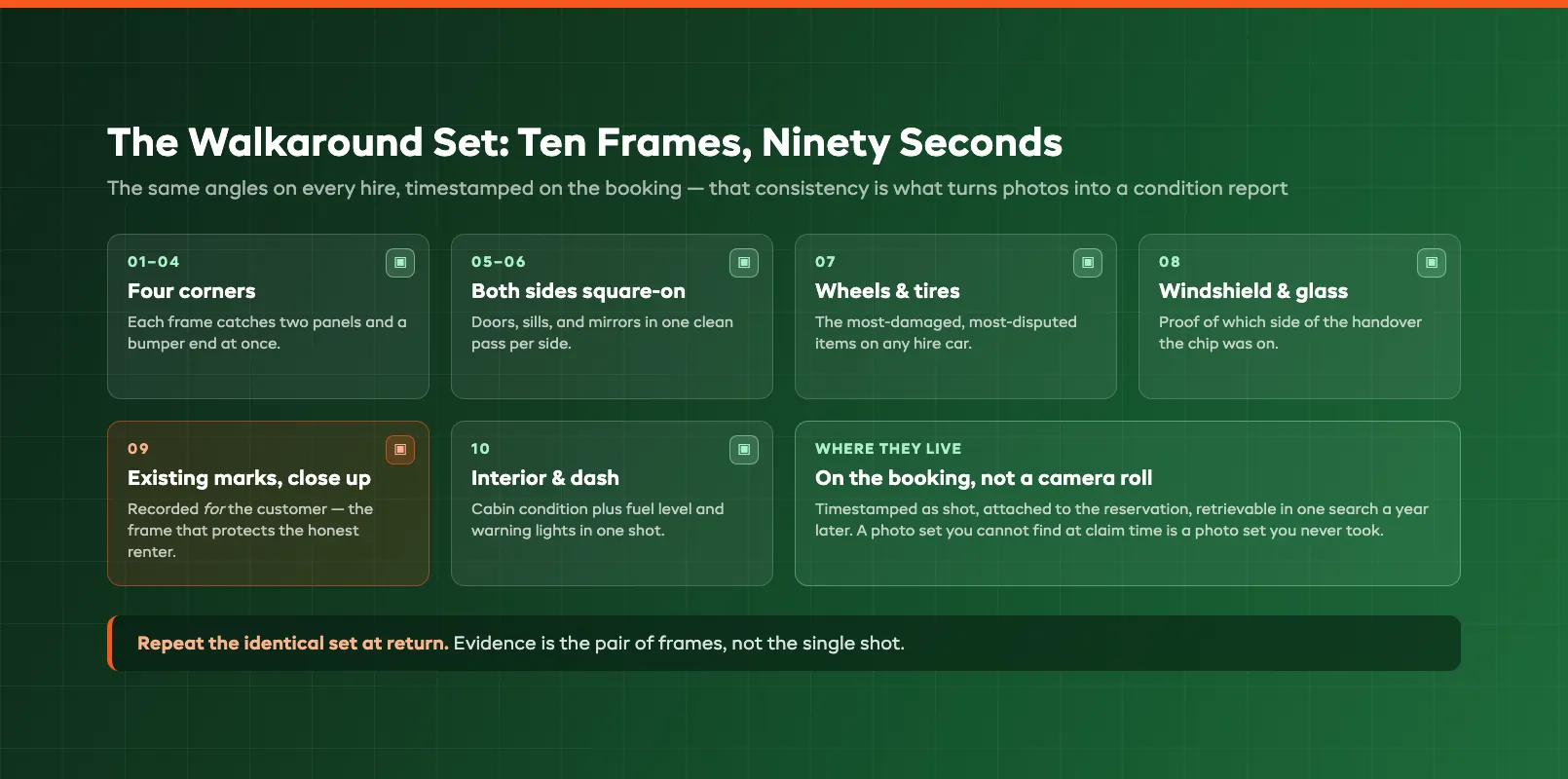
The set worth standardizing on runs eight to twelve frames and takes under ninety seconds:
- Four corners: front-left, front-right, rear-left, rear-right, each capturing two panels and a bumper end in one frame
- Both sides square-on: doors, sills, and mirrors
- All four wheels: alloys and tires are the most-damaged, most-disputed items on any hire car
- Windshield and glass: chips grow into cracks mid-hire, and you want proof of which side of the handover the chip was on
- Existing damage close-ups: anything already marked gets its own frame, so the customer can see you are recording it for them, not against them
- Interior and fuel gauge: one cabin shot, one dash shot that catches fuel level and warning lights
Why so thorough on a clean car? Because the photos protect both directions. When the scratch was already there, the close-up proves the customer did not do it, and the renter who watched you document existing marks at pickup is the renter who does not brace for a fight at return. When the scratch was not there, the corner frame proves it appeared on their watch. Either way the conversation is short.
The discipline that matters most: the photos must live on the booking, not in a staff member's camera roll. A photo set you cannot find at claim time is a photo set you never took. Purpose-built systems attach the walkaround to the reservation with timestamps as it is shot, so six months later the whole file (photos, readings, agreement) comes up in one search.
Mileage In and Out
Photographs prove condition; readings prove usage. Every handover should record two numbers as structured fields, odometer and fuel level, and every return should record the same two. Four numbers, entered in seconds, and they settle three separate categories of dispute before they start.
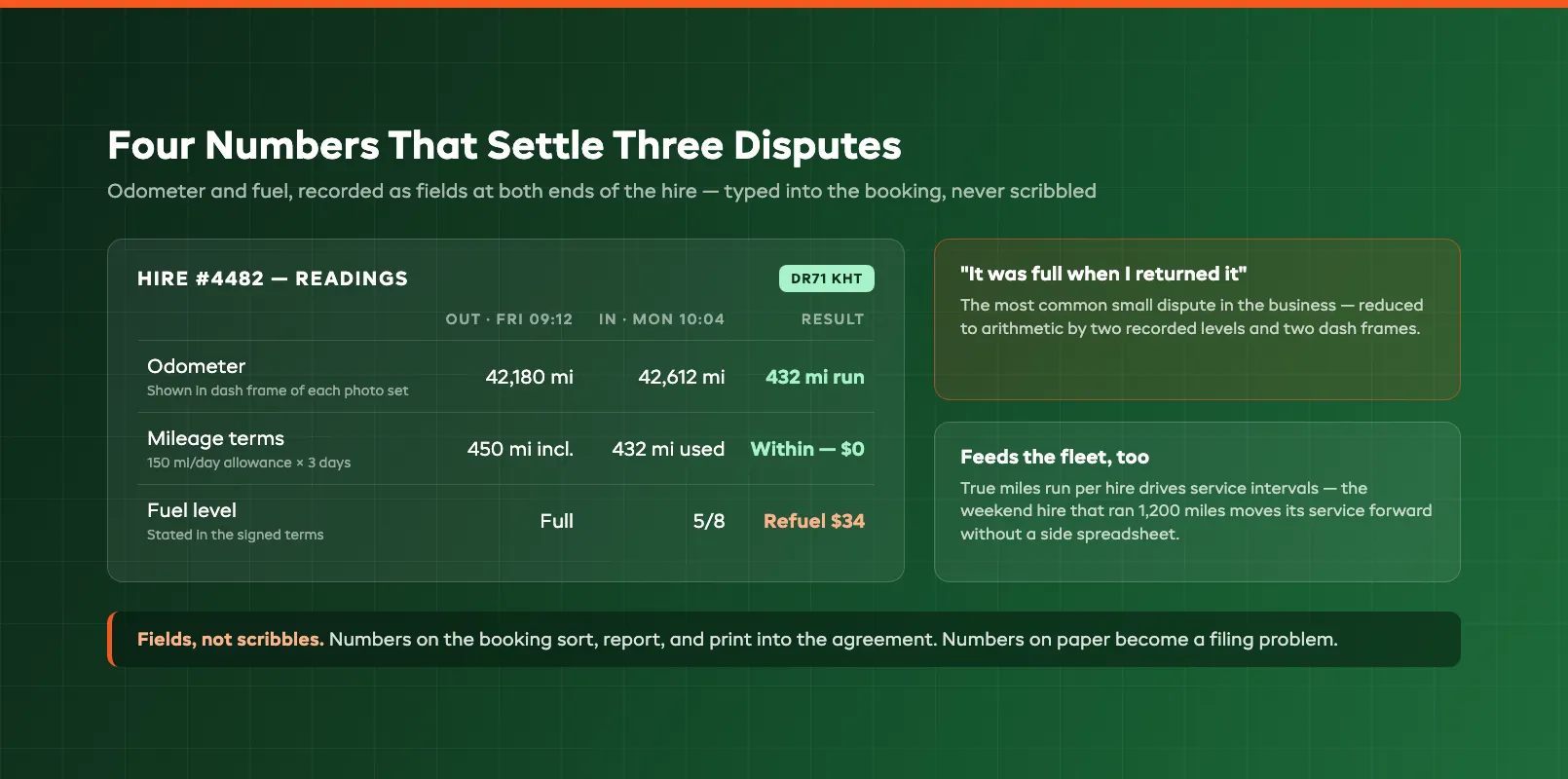
First, mileage terms. If your rates carry a daily mileage allowance, common on independent fleets running newer vehicles, the out-and-in readings are the entire basis of the excess-mileage charge. A reading scribbled on a paper form is arguable; a reading entered at handover, shown on the dash photo from the walkaround set, and echoed on the signed agreement is not.
Second, fuel. "It was full when I returned it" is the most common small dispute in the business. A recorded fuel level at both ends, backed by the dash frame in each photo set, reduces it to arithmetic: out at full, back at five-eighths, here is the refueling charge stated in the terms you signed.
Third, and least appreciated, the odometer log feeds the fleet itself. True miles run per hire is what drives service intervals, and a car that quietly ran twelve hundred miles on a "weekend away" hire needs its next service sooner than the calendar thinks. Fleet systems that capture readings at every checkout and return keep per-registration servicing honest without anyone maintaining a spreadsheet on the side. Those same readings feed the earning-days and revenue-per-unit numbers in our fleet utilization guide.
The rule is the same as for photos: fields, not scribbles. Numbers typed into the booking at the moment of handover become part of a record that sorts by date, feeds reports, and prints into the agreement. Numbers on paper become a filing problem.
Getting the Agreement Signed on Screen
The rental agreement is the document that makes everything else chargeable. The photos prove the damage happened on hire; the agreement proves the customer accepted responsibility for damage on hire, agreed to the deposit terms, and acknowledged the recorded condition, fuel, and mileage. Without a signed agreement, the best photo set in the world supports a claim against nobody in particular.
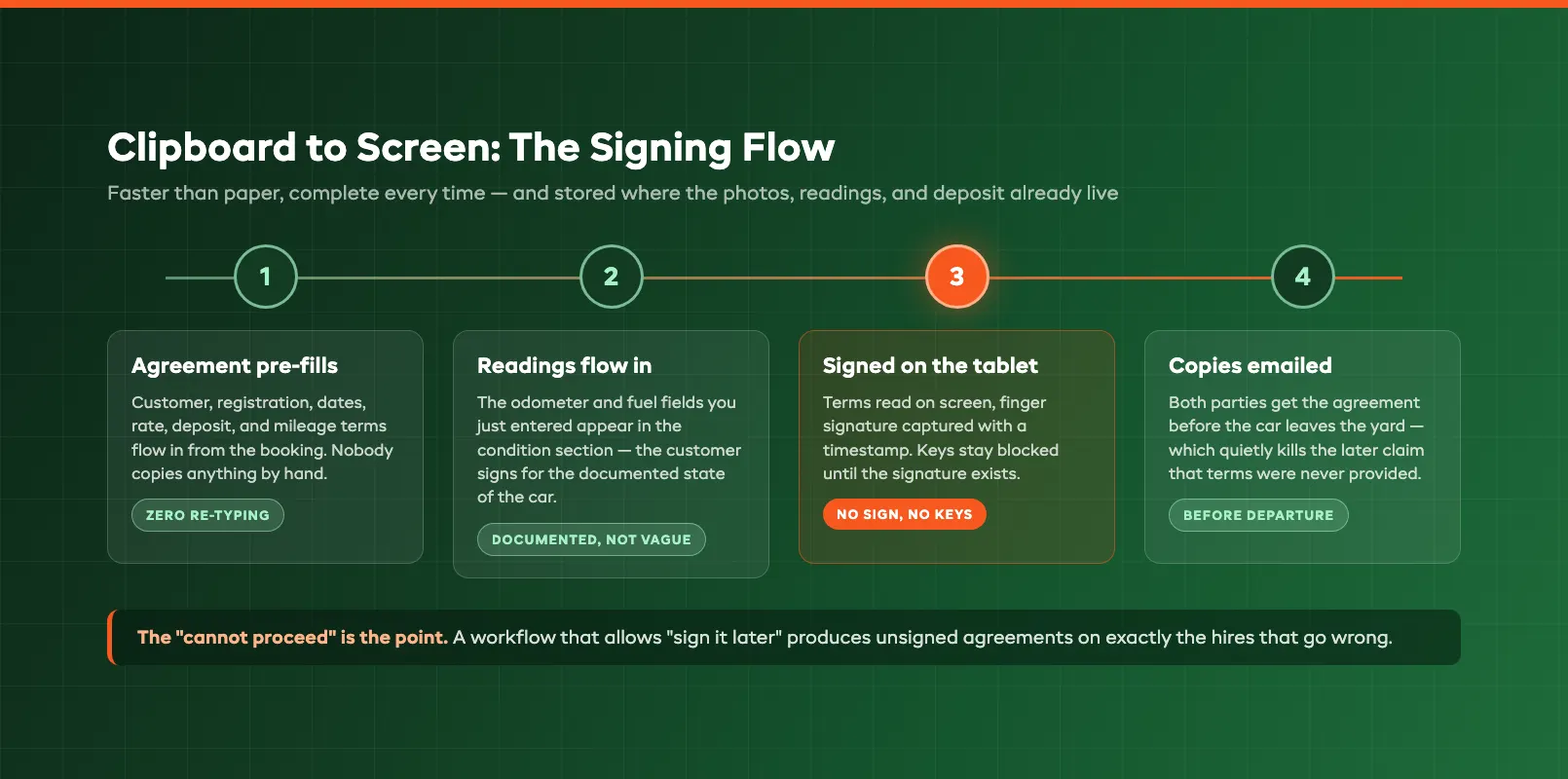
Paper agreements fail quietly. They get half-completed on busy Saturdays, signed without the condition section filled in, filed by month in a drawer, and lost precisely as often as they are needed. Moving the signature to a screen fixes completeness and retrieval in one step, and it is faster than the clipboard it replaces:
- The agreement generates pre-filled from the booking: customer details, vehicle registration, hire dates, rate, deposit amount, mileage terms. Nobody copies anything by hand.
- The recorded readings flow in: the odometer and fuel fields you just entered appear in the condition section, alongside a reference to the walkaround photo set, so the customer is signing for the documented state of the car, not a vague "good condition" checkbox.
- The customer reads and signs on the tablet: a finger signature captured with a timestamp.
- Both parties get a copy by email before the car leaves the yard, which quietly kills the later claim that terms were never provided.
The detail that separates adequate systems from good ones: the keys-released step should be blocked until the signature exists. A workflow that allows "sign it when they get back" is a workflow that produces unsigned agreements on exactly the hires that go wrong. Electronic signatures are legally recognized in the US, UK, EU, and most other jurisdictions for contracts of this kind: what insurers and card networks actually probe is whether the agreement exists, is complete, and can be produced. On-screen signing at handover is how it always can. This is the same principle behind every good customer experience workflow: the system, not the busiest person on the counter, guarantees the step happened.
Driver and License Details
A signed agreement identifies a responsible party, but only if you verified who was signing. The license check at handover has two jobs: confirming the person in front of you is legally entitled to drive the car, and binding the file to an identified, licensed driver so that traffic penalties, tolls, and claims that surface months later have somewhere to land.
The capture worth doing takes thirty seconds. Photograph the license, front and back, and store it with the booking. Check the photo against the face, the expiry date against the hire dates, and the categories against the vehicle. Record any additional drivers the same way; the second driver who was never captured is the one driving when something happens. If your bookings come in online, collect license details at reservation time and make the handover a verification rather than a data-entry session — the counter gets faster and the no-license surprise happens on the phone the day before, not in the yard at 9 a.m.
Two operational notes. First, store the capture with the same retention discipline as the agreement — license data is personal data, and it belongs in the booking system with access controls, not in a staff phone's gallery. Second, when a speeding penalty arrives eight weeks after a hire, the license capture plus the signed agreement is what lets you transfer liability to the driver instead of paying it and chasing them. Operators who skip the license step are, in effect, volunteering to absorb their customers' fines.
The Return Inspection
Everything recorded at handover pays off in the four minutes at return. The return inspection is the same routine run in reverse (walkaround photo set, odometer, fuel) while the customer is still standing there. That last clause is the important one.
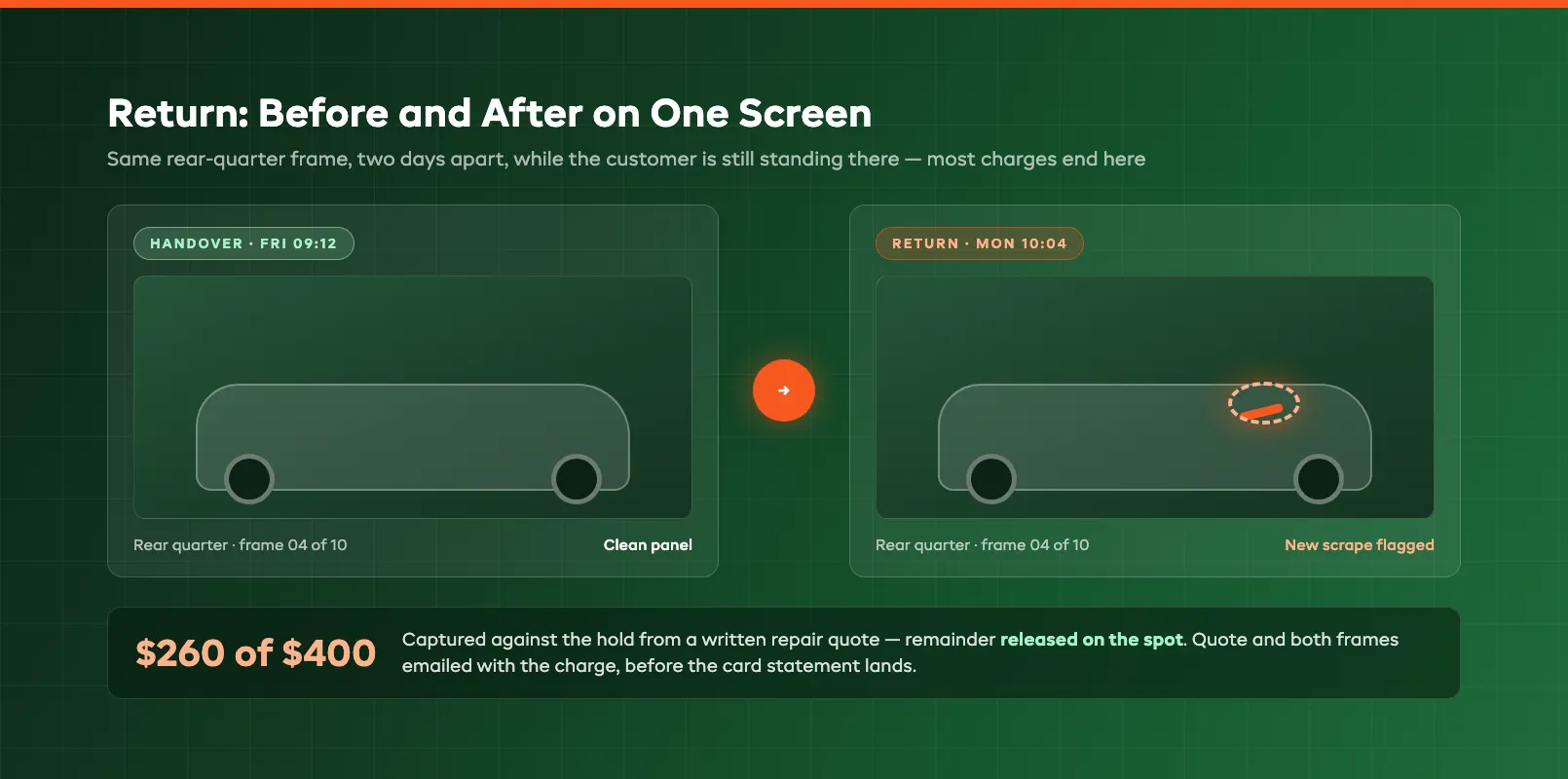
Inspecting with the customer present changes the entire character of a damage conversation. New mark on the rear quarter? You are looking at it together, next to the handover photo of the same panel from two days ago, on the same screen. Most customers, shown a clean before-frame and a marked after-frame, accept the charge on the spot — the dispute never starts because there is nothing left to dispute. The operator who finds the damage an hour after the customer left has the same evidence but a much worse conversation: a phone call, an accusation, and a customer who feels ambushed.
Run returns like this:
- Photos first, same angles: the comparison only works if the return set mirrors the handover set frame for frame
- Odometer and fuel into the booking: closing out mileage terms and refueling in front of the customer
- Walk any new marks together: before-and-after on one screen, and note what the customer says
- Sign off the return: a clean return releases the deposit hold on the spot, which customers notice and remember; a marked return moves to a documented charge
When a return comes in after hours or the yard is slammed, do the photo set anyway, immediately — the gap between drop-off and inspection is exactly the gap a disputing customer will drive through. A timestamped set from twenty minutes after key-drop is strong; one from the next afternoon is not.
Charging From the Record
The last step is where the routine turns into money recovered instead of money argued about. Charging for damage well means charging the documented amount, from the documented record, against the agreed deposit, and never a round number from the gut.
The sequence that holds up:
- Quantify: a repair quote or invoice for the specific damage, not an estimate rounded to the nearest hundred. If you self-repair, a written internal rate does the same job.
- Assemble the file: handover frame, return frame, the signed agreement showing the deposit terms, the return notes. Good systems assemble this automatically because everything already lives on the booking.
- Capture against the hold, not the card: if you run deposits as pre-authorization holds, capture the documented amount and release the rest. Charging $260 of a $400 hold with an itemized reason reads as fair process; capturing the full hold "to be safe" reads as a grab and invites the chargeback.
- Send the evidence with the charge: an email with the amount, the quote, and the before-and-after photos, sent before the card statement lands. Customers dispute surprises; they rarely dispute documents.
When a chargeback comes anyway, this file is what wins it. Card issuers side with whoever has the paperwork, and a response containing a signed agreement, an identified licensed driver, timestamped condition photos at both ends, recorded readings, and an itemized repair invoice is close to unbeatable. A response containing "the car was damaged and we charged them" loses, every time, regardless of who was right.
The through-line of all six sections is the same: none of this is about being better at arguing. It is about a two-minute handover and a four-minute return, run identically on every hire, inside car rental software that keeps photos, readings, license, agreement, and deposit on one booking. The routine costs you six minutes per hire. The first dispute it wins pays for the year.
FAQ
What should a car rental damage inspection include?
A complete walkaround photo set — four corners, both sides, all four wheels, glass, close-ups of any existing marks, plus an interior and dash frame — together with the odometer and fuel readings recorded as fields on the booking. Run the identical inspection at handover and at return so every frame has a before-and-after pair. Stored on the booking with timestamps, that set functions as your vehicle condition report and is the core evidence in any damage claim.
How many photos should I take at a car rental handover?
Eight to twelve frames covers a standard car: four corner shots, two square-on side shots, the four wheels, the windshield, and a close-up of every existing mark, plus one interior and dash frame. The set takes under ninety seconds once it is routine. Consistency matters more than volume: the same angles on every hire, at both handover and return, is what makes the comparison decisive.
Do handover photos actually hold up in a damage dispute or chargeback?
Yes. Timestamped photos attached to a specific booking are exactly what card issuers ask for in a chargeback response. The winning file pairs them with a signed agreement, a captured driver's license, recorded mileage and fuel, and an itemized repair quote. Photos alone prove condition; the full file proves who accepted responsibility for it, which is what turns evidence into a won dispute.
Should the customer be present for the return inspection?
Whenever possible. Walking new damage together, before-frame and after-frame on one screen, resolves most charges on the spot and keeps the relationship intact, because the customer sees process rather than accusation. When a return lands after hours, shoot the same photo set immediately at key-drop; a set timestamped minutes after return is strong evidence, while one from the next day leaves a gap a dispute will exploit.
Can I charge a customer's card for damage after the rental?
Yes, if the signed agreement authorizes it and the amount is documented. The clean pattern is a pre-authorization hold taken at pickup: capture the documented repair amount against the hold, release the remainder, and email the customer the quote and before-and-after photos with the charge. Capturing round numbers, or the whole hold without an itemized reason, is what triggers chargebacks, and without a signed agreement and condition evidence, those chargebacks are usually lost.
What software do I need to run this handover routine?
A system where the walkaround photos, odometer and fuel fields, license capture, on-screen signature, and deposit hold all attach to the same booking, so the claim file assembles itself instead of living across a phone gallery, a paper form, and a card terminal. Purpose-built car rental platforms run this as the standard checkout and return flow; the test in a demo is asking to see one hire's complete file retrieved in a single search.
in one place