Car Rental Software for Independent Fleets: What Actually Matters
Car Rental Software for Independent Fleets: What Actually Matters
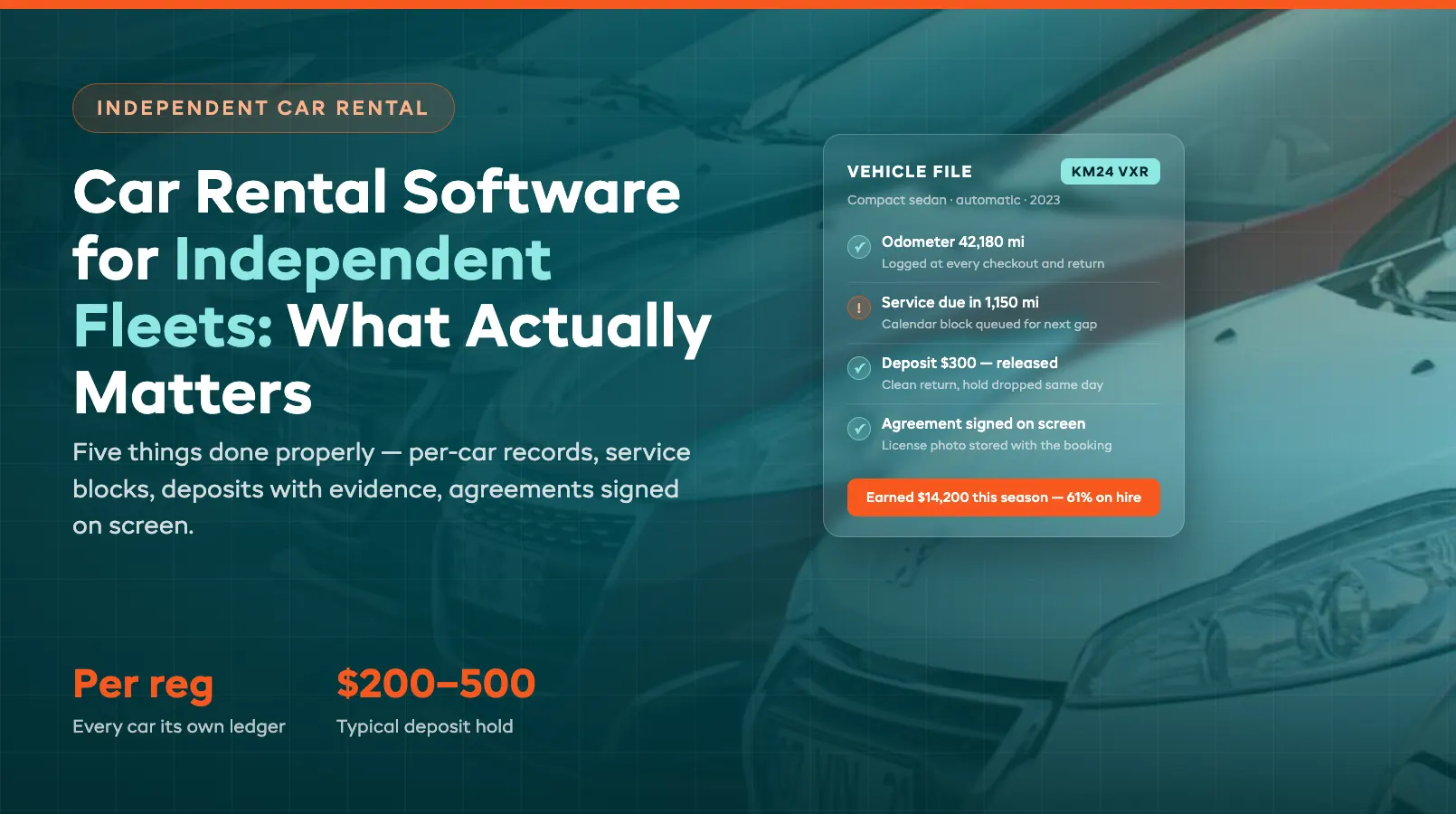
An independent fleet does not need what the majors run. Enterprise rental platforms are built for ten thousand vehicles across four hundred branches, with a pricing team, a fleet team, and an IT department feeding them. You have twenty registrations, one yard, and a phone that rings while you are washing a car. The software question for an independent operator is not "which system has the most features" — it is which system does five specific things properly, because those five things are where small fleets actually lose money.
This guide walks through the five: tracking every car as its own business, keeping servicing and inspection dates off the booking calendar automatically, holding deposits with condition evidence behind them, signing agreements on a screen instead of a clipboard, and taking bookings around the clock without a counter. If a platform does these well — the way purpose-built car rental software does — everything else is nice-to-have. If it does them badly, no feature list saves it.
Per-Registration Tracking
A small fleet lives or dies on per-vehicle economics, and most independents cannot answer the basic question: which of your cars made money last quarter, and which just sat there depreciating? The majors solve this with analysts. You solve it by picking software that treats the registration plate as the unit of record — not "a midsize sedan," but this specific car, with its own history attached.
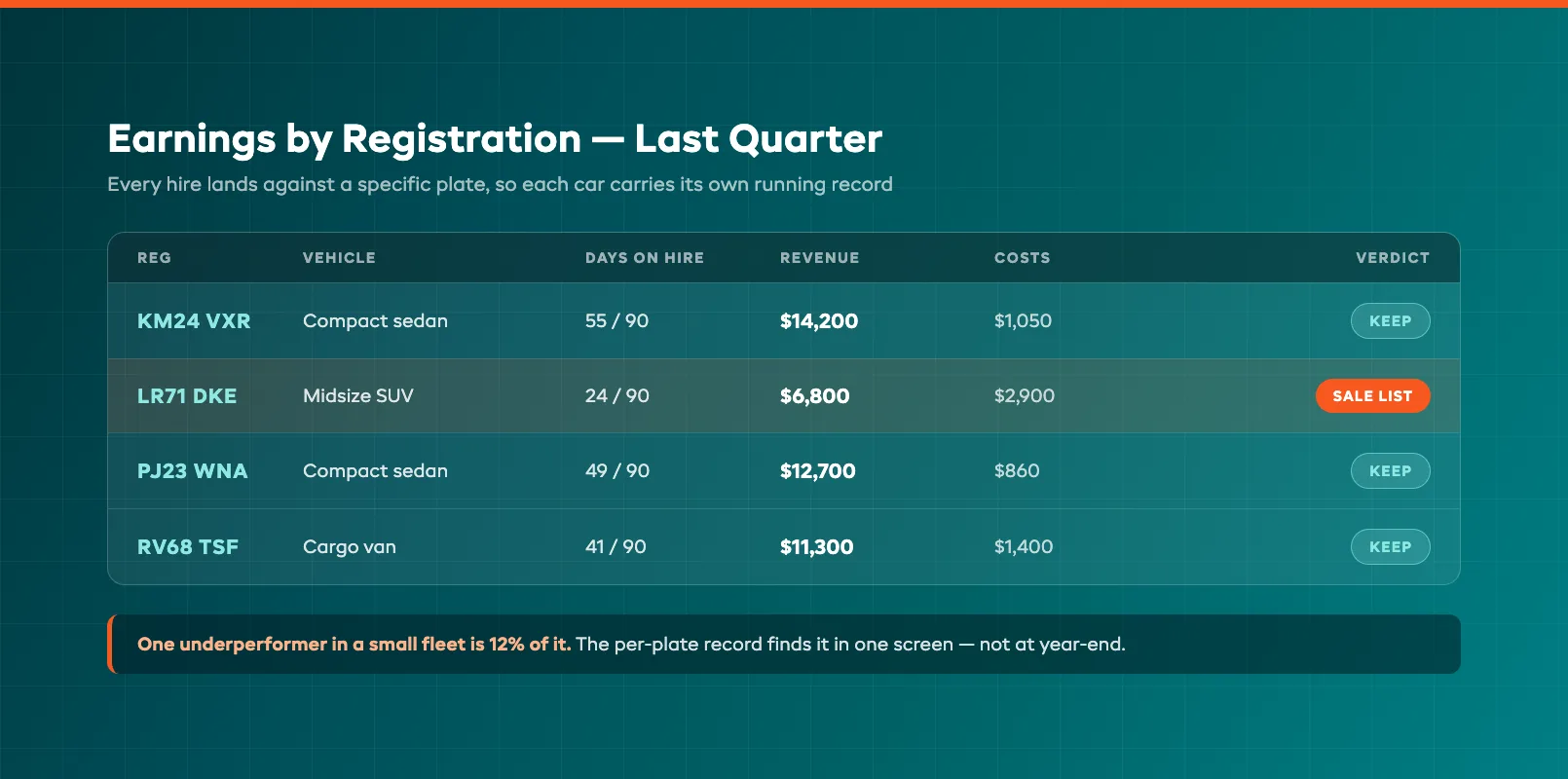
Every hire should land against a specific registration, so the system builds a running ledger per car: days on hire, days idle, revenue earned, and the costs logged against it — servicing, repairs, valeting, that windshield chip you paid for in March. Odometer readings captured at every checkout and return feed the same record, so you know true miles run, not guesses. Over a season this turns fleet decisions from instinct into arithmetic. The sedan that earned $14,200 on 61% utilization keeps its place. The SUV that earned $6,800 and spent two stints in the workshop goes on the sale list, and you can see it in one screen instead of reconstructing it from invoices. For the full method — earning days per registration, turnaround as a lever, and buying the next vehicle on the numbers — see which cars are earning and which are just parked.
Per-registration tracking is also what makes everything downstream work. Damage gets logged against the right car. Service intervals count down against real mileage. And when a customer disputes a charge from a hire in June, you pull one vehicle's file instead of digging through a shoebox. If the software you are evaluating only tracks vehicle categories and treats individual cars as interchangeable stock, it was built for gear rental, not fleets — walk away.
Servicing and MOT Blocking the Calendar
The most expensive booking an independent takes is the one on a car that is not roadworthy. A vehicle due its MOT — or state inspection, depending where you operate — that goes out anyway is an insurance problem. A vehicle three hundred miles past its service interval that goes out anyway is a breakdown call from two hundred miles away, a recovery bill, and a refunded hire. Both happen for the same reason: the servicing schedule lives in someone's head or on a whiteboard, and the booking calendar cannot see it.
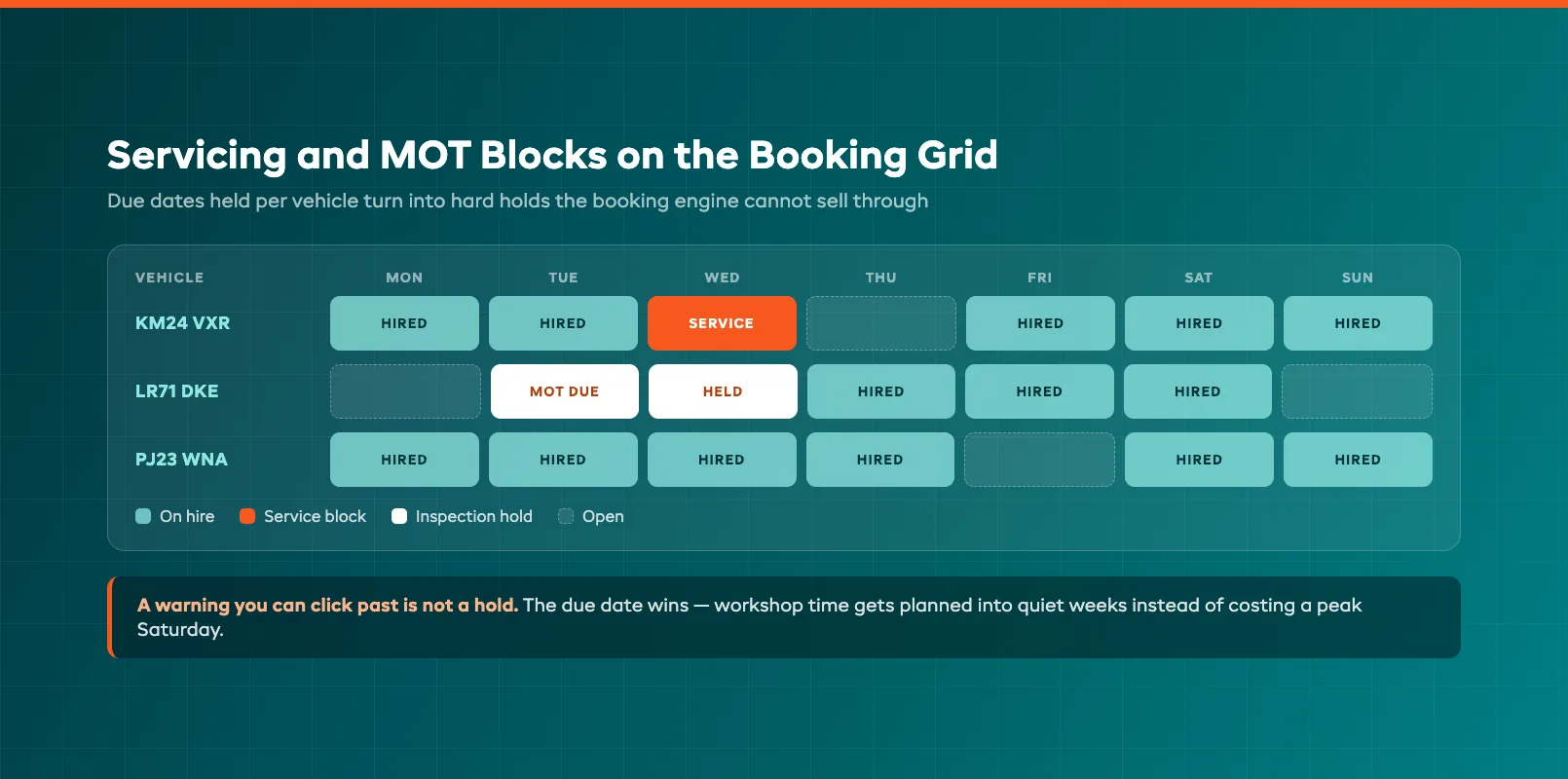
The fix is structural, not disciplinary. Good fleet software holds servicing, inspection, registration renewal, and insurance dates against each registration, and turns them into hard blocks on the availability calendar as they come due. A car due its inspection on the 14th simply is not bookable past the 13th until someone clears the block. Service intervals work the same way off real odometer data: when a car crosses its mileage threshold, the system flags it and can hold it out of the next gap in its bookings rather than letting it run another four hires overdue.
Two details separate adequate from good here. First, the block has to push back against bookings the same way a reservation does — a warning banner you can click past is not a block, and in a busy week someone will click past it. Second, you want visibility forward: a view of everything falling due in the next 60 days, so you can schedule workshop time into quiet weeks instead of losing a peak Saturday to an inspection that could have happened on a wet Tuesday. Independents run tight fleets; a planned day off the road costs a fraction of an unplanned one.
Deposits and Condition Evidence
Deposits are where small operators bleed quietly. Charge nothing and you eat every scuffed alloy wheel. Hold cash manually and you spend your week processing refunds and arguing about them. The workable pattern is the one card networks built for exactly this: a pre-authorization hold placed on the driver's card before the keys move — commonly $200–$500 for standard cars, more for premium — that never actually leaves their account, and releases automatically after a clean return.
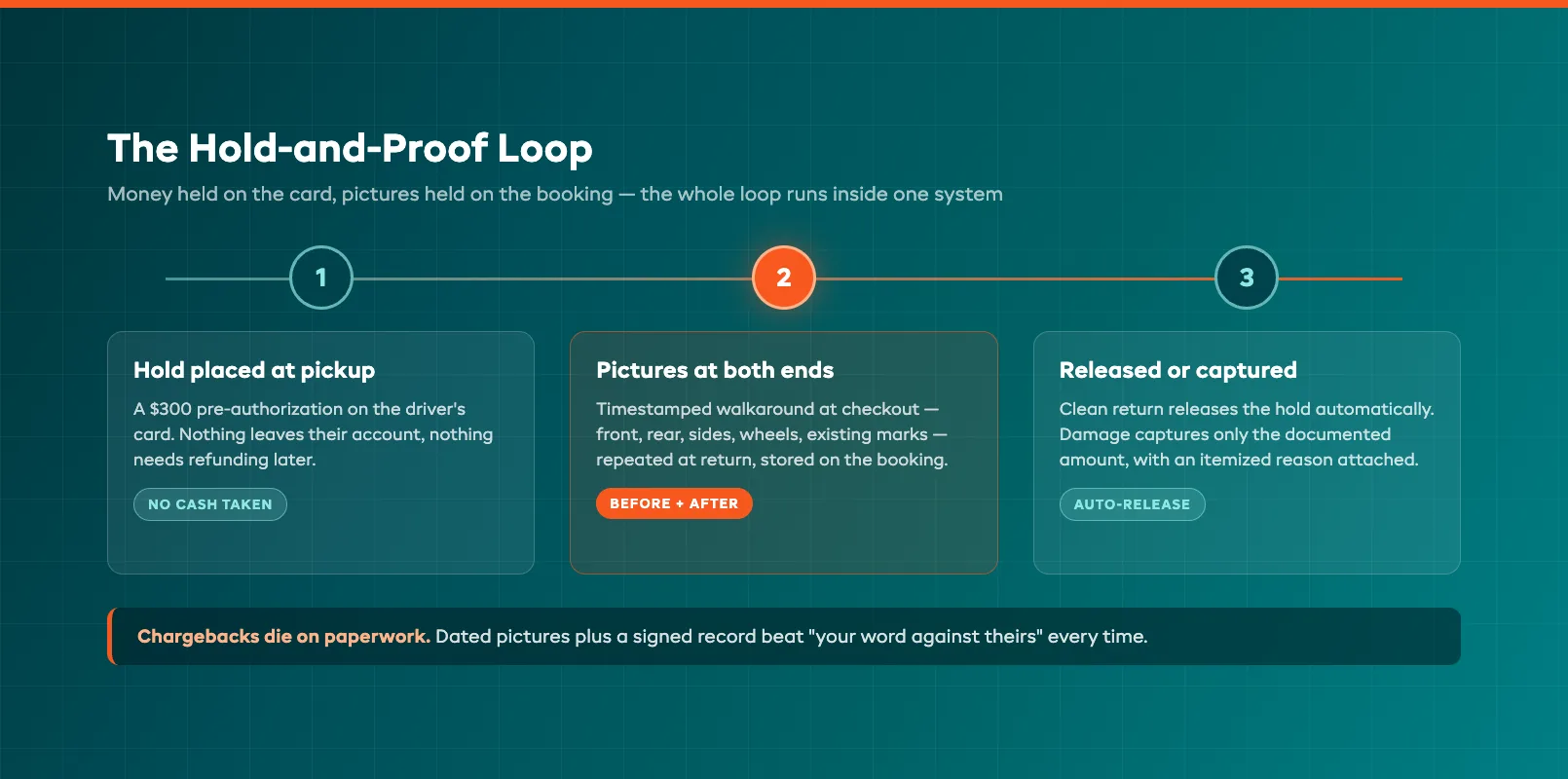
Software should run that lifecycle without you touching a card terminal: hold placed at pickup, released on return sign-off, or partially captured — the documented amount, not a round number — when something comes back damaged. But the hold is only half the system. The half that wins arguments is condition evidence. A walkaround photo set at checkout — front, rear, both sides, wheels, existing marks — timestamped and stored against the booking, then repeated at return, means a damage charge is a before-and-after comparison, not your word against theirs. Card issuers side with whoever has the paperwork; chargebacks die quickly when the response includes dated photos and a signed agreement.
The evidence habit protects the honest customer too. When the scratch was already there at pickup, the photos prove it, and the customer who was braced for a fight leaves a review about how fair you were. Ask any platform you are evaluating to show the full loop in a demo: hold placed, photos attached at both ends, partial capture with an itemized reason. If any step happens outside the system — on your phone's camera roll, in a separate card terminal — the record fragments exactly when you need it whole. For the full routine — what to photograph, what to record, and how to charge from it — see the two minutes at handover that win a damage claim.
Digital Agreements at Handover
The rental agreement is the document your insurer, your lawyer, and the card networks all care about, and at most independents it is still a paper form filled in at a counter while the customer's family waits in the sun. Paper agreements get half-completed, filed in a drawer by month, and go missing the one time a claim depends on them. Moving the agreement onto a screen fixes the speed and the record-keeping in one step.
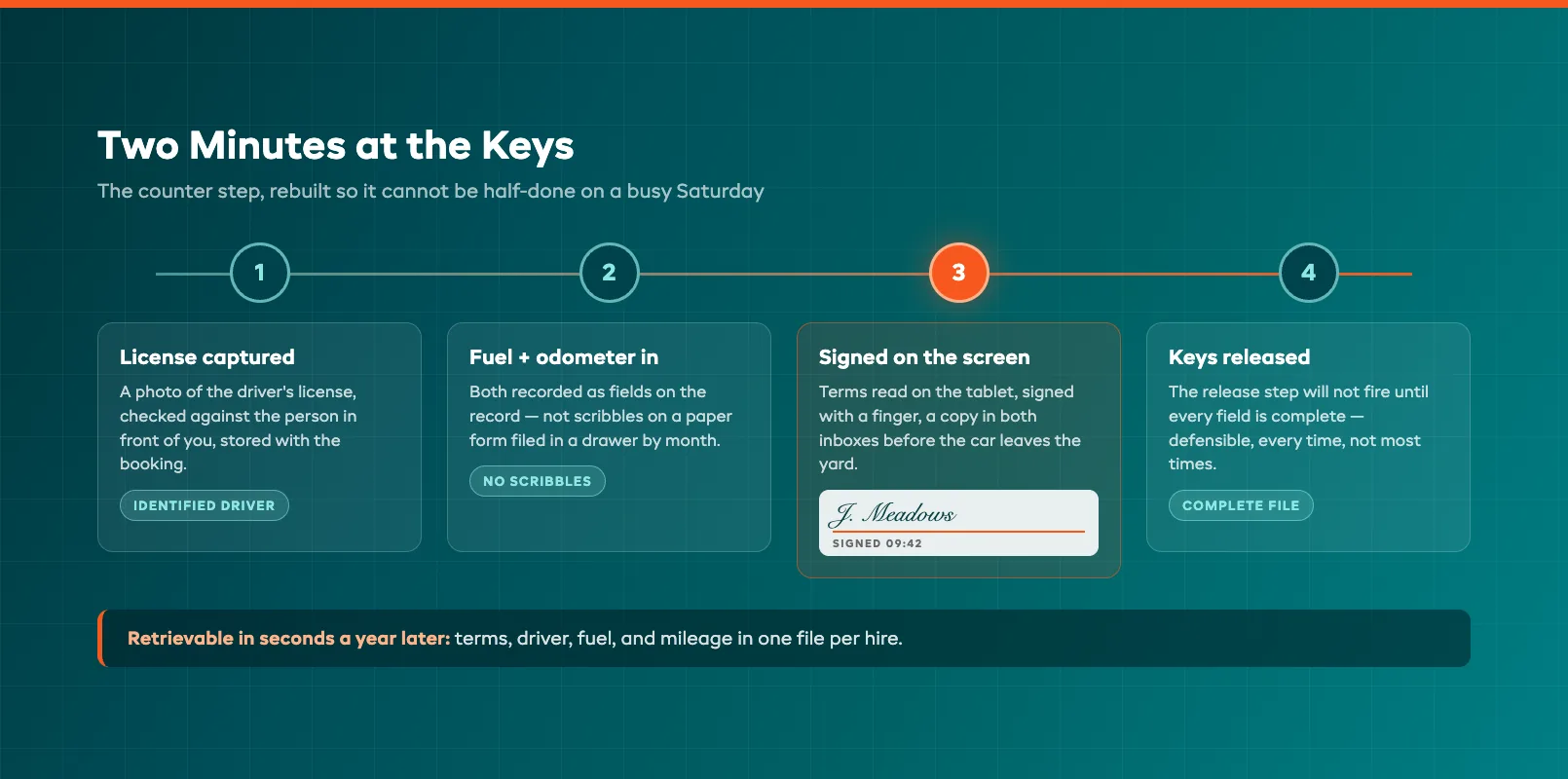
The handover flow worth buying looks like this: the booking already holds the customer's details, so the agreement generates pre-filled. You capture the driver's license — a photo of it, checked against the person in front of you and stored with the booking. Fuel level and the odometer reading go in as fields, not scribbles. The customer reads the terms on the tablet, signs with a finger, and both of you get a copy by email before the car leaves the yard. Two minutes, complete every time, and stored where the booking, the deposit, and the condition photos already live — one file per hire, retrievable in seconds a year later.
Completeness is the real win. A paper process depends on whoever is on the counter remembering every field on a busy Saturday. A digital one will not let the keys-released step happen until the license is captured and the signature is on the screen. That "cannot proceed" is what makes the file defensible: when a claim or a traffic penalty surfaces months later, you have the signed terms, the identified driver, and the recorded fuel and mileage — every time, not most times.
Online Booking
Independents lose their easiest revenue at 9 p.m., when someone comparing options books with whichever operator shows live availability and takes payment on the spot. If your booking process is a contact form and a call back tomorrow, you are handing those hires to the operator down the road — or to the airport majors' websites, which never sleep.
Online booking for a small fleet has one structural subtlety: customers book a vehicle class, but your calendar runs on registrations. The software should let someone book "compact automatic, Friday to Monday" while you keep the freedom to assign the specific car later — and it must count availability correctly against the class, including turnaround time between hires and every servicing block from earlier in this guide. A booking engine that shows a car as free while it is due in the workshop is worse than no booking engine.
Beyond that, the checklist is short. Pricing by duration, displayed as a total — daily rate, any mileage terms, extras — with no surprises at the counter. Extras on the same booking: additional driver, child seat, out-of-hours return. Payment up front or a booking amount with the balance scheduled, and the deposit terms stated before they pay, so the pre-authorization at pickup is never a surprise. Confirmation and reminder messages that go out on their own. Every one of those is a task that currently interrupts your day, moved to software that does not mind working evenings.
The Independent Fleet Software Checklist
Take this list into every demo, and make them show you each item live rather than nodding at it:
- Per-registration records — revenue, costs, odometer history, and utilization for each car, not just categories
- Servicing, MOT/inspection, registration, and insurance dates held per vehicle, with forward visibility of what falls due in 60 days
- Hard calendar blocks — a car due for servicing or inspection cannot be booked past the due date
- Deposit pre-authorization holds placed, released, and partially captured inside the system, no separate card terminal
- Photo condition evidence at checkout and return, timestamped, stored on the booking
- Digital agreements — pre-filled, signed on screen, license captured, fuel and odometer recorded before keys release
- Online booking by vehicle class with real availability, turnaround gaps respected, and extras on the same reservation
- Automatic messages — confirmations, reminders, balance requests, deposit release notices
- Pricing you can actually run — independents should not pay enterprise per-vehicle fees; check the numbers against a plain published price list before you fall for a feature
Score honestly. Most platforms pitched at independents do two or three of these well and paper over the rest. The ones worth shortlisting — EquipDash's car rental software among them — do all nine, because they were built around the hire-out, hand-over, get-it-back loop rather than adapted from something else. And if your yard also runs two-wheeled stock, the same test applies with a different risk profile: motorcycle rental software adds rider license checks and waivers on top of everything above. Pick the system that handles the five things in this guide properly, and the twenty-car fleet starts running like it has a back office — without hiring one.
FAQ
What should car rental software for small fleets cost?
Independents should expect transparent monthly pricing rather than enterprise per-vehicle contracts. As a sanity check, a 10–30 car fleet should be paying tens of dollars per month, not hundreds per vehicle — and setup fees or long lock-in contracts are a warning sign. Compare any quote against a published price list before committing, and confirm what happens to the price as the fleet grows.
Do I really need per-registration tracking with only eight cars?
Small fleets need it more, not less. With eight cars, one underperformer is 12% of your fleet quietly losing money, and without a per-registration ledger you will not spot it until year-end. Per-car revenue, costs, and utilization is also what tells you which vehicle to replace next and what to buy — decisions that matter far more at eight cars than at eight hundred.
How big should a car rental security deposit be?
Most independents hold $200–$500 on standard cars as a pre-authorization rather than a charge, rising for premium vehicles. The hold should roughly cover your insurance excess plus common minor damage — wheels, glass, trim. Sizing it as a card hold instead of taken cash keeps the money in the customer's account, avoids refund processing, and still gives you something to capture against documented damage.
Can servicing and MOT dates really block bookings automatically?
Yes — that is the test to run in a demo. Purpose-built fleet software holds inspection, servicing, registration, and insurance dates per vehicle and converts them into availability blocks as they approach, so the booking engine cannot sell a car past its due date. If the platform only shows a reminder that staff can ignore, it is a to-do list, not a block, and a busy Saturday will find the gap.
Are digital rental agreements legally binding?
Electronic signatures are legally recognized in the US, UK, EU, and most other jurisdictions for contracts of this kind, and a digitally signed agreement is typically easier to defend than paper because it arrives complete — identified driver, captured license, timestamps, and stored terms in one record. Insurers and card networks care most that the agreement exists and is retrievable, which is exactly where paper processes fail.
What is the difference between car rental software and general rental software?
General rental platforms track interchangeable stock — ten kayaks are ten identical units. Fleet software treats every registration as a distinct asset with its own odometer history, servicing schedule, inspection dates, and earnings record, and adds the vehicle-specific layer: driver license capture, signed rental agreements, condition photo evidence, and deposit holds sized to insurance excess. If a platform cannot show you one specific car's complete file, it is general rental software wearing a car costume.
in one place