Automating Review Collection: More Five-Star Reviews Without Chasing
Automating Review Collection: More Five-Star Reviews Without Chasing
A guest finishes a kayak hire or a half-day tour, smiles at the counter, and says they had a great time. You never see a review. A week later you send a polite email. Silence. Another operator down the road has twelve fresh five-stars this month and you have two. The gap is not hospitality. It is timing, channel, and whether the ask runs itself.
Review chasing fails because it depends on memory. Peak days bury the follow-up. Off-days feel too quiet to bother. Happy guests cool off. The operators who pull ahead treat the review request the same way they treat a booking confirmation — as a fixed step that fires when the booking completes. That is the whole shift: from hoping someone remembers to wiring the ask into the job.
This post covers why chasing fails, the post-trip window that actually works, how to choose Google versus an OTA, how to tie the trigger to booking completion, and how to answer a bad review without burning an afternoon. It sits next to rental business SEO — reviews are a local ranking signal — and the same automation habit as booking confirmations.
Why Chasing Reviews Fails
Manual review asks look fine on a quiet Tuesday. They fall apart when the diary is full.
You finish a busy Saturday with forty completed rentals or six tours. Half the guests were happy. You meant to send personal notes. Monday arrives with returns, damage holds, and a staff call-out. The Friday guests who would have reviewed are already on a flight or back at work. By Wednesday the glow is gone. Response rates crater.
Chasing also creates uneven coverage. The guests you remember get asked. The ones from the chaotic hand-over do not. That is exactly when you need the buffer of volume — one rough comment sits on top of a thin listing for weeks. Steady velocity buries a bad day. Sporadic asks leave it exposed.
There is a third failure mode: the awkward ask at the counter. Guests feel cornered. Staff feel salesy. Platforms frown on incentivized reviews. A calm message 24 to 48 hours later, with a direct link and no discount dangling, converts better and stays clean.
If you already think about review velocity as a system — the same idea behind a tour review velocity strategy — automation is what keeps the system running when you are not watching.
The Post-Trip Timing Window
When you ask matters as much as whether you ask.
Too early — at the dock before the gear is racked — and the experience is not finished in the guest's head. Reviews come back thin: "Nice trip." Too late — five or seven days out — and the trip competes with inbox noise and the next vacation photo. Opens drop. Clicks drop.
The window that works for most rental and tour businesses is 24 to 48 hours after the booking ends. The guest has slept on it, told a friend the highlight, and still has the day in working memory. They are often on a phone in a hotel, a car, or a quiet evening — exactly when a short SMS or email gets answered.
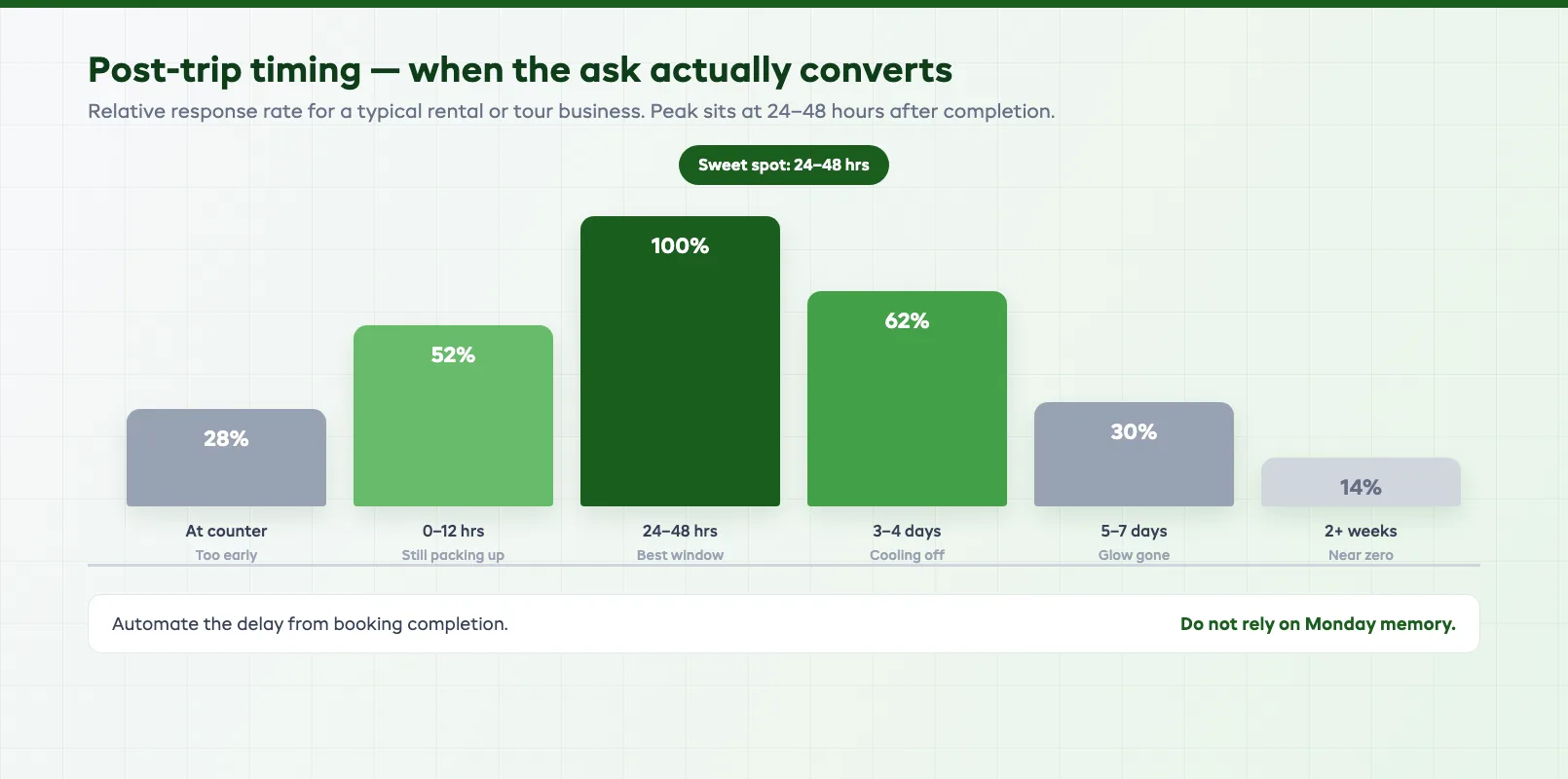
Two refinements help:
- Send when people are on phones. Early evening often beats mid-morning for leisure guests. Corporate and school groups may differ — test once, then lock it.
- Make the clock automatic. If a person has to remember the window, half the guests miss it. Tie the send to booking end time so every completed job gets the same ask.
One gentle follow-up two or three days later is fine if there is no click. A third nudge is nagging. Stop.
Google vs OTA: Choose the Channel on Purpose
"Please leave us a review somewhere" scatters thin ratings across five platforms. None of them look strong. Route each guest to the one place that moves your next booking.
Google wins when walk-ups, "near me" search, and local discovery matter. Map pack visibility and trust for direct bookers live here. Guests who found you on Google Maps or booked on your site are the natural ask for a Google review.
OTA platforms (Viator, GetYourGuide, Tripadvisor, and the rest) win when that channel feeds a real share of your bookings. A review on the platform where the guest booked compounds ranking where you already pay commission. Sending a Viator guest only to Google leaves the listing that sold them looking quiet.
A simple routing rule:
| Guest booked through | Primary review ask | Why |
|---|---|---|
| Your website / walk-up / phone | Fuels local SEO and direct trust | |
| Viator / Tripadvisor | That OTA listing | Ranking where the booking came from |
| GetYourGuide | GetYourGuide | Same — platform velocity |
| Partner / hotel desk | Google (or partner's preferred) | Usually local discovery |
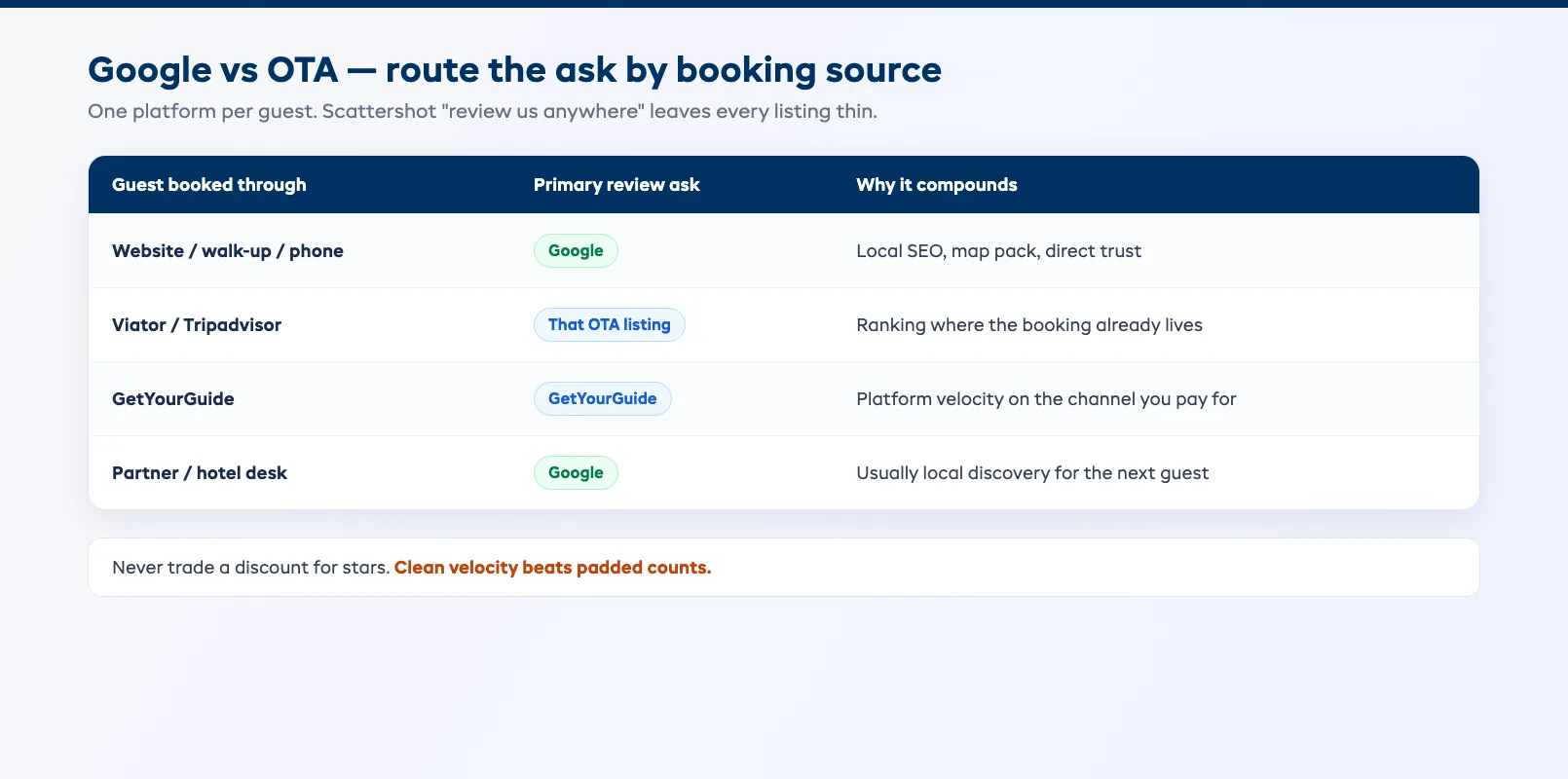
Do not ask the same guest to paste the same review in four places. Do not trade a discount for a star rating. Clean velocity beats padded counts — platforms detect and punish the padded kind.
Google reviews also feed the story you tell in rental business SEO: fresh ratings and recent responses are part of how locals decide you are still open and still good.
Automation Triggers Tied to Booking Completion
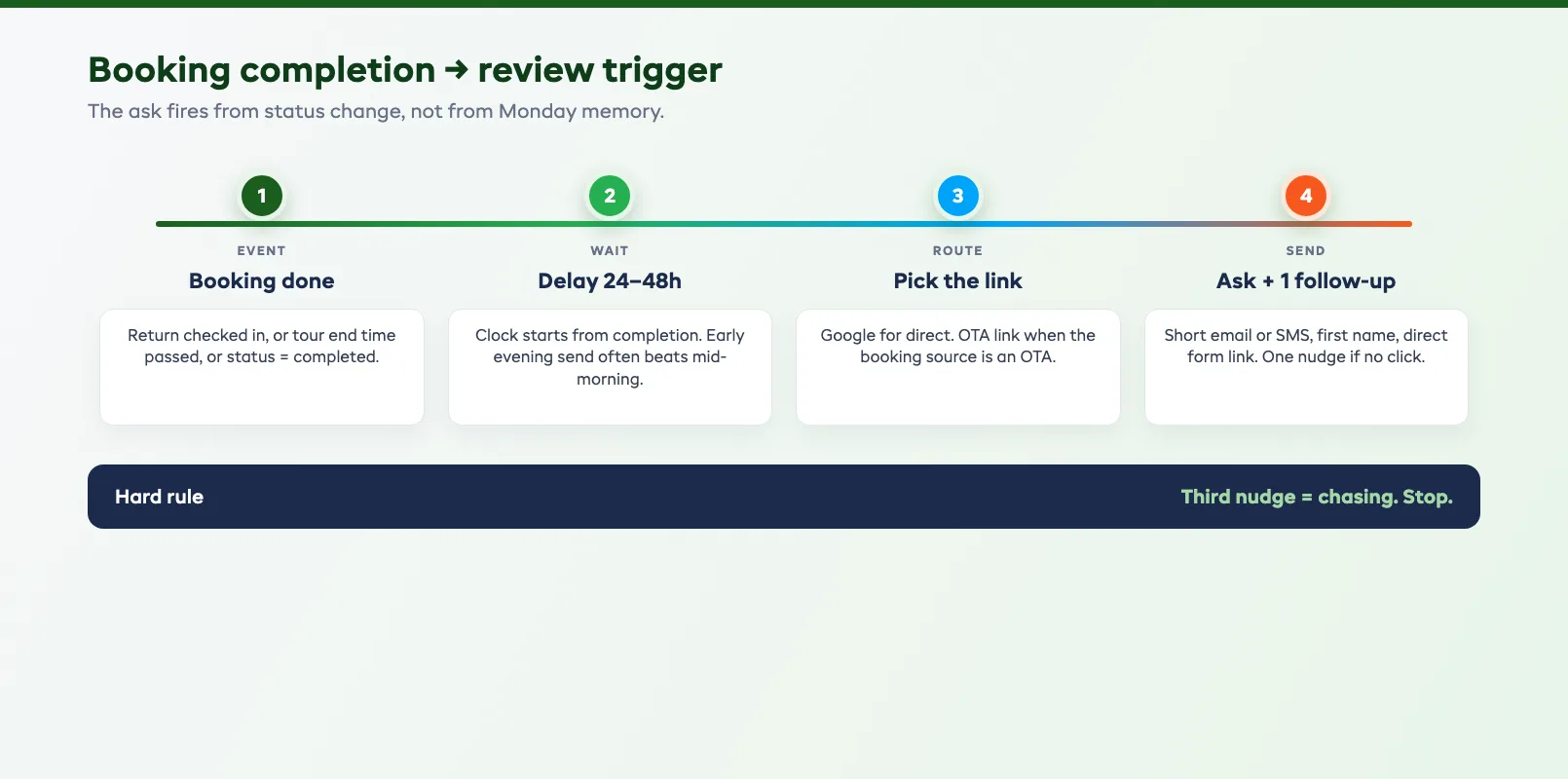
The ask should fire when the booking is done — not when someone remembers.
Completion means the hire return is checked in, or the tour end time has passed, or the status flips to completed in your system. That event is the trigger. From there the automation:
- Waits your chosen delay (for example 30 hours)
- Picks the review link from the booking source (Google vs OTA)
- Sends a short email or SMS with the guest's first name and a direct link
- Logs whether the message was delivered, opened, or clicked
- Optionally sends one follow-up if there was no click
Keep the copy small. Subject lines that work sound like a human: "How was your paddle yesterday?" Body: two or three sentences, one link, one thank-you. Link straight to the review form, not a homepage.
This is the same discipline as automated confirmations and reminders. If confirmations already leave your system without a staff member typing them — see how to automate booking confirmations — review requests belong in that same post-trip lane. Guest messaging that already runs after the trip, the way automated guest communication describes, is the natural home for the ask.
One EquipDash note and then we move on: a post-trip review agent can own the delay, the channel link, and the follow-up so the counter never has to chase.
Test the loop yourself once. Complete a fake booking. Wait the delay on a short test setting. Confirm the link opens the right form. Then turn it on for live bookings.
Responding to Bad Reviews Without Burning the Day
Bad reviews happen. Automation does not stop them. What you do in public decides whether the next stranger trusts you.
Rules that keep the response short and useful:
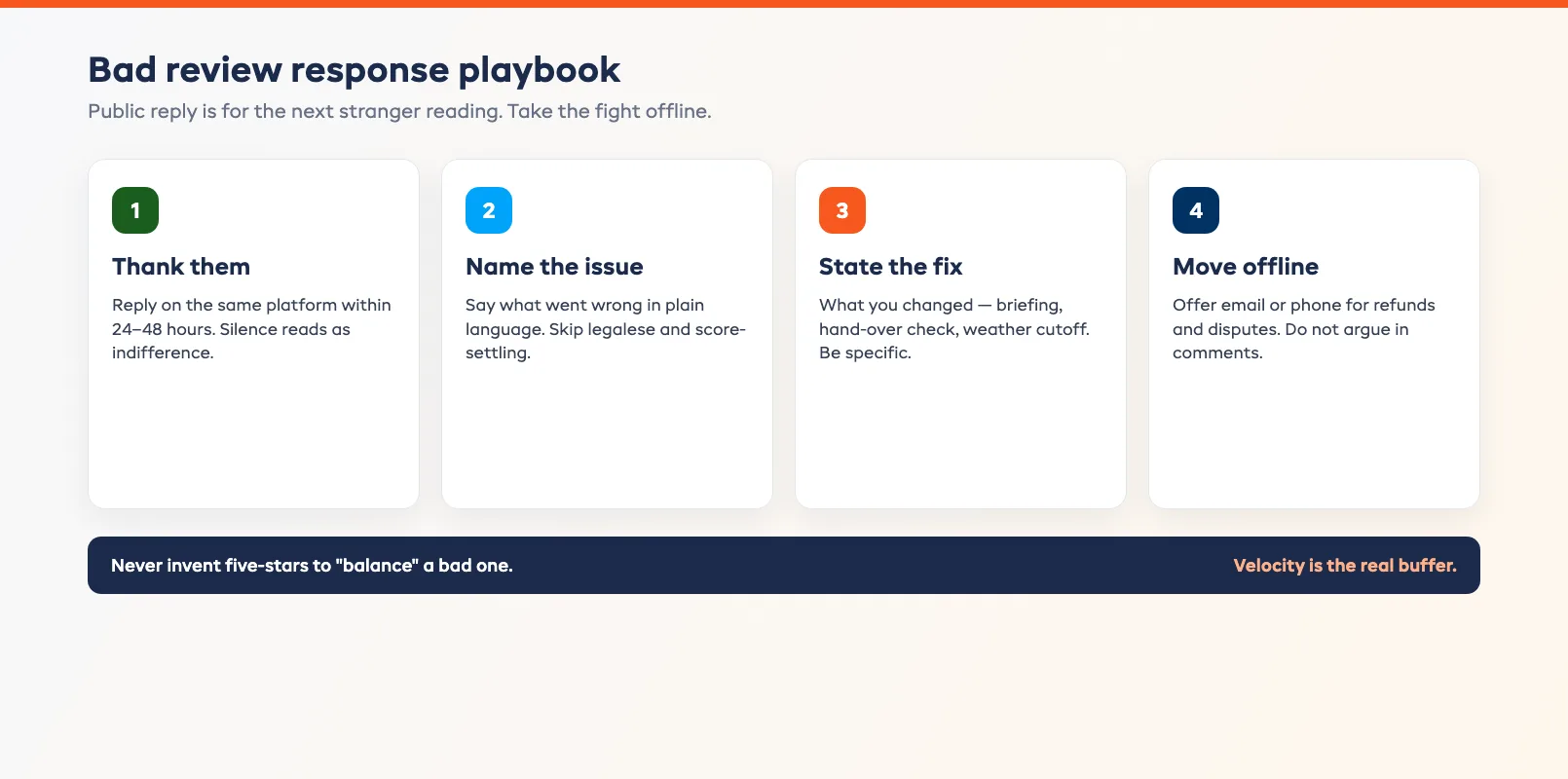
- Answer in public, on the same platform, within 24–48 hours. Silence looks like indifference. A calm reply looks like an operator who owns the day.
- Thank them, name the issue, say what you fixed or will fix. Skip legalese. Skip arguing about who is right in the comments.
- Take the fight offline. Offer a direct email or phone for refunds, damage disputes, or medical issues. The public reply is for future readers, not for winning an argument.
- Never invent a fake positive review to "balance" it. Platforms catch patterns. One honest bad review with a good response is better marketing than a suspicious pile of five-stars.
A template that works:
Thanks for the feedback, [Name]. We're sorry the [specific issue] got in the way of the day you booked. We've [specific fix — briefed the team / adjusted the hand-over check / changed the weather call cutoff]. If you'd like us to make it right on your booking, email [address] and we'll sort it.
Staff should not invent replies under pressure at 9pm. Keep three approved templates for common cases: late start, gear condition, weather cancel. Personalize the name and the issue. Publish. Move on.
Velocity still matters here. If you collect reviews every week, one rough comment is a blip. If you collect one a month, that comment is your homepage for strangers.
Stop Hoping. Wire the Ask.
Five-star reviews are not a personality trait. They are a post-trip process: ask inside the window, route to the channel that compounds, trigger from booking completion, answer the bad ones in public, and keep the volume high enough that one rough day does not define you.
Set the delay. Pick the links. Write two short templates. Turn the trigger on. Then spend the hours you used to spend chasing on the work that actually earns the next five stars — the hire, the brief, the guide, the hand-over.
When you are ready to run that loop beside bookings, inventory, and guest messages in one place, start a free EquipDash trial and wire the post-trip ask once instead of chasing it every Saturday.
FAQ
When should I send a review request after a rental or tour?
Most operators see the best response inside 24 to 48 hours after the booking ends. Earlier and the experience still feels unfinished. Later and the glow has faded. Automate the delay from booking completion so the window does not depend on someone remembering.
Should I ask for a Google review or an OTA review?
Route by how the guest booked. Direct, walk-up, and Google-discovery guests go to Google. Guests who booked on Viator, GetYourGuide, or similar go to that platform's listing. One clear ask beats a scattershot "review us anywhere."
Is it okay to offer a discount for a five-star review?
No. Major platforms treat incentivized reviews as a policy problem, and the risk is not worth a temporary bump. A short, timely ask with a direct link is enough when the experience was good.
How do I respond to a bad review without making it worse?
Reply in public within a day or two. Thank them, name the specific issue, say what you changed, and invite them to continue offline for refunds or disputes. Do not argue in the comments. Future readers are the real audience.
Can review requests be automated from my booking system?
Yes — and they should be. Trigger on booking completion, wait your delay, pick the channel link from the booking source, send email or SMS, and optionally follow up once. The same systems that send confirmations can own the review ask.
How many review requests is too many?
One ask in the 24–48 hour window plus one gentle follow-up if there was no response is enough. A third message feels like chasing. Stop and let the next booking's automation carry the volume.
in one place