Blocked Stock Is Real Stock: Availability That Matches the Shelf
Blocked Stock Is Real Stock: Availability That Matches the Shelf
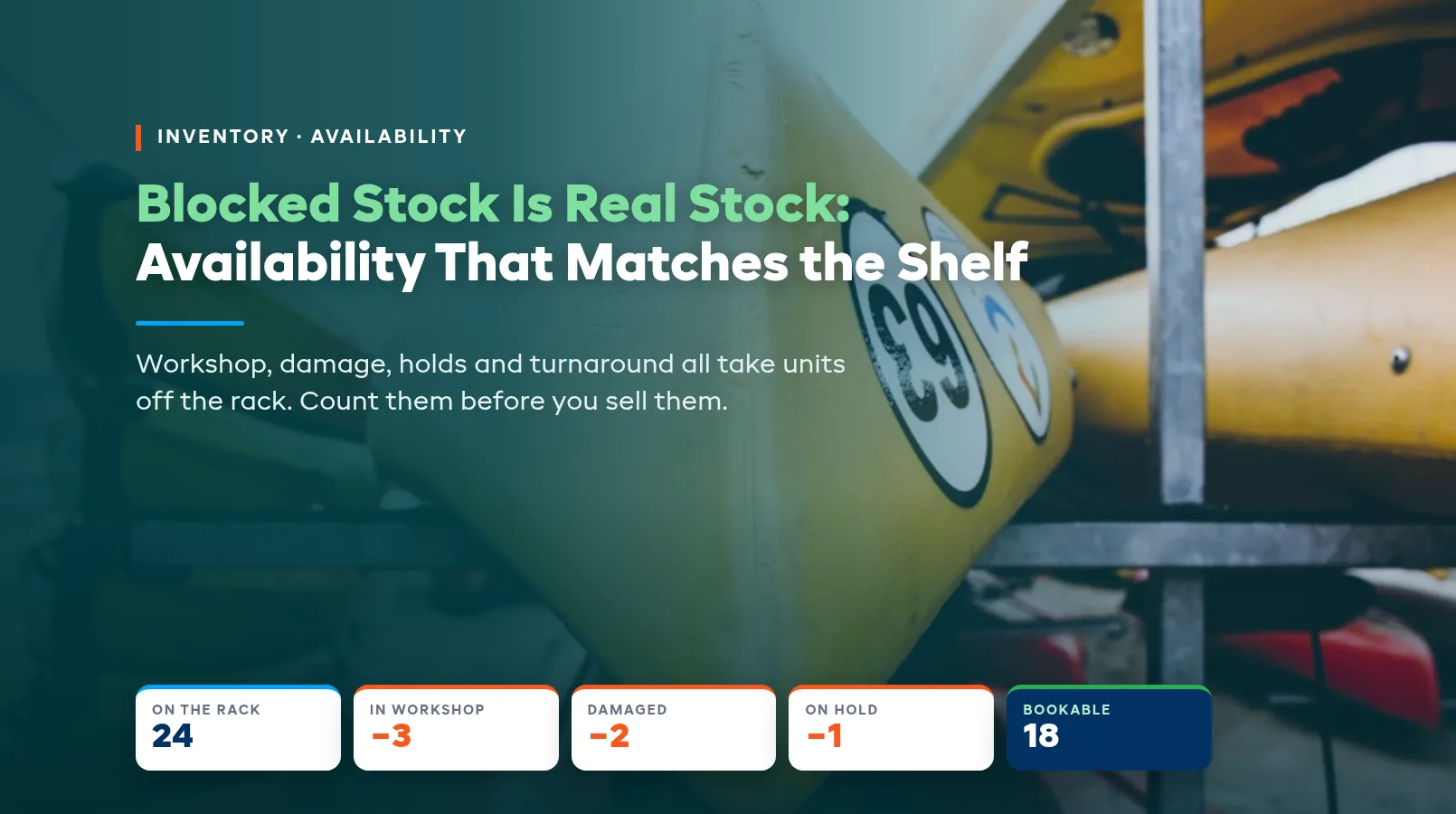
A customer books four kayaks for Saturday because your website says twelve are free. At 8 AM your staff count eight that can actually go out. The other four are in the workshop, waiting on a damage check, or set aside for a group. They're on the rack, so your system counts them. That gap between the shelf and the booking page is blocked stock, and it's where a lot of "we're so sorry" phone calls start.
Blocked stock is any unit you own and can see but can't rent right now. It still takes up space and it still shows up in a headcount, which is exactly why it causes trouble. This guide covers the kinds of blocked stock most rental shops carry, why availability drifts away from what's on the shelf, and the habits that keep the two in line. For the wider system behind it, start with our rental inventory management guide.
The five kinds of blocked stock
Most shops have the same handful of reasons a unit can't go out, whatever they rent.
- In the workshop. A bike waiting on a brake job, a ski that needs a base repair, a paddleboard with a leaking valve. Everyone knows it's broken, but it often still counts as stock.
- Damaged, not yet inspected. It came back with a scrape or a rattle late on Sunday, and nobody has had time to decide whether it's fine or needs fixing.
- Held for someone. Units set aside for a school group, a guide's kit, a demo day, or a customer who called and said they'd pay tomorrow.
- In turnaround. Wetsuits drying, e-bike batteries charging, skis being waxed. These units will be ready in a few hours, but not for the 9 AM pickup.
- Somewhere else. Units sitting at your other location, out on a delivery run, or simply missing since the last busy weekend.
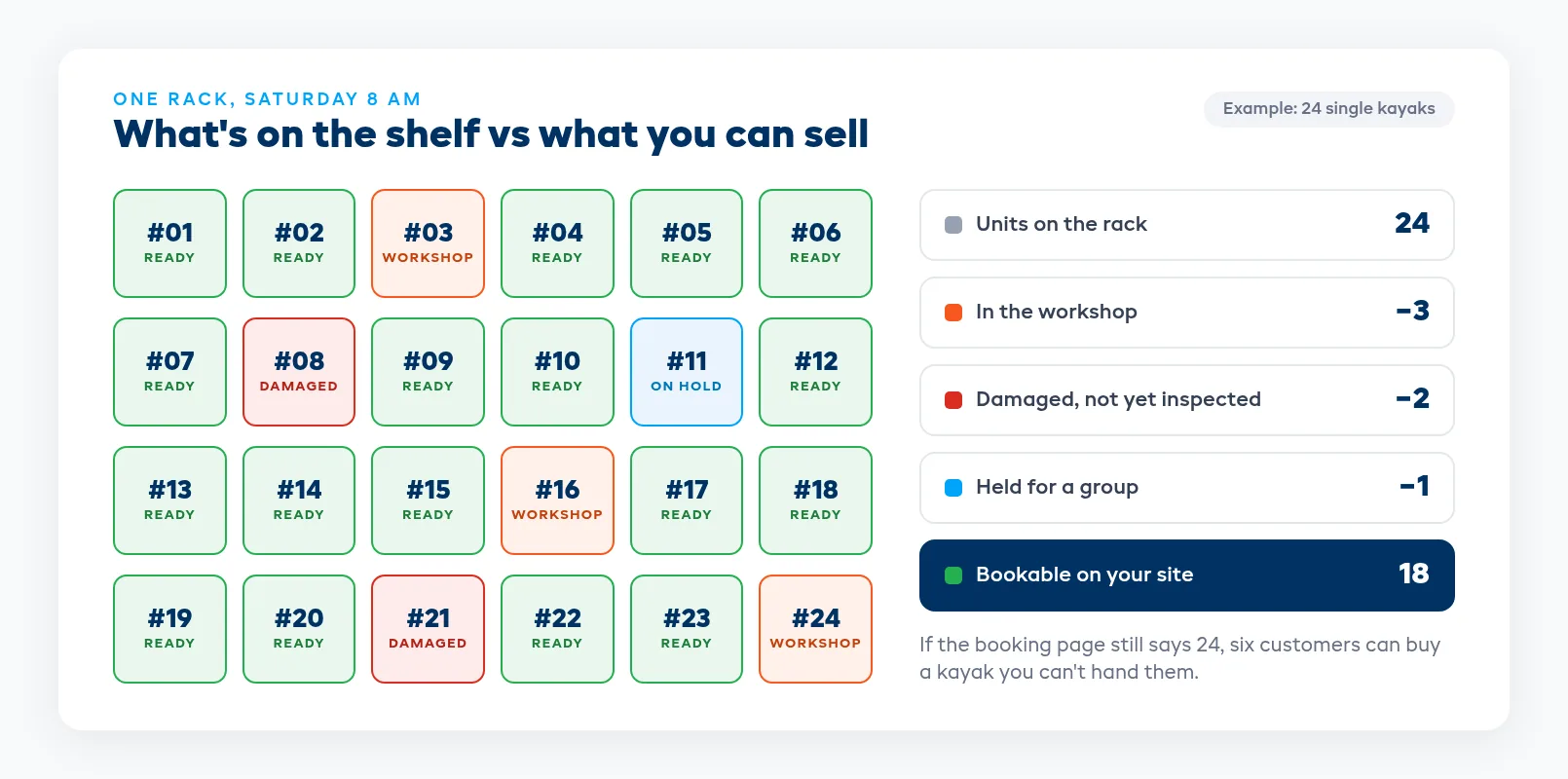
Every shop carries some of each, and on a busy weekend they stack up. You can live with a few units off the rack. What hurts is a booking page that still counts them.
Why availability drifts from the shelf
Availability goes wrong a little at a time, and usually for ordinary reasons.
A mechanic tags a bike as broken with a paper label on the handlebars, but the status in the system never changes. A staff member promises six bikes to a hotel over the phone and writes it on the whiteboard. A unit comes back damaged at closing time and goes straight onto the rack because the counter is busy. Each one is a small miss, and they add up over a week.
Selling on more than one channel makes it worse. Your website, the counter, and any tour marketplaces you list on all draw from the same number. If that number includes four kayaks you can't hand over, every channel will happily sell them. We cover the booking side of this in how to prevent double bookings, but blocked stock is the version that catches shops who think they've already solved double bookings.
Track units, not just a count
A single number like "24 kayaks" can't tell you which three are in the workshop. You need each unit to carry its own status.
That means a unit number on every item: painted on a hull, stickered on a frame, or printed as a barcode. It also means a short, fixed list of statuses that staff actually use, such as available, reserved, out, in the workshop, and overdue. Keep the list short enough that nobody has to think about which one to pick.
If you're still running this from a spreadsheet, it can work for a small fleet, but the weak point is always the same. Someone has to remember to update the sheet when a unit changes state, and on a busy day they won't. Our comparison of spreadsheets and rental software for inventory goes through where that tends to break. For setting up unit numbers and scanning in the first place, see how to track rental equipment.
Make the return counter your checkpoint
Most blocked stock is created at the return counter, so that's where you catch it. Nothing goes back on the rack until someone has looked at it and decided where it goes.
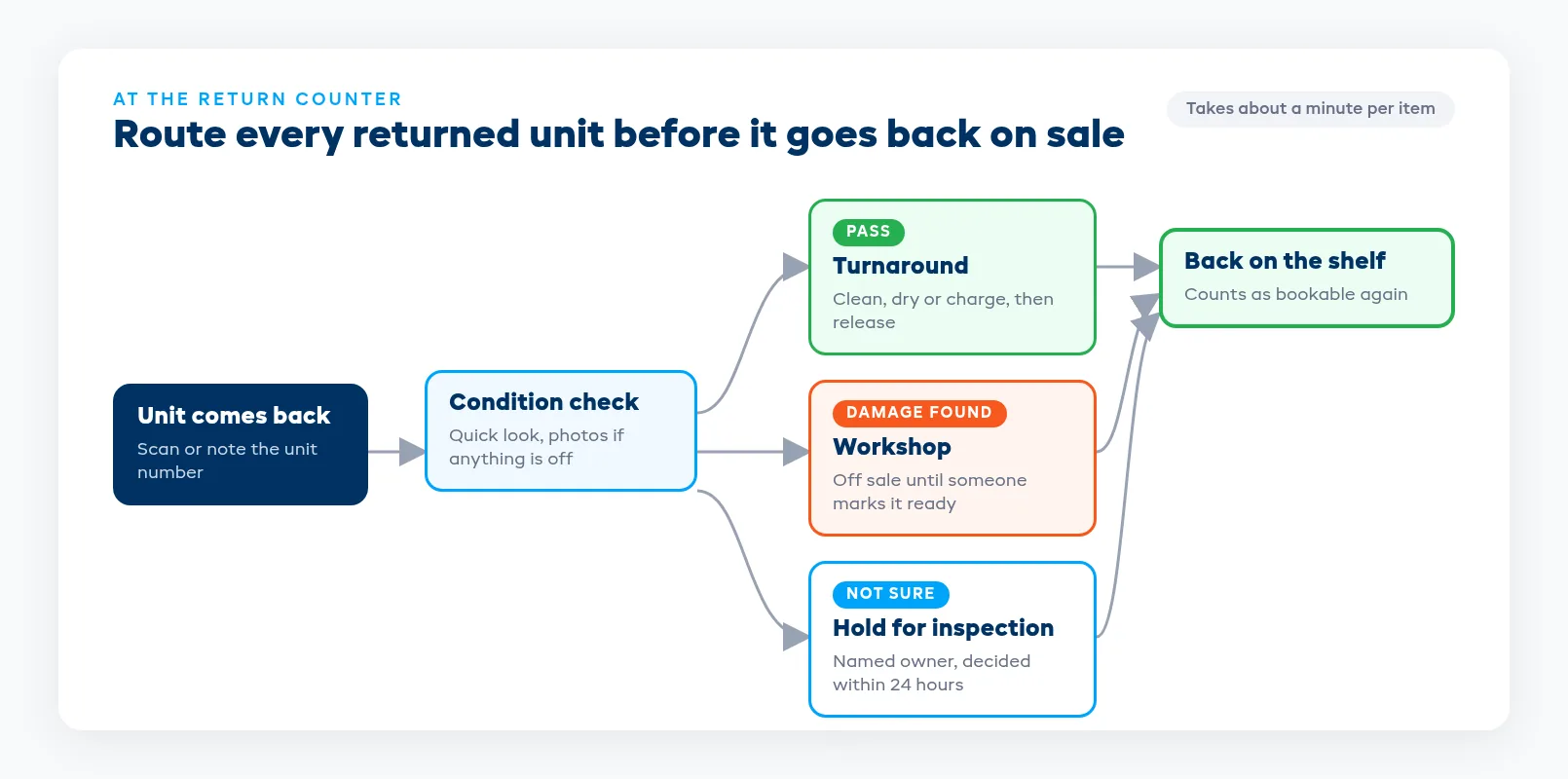
Keep the check fast. A quick look over the item, a photo of anything new, and one of three outcomes:
- It passes. It goes into turnaround (clean, dry, charge) and comes back on sale when that's done.
- There's damage. It goes to the workshop and stays off sale until someone marks it ready.
- You're not sure. It goes on hold for inspection, with a named person who decides within 24 hours.
Staff in a hurry tend to put questionable units back on the rack when the only other choice is a workshop ticket. A one-day inspection hold gives them a quick, honest option, and someone still has to make the call by tomorrow.
In EquipDash, staff can log a condition report when an item comes back, flag new damage, and attach photos. If they find damage, they can send the item straight to the workshop, and items in the workshop are automatically removed from available stock until they're marked ready.
Give every hold an owner and an end date
Holds are easy to forget because setting one feels like good service. Six bikes held for a hotel that never confirms are six bikes you didn't rent on a sunny weekend.
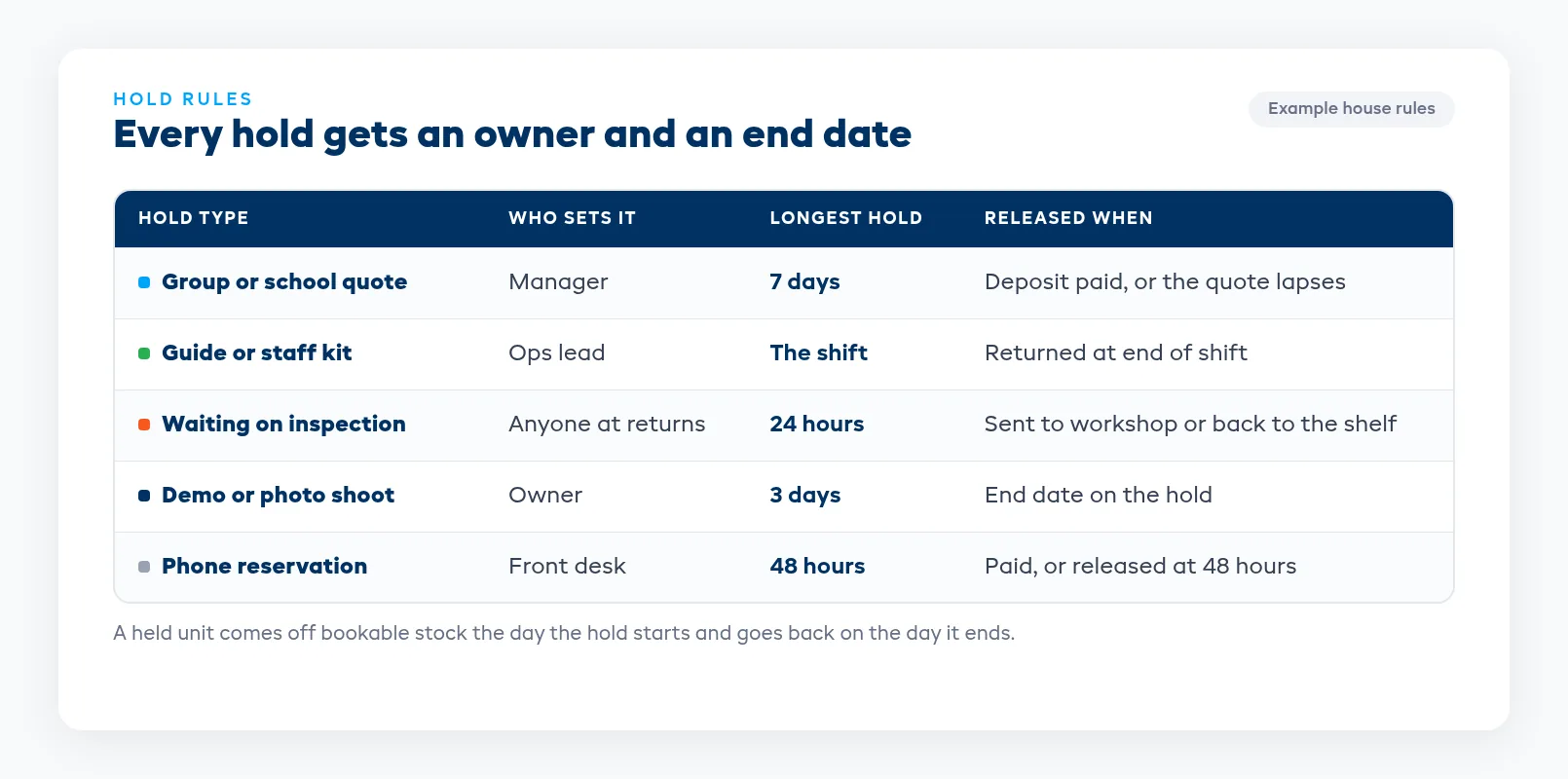
Write down a few house rules and stick to them:
- Every hold has a name on it. Whoever set it is responsible for confirming or releasing it.
- Every hold has an end date. A school quote might get a week. A phone reservation might get 48 hours. A guide's kit is held for the shift.
- Holds live in the system, not on the whiteboard. The simplest way is to enter them as a booking or reservation, so the units come off availability the moment the hold is set.
- Expired holds go back on sale the same day. Don't wait for someone to notice.
For closing a whole product line for a stretch of dates, such as a maintenance week or the off-season, EquipDash lets you set blackout dates per product, so it disappears from sale for those dates without anyone deleting stock.
Count turnaround as blocked time
Turnaround is blocked stock with a clock on it. A wetsuit that comes back at 4 PM isn't ready at 4:15. An e-bike that came in with a flat battery needs hours, not minutes.
Look at how long each product type really takes to turn around, then build that gap in. Whether your system adds a buffer between bookings for you or you block the time by hand, the point is that the next customer can't book the unit until it will actually be ready. Base it on what happens on a busy day, not a quiet one.
This is also where planned maintenance belongs. EquipDash lets you set service intervals per product by time or by number of rentals, for example a tune-up every 50 rentals, and alerts your team when an item is due. Planned work you can see coming is easier to schedule around than a breakdown on a Saturday morning.
Check the shelf against the system every week
Even with good habits, the shelf and the system will slip apart. A weekly count catches it before customers do.
Pick a quiet hour, scan or count every unit, and compare it with what the system says. Look for units marked available that are actually in the workshop, holds past their end date, and items nobody has seen in a while. Fix each one on the spot, then ask why it happened. If the same kind of miss keeps showing up, the fix is usually at the return counter or in how holds get set.
Keep a running tally of how many units were blocked each week and why. If the workshop is always holding a big share of your e-bikes, look at your maintenance schedule or your replacement plan before you blame the booking page.
How EquipDash keeps availability honest
Here's what EquipDash does for this today, based on its inventory management features:
- Live stock counts. Stock changes as bookings are created, modified, and returned. When a customer books online, that unit is unavailable at the counter and on any connected OTA channel.
- Workshop status. Items sent to the workshop are marked unavailable automatically, and they go back into bookable stock when you mark them ready.
- Condition reports on return, with photos and a direct route to the workshop when damage is found.
- Stock by location. Each location has its own counts, with a combined total across all of them.
- Low-stock alerts with a threshold you set per product.
- Barcode scanning for check-in, check-out, and stock counts.
You can also ask Dash AI which items are due for maintenance or what's rented out right now, which is handy before a weekly count.
FAQ
What is blocked stock in a rental business?
Blocked stock is any unit you own that can't be rented right now, even though it's physically in your shop. The usual reasons are repairs, damage that hasn't been checked, holds for a group or a staff member, turnaround time like drying or charging, and units sitting at another location. If your booking system counts these as available, customers can book gear you can't hand over.
Should damaged rental equipment still show as available?
No. As soon as damage is found, the unit should come off sale. Send it to the workshop if it clearly needs work, or put it on a short inspection hold if you're not sure. It should only go back on sale once someone has checked it and marked it ready.
How long should a rental hold last?
Set the length by hold type and write it down. A group or school quote might get a week, a phone reservation 48 hours, and a guide's kit the length of the shift. What matters most is that every hold has an end date and a person responsible for it, so expired holds go back on sale the same day.
How often should we count our rental inventory?
A quick count of every unit once a week works for most shops, plus a full count before and after your busy season. Compare the count with your system, fix anything that doesn't match, and note why it happened so you can fix the habit behind it.
Does EquipDash take workshop items out of availability automatically?
Yes. When an item is marked for the workshop in EquipDash, it's removed from available stock so it can't be booked. When the repair is done and you mark it ready, it goes back into bookable stock right away.
in one place