Upsell Strategies for Rental Businesses: What to Offer, When, and How to Price It
Most upsell advice is written for hotels and holiday homes: late checkout, welcome baskets, a bottle of something on arrival. A rental counter works differently. Your customer is already holding the bike, the board or the kayak, and the add-on that sells is the one that fixes a problem they'll hit in the next few hours.
This guide covers upsell strategies for rental businesses in the order you'd actually set them up. Pick the right add-ons, charge them by the right unit, put stock behind the physical ones, then offer them at the moments people say yes.
It's written for equipment, outdoor and activity rentals: bikes, e-bikes, kayaks, paddleboards, skis, camping gear and guided add-ons.
What counts as an upsell at a rental shop
People use three words for this, and they mean different things at the counter.
- Upsell: a better version of what they came for. The e-bike instead of the hybrid, the touring kayak instead of the sit-on-top.
- Add-on (or cross-sell): something extra next to the main rental. A lock, a dry bag, a child seat, a photo package.
- Required charge: something every rental carries, like a cleaning charge per wetsuit. It isn't an upsell, and it belongs in the price people see before they pay.
For most shops, add-ons are the place to start. They're easy to say yes to because the big decision is already made.
Offer the add-ons that fix a problem on the day
The best add-on answers a question the customer hasn't asked yet.
Where do I leave the bike while we eat? Will my phone survive the river? What about the four-year-old?
A short list by rental type:
- Bikes and e-bikes: locks, lights for late returns, child seats and trailers, panniers, phone mounts.
- Kayaks and paddleboards: dry bags, phone pouches, wetsuits in shoulder season, a roof rack or car-top kit.
- Ski and snowboard: helmets, goggles, a locker, a lesson for first-timers.
- Camping: a stove and fuel, a cooler, camp chairs, a lantern.
- Guided activities: photos, a hotel pickup, a longer session.
Start with two or three per rental, not ten. A list of twelve checkboxes reads like a menu at an airport, and people skip all of it.
Put the better version next to the standard one
A true upsell is a better version of the same rental: the e-bike over the hybrid, performance skis over the basic package, the touring kayak over the sit-on-top. List it on the same page as the standard option with both prices showing, so the difference is a number, not a sales pitch.
At pickup, staff can mention it once. If the hills on your route are steep, the e-bike sells itself the moment someone looks at the map.
Never sell what the law or common sense says is included
Some gear isn't an add-on at all. On a kayak or canoe, the Coast Guard requires at least one wearable life jacket on board for each person, so the basic jacket comes with the boat. A more comfortable jacket can be the upsell.
Helmets work the same way for kids. In California, riders under 18 must wear a fitted helmet, and that includes a child in a bike seat or a towed trailer. If you rent the child seat, the kid's helmet should come with it.

Charging separately for safety gear also costs you at the counter. The customer who declines the helmet becomes your problem an hour later.
Price add-ons by the right unit
An add-on priced the wrong way either looks greedy or loses money. A bike light charged once on a week-long rental is too cheap. A photo package charged per day makes no sense at all.
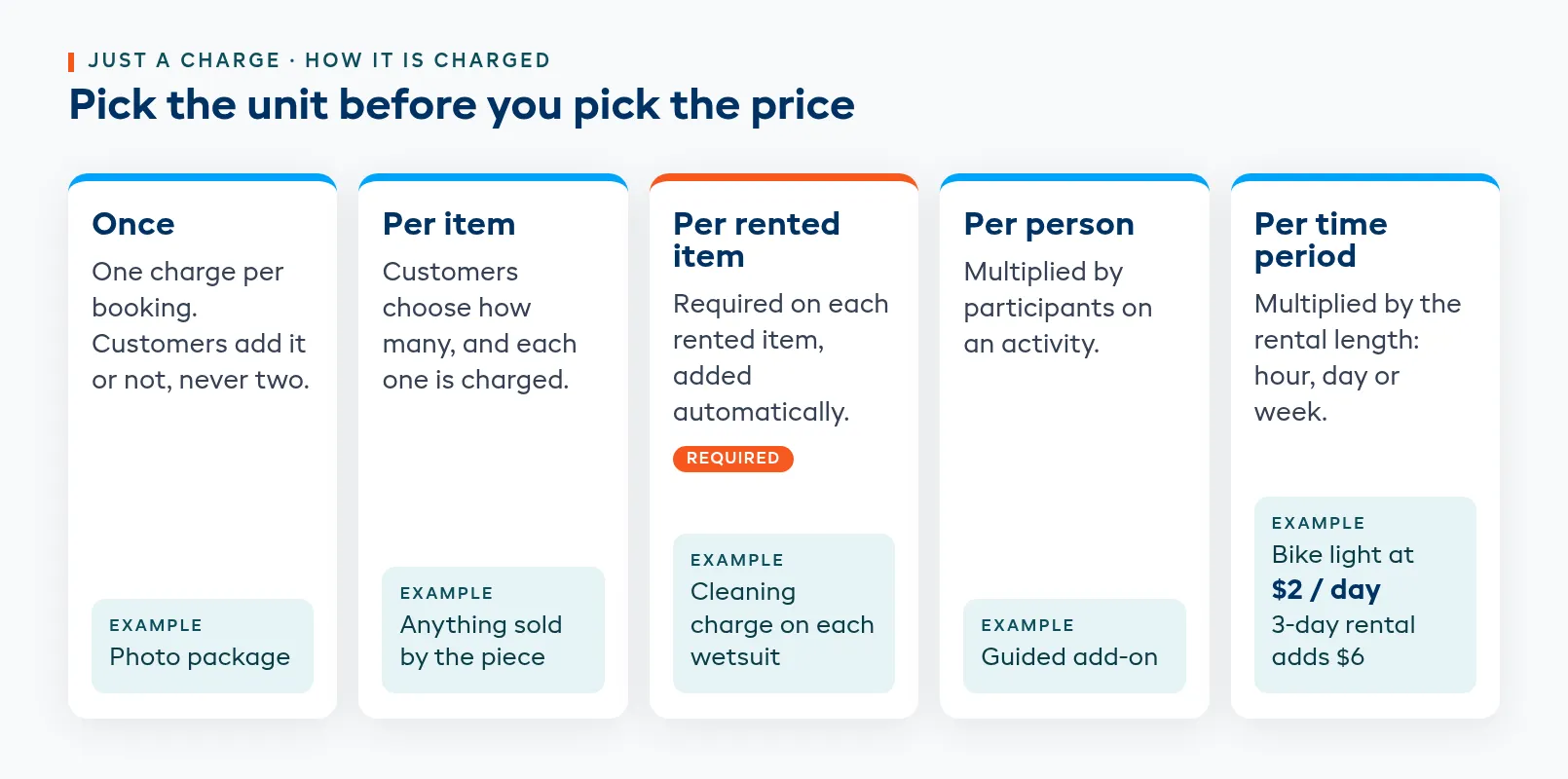
In EquipDash, each extra is set up under Rentals > Extras with Add Extra, and you choose one of three kinds: Just a charge, Rental item or Store product. A "Just a charge" extra is then charged one of five ways:
- Once: one charge per booking. Customers add it or don't, never two. Good for a photo package.
- Per item: customers choose how many, and each one is charged.
- Per rented item: a required charge on every rented item, added automatically. Use it for a cleaning charge on each wetsuit. Customers can't remove it.
- Per person: multiplied by participants on an activity.
- Per time period: multiplied by the rental length, by hour, day or week. Say a bike light is $2 / day. On a 3-day rental it adds $6 without anyone at the counter doing the math.
How much to charge
Price add-ons against the booking, not against what the item cost you. Checkfront's own guidance for operators is to keep add-ons between 10 and 25 percent of the base price, and that's a sensible ceiling. Above it, the add-on starts to feel like a second purchase.
Our rental pricing strategy guide covers how to set the base rates those add-ons sit on top of.
For a pickup or delivery that costs more the further away it is, EquipDash has Set when booked. The customer adds it online, sees "Price confirmed after booking", and you type the amount on the booking afterward. The customer then gets an email with the new total.
Put stock behind every physical add-on
Rental upsells usually go wrong at this step. You sell six child seats for Saturday and own four, and two families find out at pickup.
If you'd hand it back across the counter, track it as stock. In EquipDash, a Rental item extra is backed by one of your rental products and shares its stock, so two helmets added to a booking reserve two helmets for those dates. A Store product extra, like a spare tube or a water bottle, takes stock off the store product it's linked to.
The checks come along too. A rental extra brings the linked product's booking checklists with it, so staff see the helmet check at pickup and return under the extra's name.
For gear you never rent alone, there's Only available as this add-on. Turn it on and the item disappears from your rentals list, store and booking page, and can only be booked as that extra. All of this lives in the product catalog.
Offer it at the moments people say yes
Timing matters as much as the item. There are four moments where an add-on fits, and none of them needs a pushy staff script.
On the booking page, next to the rental
The add-on that solves today's problem goes right next to the item. On the EquipDash booking page, extras appear under the quantity selector with their prices, and the running total updates as they're added. On activities, they appear after the customer picks a time and participants.
A single extra can be offered on rentals and activities at once, so the helmet shows on your bike rentals and your guided bike rides. Bundles pick up extras automatically when an extra is offered on any item inside them. That's all part of online booking.
In the cart and the confirmation email
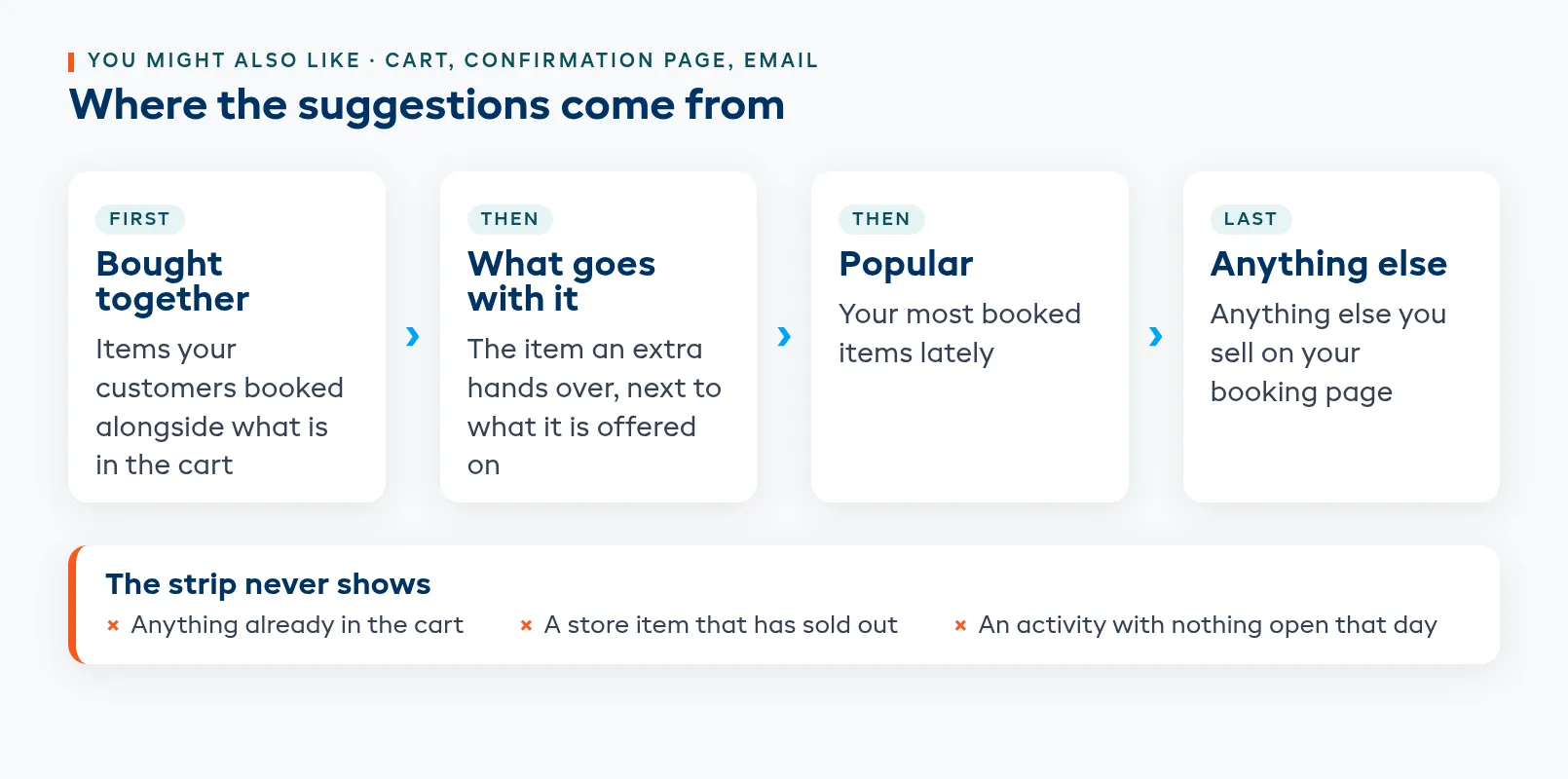
The second moment is after they've chosen but before they've paid, and again once they have. EquipDash shows a short You might also like strip in the cart, on the confirmation page and in the confirmation email, with nothing to set up.
It picks items from your own bookings, in this order: what customers booked together, what goes with it, what's popular lately, then anything else you sell online. It never suggests something already in the cart, a sold-out store item or an activity with nothing open on the chosen day.
Compare that with Booqable, where you pick recommended products by hand for each product page. Hand-picking works for a small catalog. Past a few dozen items, letting your own booking history choose saves the upkeep.
To keep one item out of the strip, turn off Suggest in the cart on that item's Details tab. To switch the whole strip off, it's Suggest items in the cart under Settings > Booking widget > Widget settings > Selling & conversion.
At the counter
At the counter, the customer can pick up the dry bag and feel it, which makes the add-on an easy question. The POS shows the same extras with the same quantity controls, and required charges follow the rental quantity on their own. If you run a busy counter, our guide to rental POS systems covers the rest of that setup.
Halfway through the rental
The most overlooked upsell is more time. A family having a good day on the lake wants another two hours, and that sale needs no new customer and no new gear.
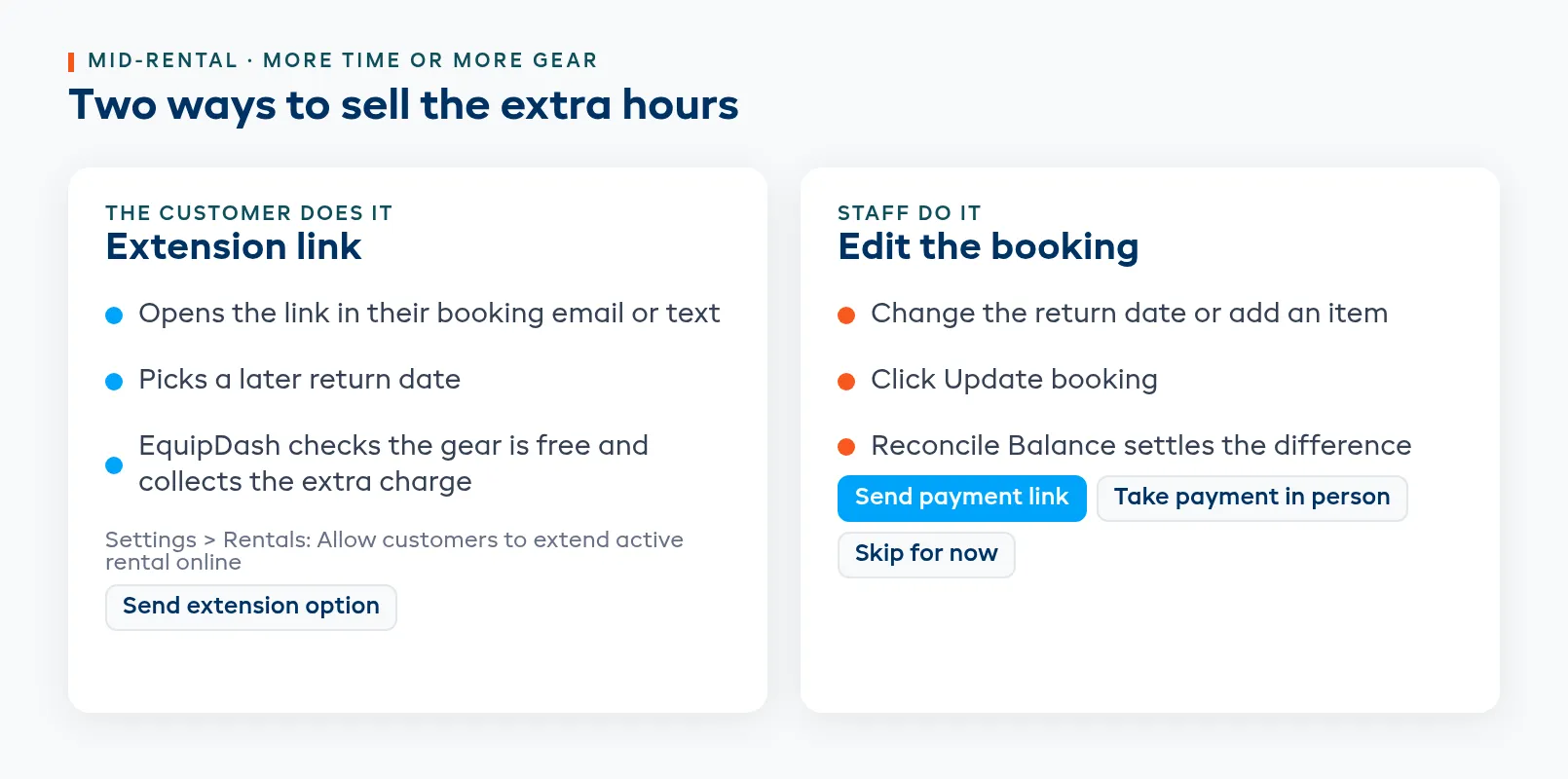
Turn on Allow customers to extend active rental online under Settings > Rentals, and customers can push out their own return date from the link in their booking emails and texts. EquipDash checks the gear is free and collects the extra charge. When someone calls instead, the Send extension option button on the booking sends them that link.
Staff can also edit a picked-up booking to add an item, like a leash or a second day. If the total goes up, the Reconcile Balance step offers Send payment link, Take payment in person or Skip for now.
Sell packages, and show the saving in dollars
A bundle is an upsell that doesn't feel like one. "Bike, helmet, lock and a guided morning ride" is easier to say yes to than four separate decisions.
In EquipDash, bundles live under Rentals > Bundles and can mix rentals, activities and store items. With Add up the items (with deals) pricing, each item gets a Bundle discount %, and customers see the saving in dollars, never the percentage. Bundles come with the $69/mo plan and up, as shown on the pricing page.

Keep each bundle to one clear use, like a family beach day or a first-timer ski package. If you run charters, our post on charter add-on revenue covers catering and photo packages in more depth. Campgrounds can borrow from our guide to glamping gear rentals as add-on revenue.
What not to do
A few habits cost more than they earn.
- Pre-ticked boxes. In the EU, the Consumer Rights Directive (Article 22) says an extra payment needs the customer's express consent, and a pre-ticked default doesn't count. Even where it's legal, customers notice and remember.
- Surprise required charges. In the US, the FTC's fee rule covers live-event tickets and short-term lodging, not rentals. Follow its logic anyway and put required charges in the price people see before they pay.
- "No thanks" on every add-on. Making people decline four things to reach checkout slows them down. Optional means optional.
- Add-ons with no stock behind them. Promising a child seat you don't have loses the booking and the review.
Bring back the carts that left
Some customers pick the bike, add the lock, then get distracted. If they entered an email, EquipDash saves the cart to them and can send one recovery email with what they were booking and a link straight back.
Switch it on under Promotions > Campaigns > Automations, on the Abandoned-cart recovery card. A cart counts as abandoned after about 2 hours without a booking, and the email sends once, never as a series. Our guide to marketing strategies for tour operators shows where this fits with the rest of your email.
Check what's working each month
Upsells are worth keeping only if people actually take them. Once a month, look at which extras made it onto bookings and which never did.
- Retire an extra nobody adds. Seasonal ones can be switched off with the Active toggle instead of deleted.
- Watch the Widget report under Reports. It shows four steps (looked at your widget, added to cart, started checkout, booked), and a steep drop between cart and checkout can mean too many choices on the way in.
- Change one thing at a time, like the price of one extra or where it appears, and give it a few weeks before you judge it.
If you rent equipment and want all of this in one place, see how EquipDash works for equipment rental providers.
FAQ
What are good upsells for a rental business?
Add-ons that fix a problem the customer will hit that day: locks and lights for bikes, dry bags and wetsuits for paddling, helmets and goggles for skiing, and photos or a pickup for guided activities. Start with two or three per rental.
How much should rental add-ons cost?
Price them against the booking, not your cost. A common ceiling is 10 to 25 percent of the base price. Charge time-based gear per day, a photo package once, and a guided add-on per person.
Should safety gear be an upsell?
No. Gear the law requires, like a wearable life jacket for each person on a kayak, or a helmet for a child under 18 in California, should come with the rental. A more comfortable or premium version can be the upsell.
When should a rental shop offer add-ons?
Next to the item on the booking page, in the cart and confirmation email, at the counter, and mid-rental as an extension. Keep each moment to one or two offers.
Can customers extend a rental online in EquipDash?
Yes. Turn on Allow customers to extend active rental online under Settings > Rentals. Customers extend from the link in their booking emails and texts, and EquipDash checks the gear is free and collects the extra charge.
in one place