ATV & UTV Booking Software: Guided Tours and Self-Drive Rentals
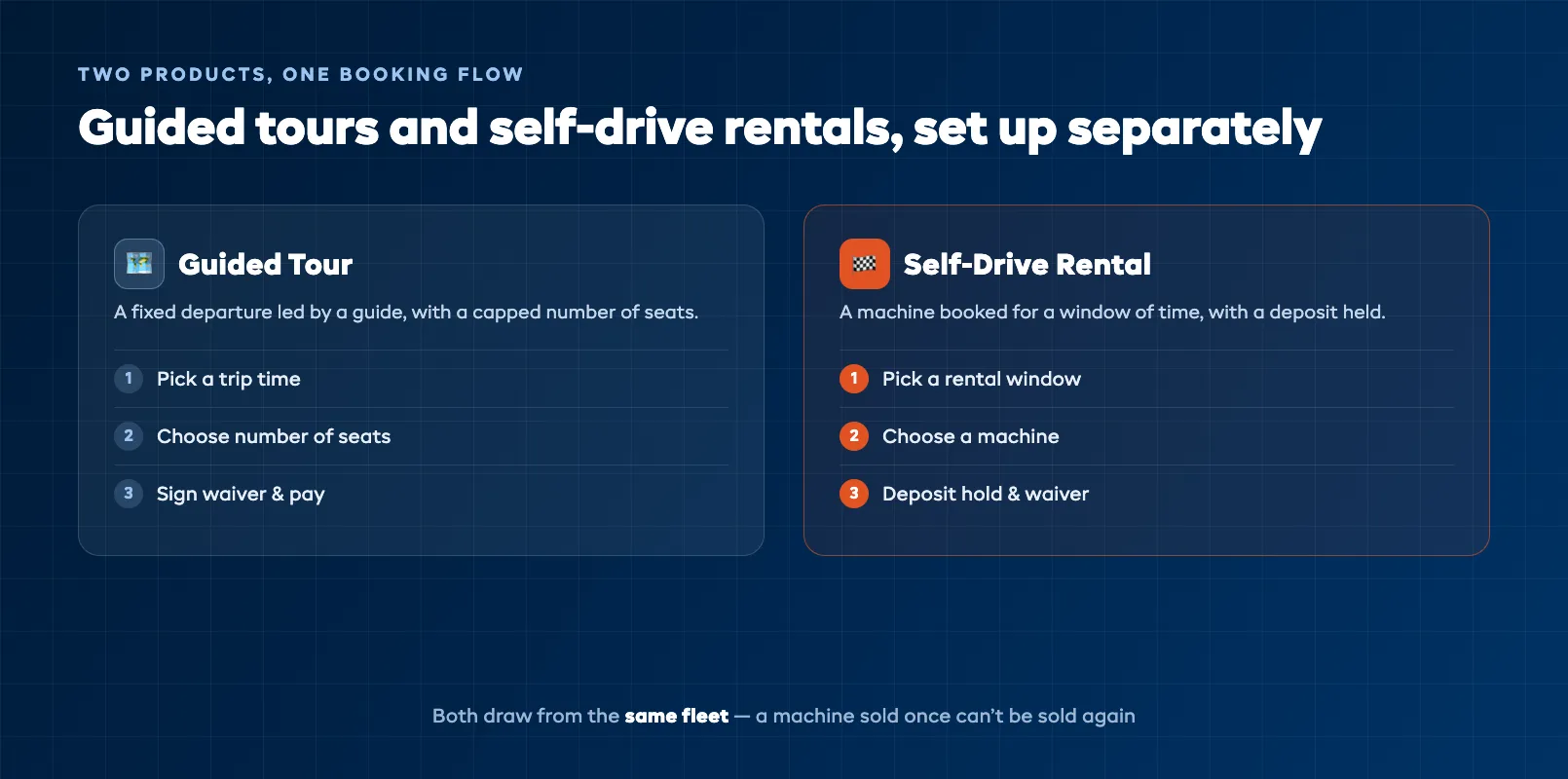
Most ATV and UTV operators are running two businesses out of the same yard. One is a guided-tour business: fixed trip times, a lead guide, a capped number of seats, and a route. The other is a self-drive rental business: a guest turns up, takes a machine for a window of time, and rides. Both pull from the same fleet of expensive machines, and both come with waivers, deposits, and a phone that never stops ringing. Try to run all of it on a paper diary and a spreadsheet and something eventually collapses — usually a double-booked machine on your busiest Saturday, or a group standing in the yard filling in waivers on a clipboard while the trip time slips away.
The job of ATV and UTV booking software is to take that whole operation and put it in one place. Not a generic calendar bolted onto a website, but a system that understands the way an off-road business actually works: guided trips and self-drive rentals sold side by side, drawn from one shared fleet, with the paperwork and the payments handled before the guest ever reaches the trailhead. This guide walks through what that software has to do, and what to look for when you choose it. If a term here is new, the ATV and off-road glossary covers the vocabulary, and the full operating playbook lives in the guide on how to run an ATV and off-road tour business.
What ATV and UTV booking software actually has to do
A lot of booking tools were built for a single, simple product — one class, one seat, one time slot. An off-road operation is messier than that, and the software has to keep up. At a minimum it needs to sell more than one kind of product, share a limited fleet across all of them, collect signed waivers, take deposits and damage holds, and send the reminders that stop guests forgetting they booked. Miss any one of those and you are back to patching the gap with a spreadsheet.
The reason this matters more for off-road than for, say, a walking tour is your inventory. Your machines are few, costly, and shared. Every guided trip and every rental is competing for the same quads and side-by-sides, so the software cannot treat availability as unlimited. It has to know exactly which machine is where, at every hour of the day, or the whole thing falls apart at the point where it hurts most — in front of a paying guest. Get the foundation right and the office runs itself while you are out on the trail.
One calendar for guided tours and self-drive rentals
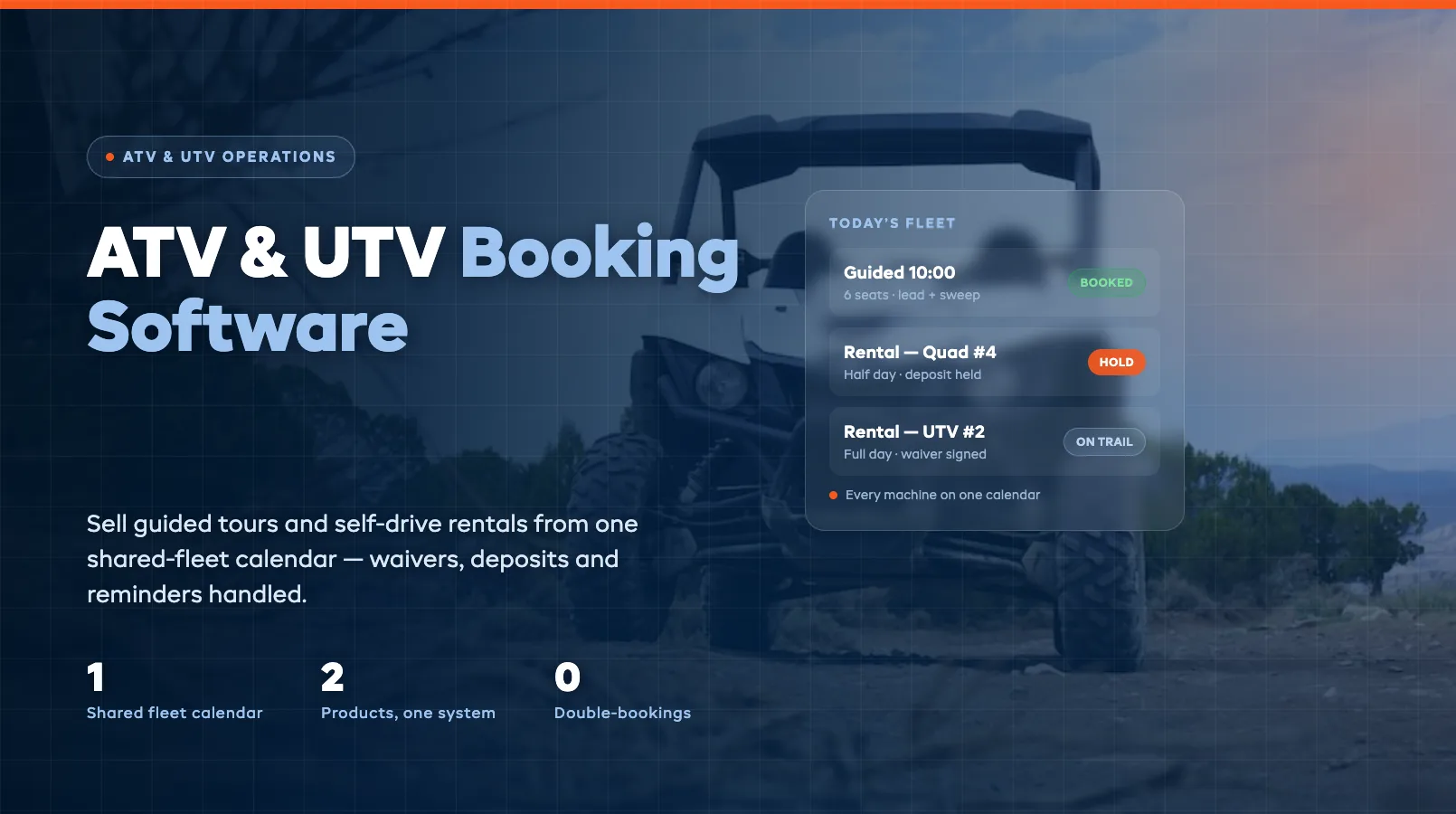
The single most important feature for an ATV operator is a shared-fleet calendar. Every machine you own is loaded as its own bookable unit, and every product you sell — guided morning tour, guided sunset tour, half-day rental, full-day rental — draws from that same pool. When a side-by-side is assigned to the 10am guided trip, it disappears from the machines available to rent at 10am. It cannot be sold twice, because there is only one of it and the calendar knows that.
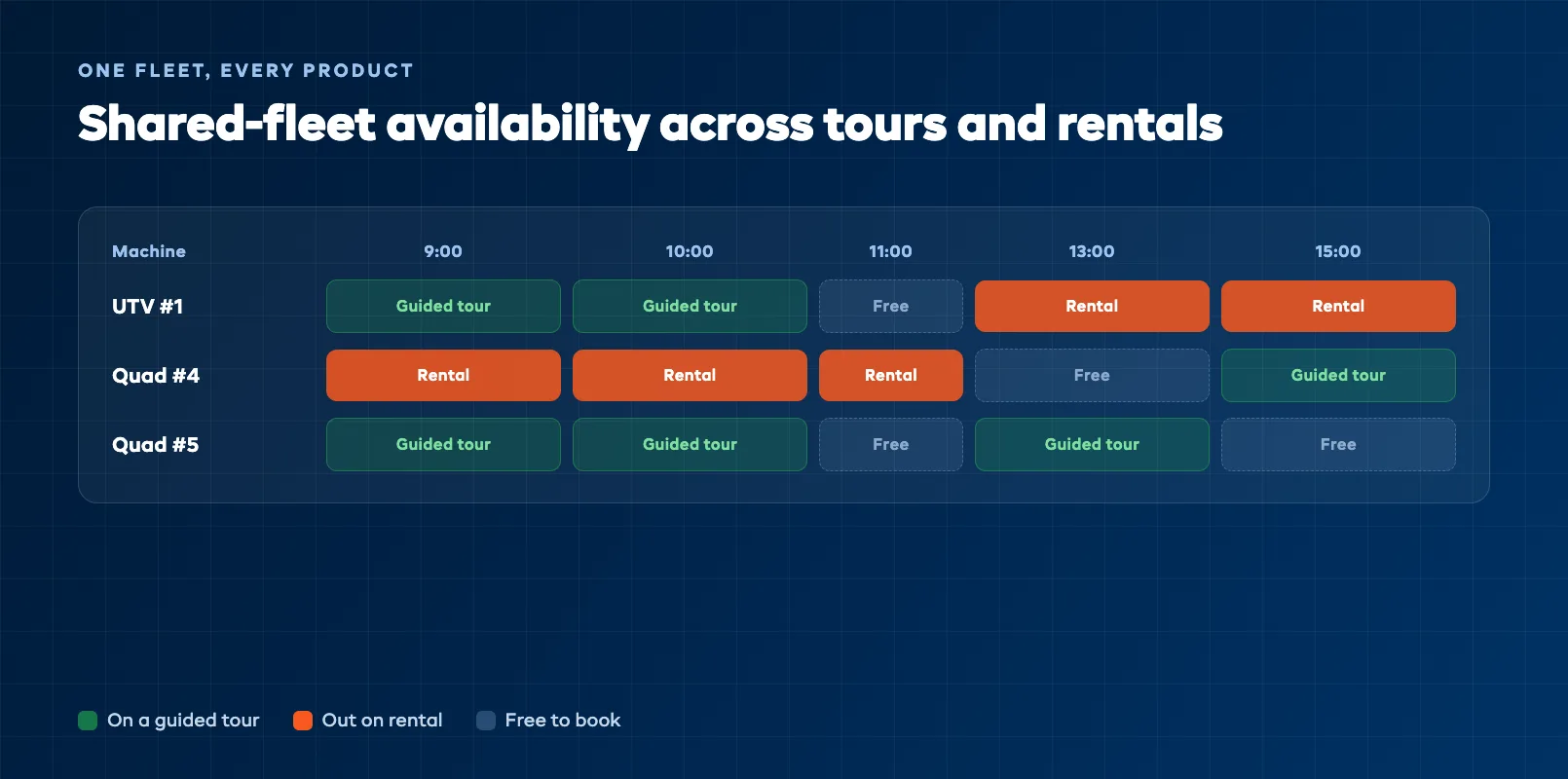
This is where operators running two separate systems — a tour calendar in one place, a rental sheet in another — get burned. The two do not talk to each other, so a machine booked on a tour still shows as free to rent, and you find out only when both parties arrive. A proper system makes the fleet the single source of truth. You can still price and present guided tours and rentals completely differently, with their own durations, deposits, and rules, but underneath they compete honestly for the same machines. That is the difference between confidently selling out a busy day and quietly overselling it.
Setting up each product separately also lets you match the booking flow to reality. A guided tour is a fixed departure with a seat count and a guide attached. A rental is a machine booked for a block of time, often with an hourly or daily rate and a deposit. Force both into one rigid template and you will spend your days working around the software. Let each be what it is, and guests get a booking page that makes sense.
Waivers and safety briefings inside the booking flow
Every rider needs a signed waiver, and every off-road operator knows the pain of collecting them at the yard — a group of eight standing around clipboards, one person's pen has run out, two of them are minors and need a guardian, and the trip is now running ten minutes late. Booking software fixes this by moving the paperwork online, before anyone arrives.
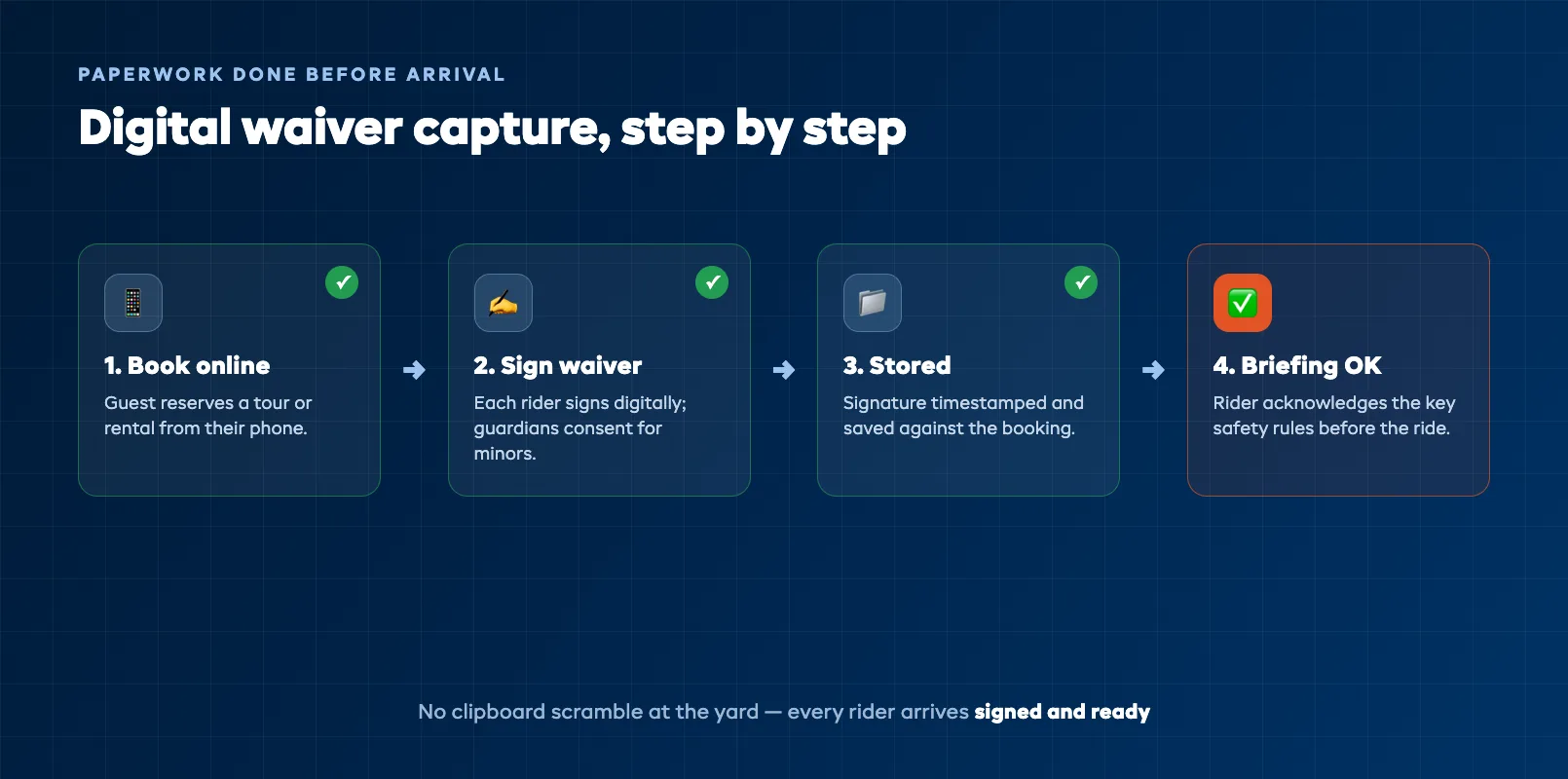
The waiver becomes part of checkout, or a link that goes to every rider in the group after they book. Each person signs on their own phone, guardians complete consent for minors, and everything is timestamped and stored against the booking. When the group arrives, the paperwork is already done — you can spend that time on the briefing and the machines instead of the admin. Just as importantly, if there is ever an incident, you have a clean, dated record of exactly who signed what, rather than a folder of paper you hope is complete.
You can fold the pre-ride safety briefing into the same flow. A short set of rules the guest acknowledges at booking — stay behind the lead guide, no passengers on single-rider quads, wear the helmet — does not replace the in-person briefing, but it means every rider has seen the key points before they arrive and cannot claim otherwise. The waiver protects you legally; the acknowledged briefing shows a rider knew the rules going in.
Deposits, damage holds, and getting paid
Self-drive rentals carry more risk than guided tours because the guest is alone with an expensive machine. The way you protect against damage is a clear, disclosed deposit, and this is another place software earns its keep. Instead of taking a cash deposit at the counter or inventing a number when a machine comes back muddy and scratched, the system takes a deposit or places a pre-authorized hold on the card at the time of booking.
The guest sees the deposit and the damage policy up front, so nothing is a surprise. You record the machine's condition before it goes out and again when it comes back — photos or a quick inspection checklist attached to the booking — and if there is genuine damage, you charge against a published schedule tied to real repair costs rather than a figure plucked from the air. Because the deposit, the condition record, and the payment all sit against the same booking, you have the full evidence trail in one place if a charge is ever queried. Most disputes come from surprise, not from the money, and a system that shows the guest exactly what they agreed to takes the heat out of almost all of them.
Taking payment online also changes your cash flow and your no-show rate. A guest who has paid a deposit, or the full amount, is far more likely to turn up than one who booked with nothing on the line. For guided tours especially, requiring payment or a deposit at booking is one of the simplest ways to protect a fixed-departure trip from empty seats.
Automated reminders and rider communication
No-shows and unprepared guests are a quiet tax on every off-road operation. Someone forgets they booked, another turns up in sandals with no idea they needed closed shoes and long trousers, a third arrives at the wrong trailhead. Booking software handles this with automatic messages that go out without you lifting a finger.
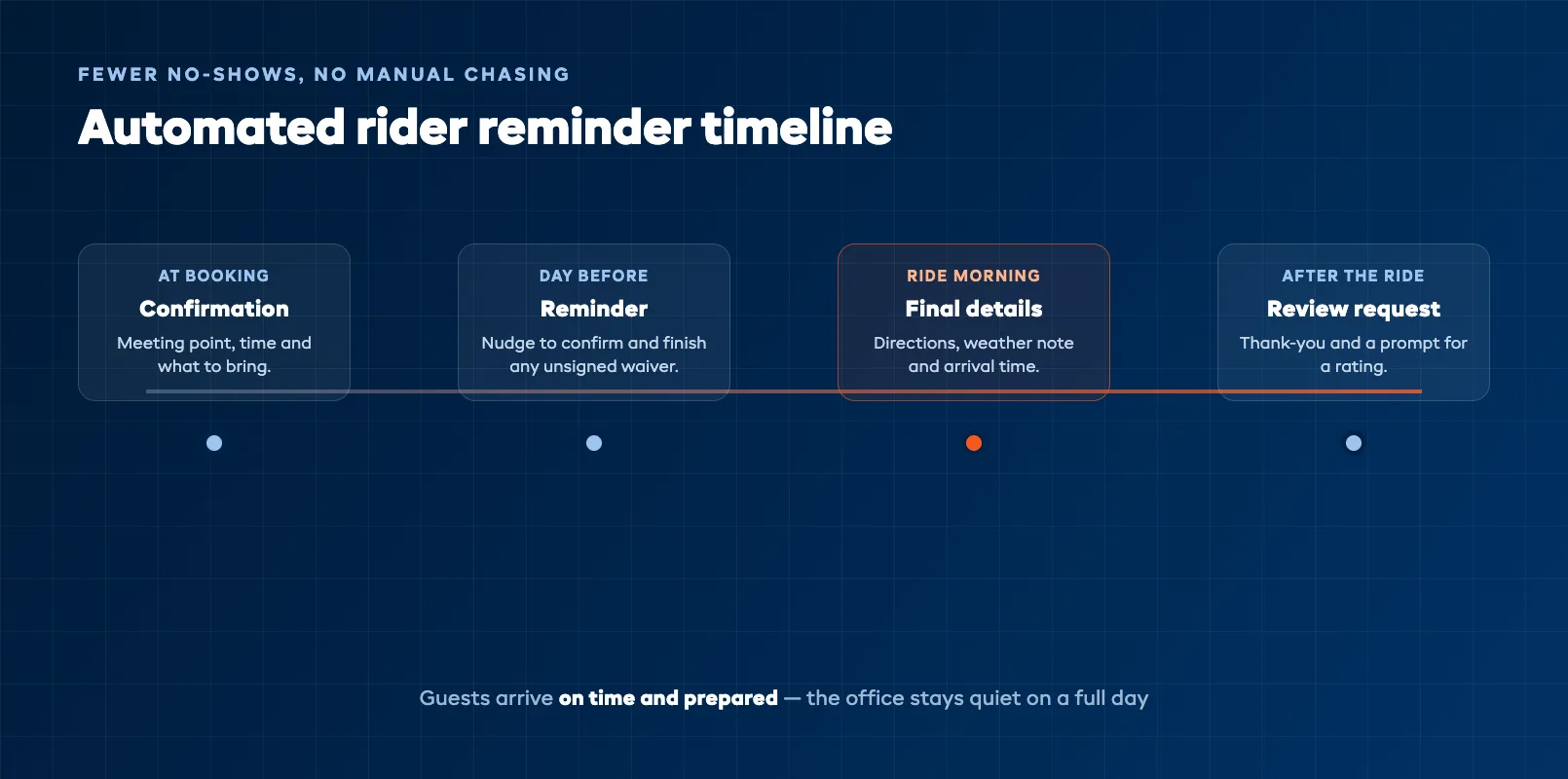
A confirmation goes out the moment they book, with the meeting point, the time, and what to bring. A reminder lands the day before, and another on the morning of the ride. If a rider still has an unsigned waiver, the system chases it for you. The result is guests who arrive on time, dressed for the trail, with the paperwork done — and far fewer of the gaps and delays that eat into a busy day. Some systems let a Dash Agent handle the routine chasing and answer common questions automatically, so the office stays quiet even when the calendar is full.
Good communication also does not stop when the ride ends. A thank-you message with a request for a review, sent automatically the evening after the trip, is how off-road operators build the stream of ratings that wins the next booking. The software that took the reservation is the natural place to close that loop.
What to look for when choosing a system
Not every booking tool is built for a fleet of machines shared across tours and rentals, so start your search with the off-road essentials rather than the flashy extras. Does it handle a shared fleet across both guided tours and self-drive rentals? Does it capture waivers and briefings? Does it manage deposits and damage holds? If a system stumbles on any of those three, it was not built for a business like yours, however polished the rest looks.
Then check the everyday basics. The booking page has to work cleanly on a phone, because that is where most guests will find you. It needs online payment, automatic reminders, and reporting that shows utilization and revenue by machine and by product — the numbers that tell you which quads are earning and which are sitting idle. Confirm it handles group bookings with per-rider detail, since off-road trips are rarely one person. And make sure it bends with your season: you want to open and close availability and adjust pricing for peak months without a fight. The right system is the one that matches how your yard actually runs, not the one with the longest feature list.
Putting it together
An ATV and UTV business is really a fleet business wearing a tour-operator hat, and the software that runs it has to respect that. The core is a shared-fleet calendar that sells guided tours and self-drive rentals from the same pool of machines without ever double-booking one. Around that sit the things that keep an off-road operation safe and paid: waivers and briefings collected before arrival, deposits and damage holds handled automatically, and reminders that fill the calendar and cut no-shows. Get those working together in one system and the office stops being the bottleneck — you can spend your day on the trail, not on the phone. When you are ready to see how the whole operation fits together, the ATV and off-road operator hub pulls every piece into one view.
FAQ
What is ATV rental booking software?
ATV rental booking software is a system that lets an off-road operator take bookings for both guided tours and self-drive rentals, manage a fleet of machines on one calendar, and handle the paperwork and payments around each ride. Instead of a paper diary and a spreadsheet, you get an online booking page where guests pick a trip time or a rental window, sign a waiver, pay a deposit, and receive automatic reminders. Behind the scenes it stops two bookings landing on the same machine, keeps a record of who signed what, and shows you which machines are earning and which are sitting idle.
Can one system handle both guided tours and self-drive rentals?
Yes, and that is the main reason to use a proper booking system rather than a generic calendar. Guided tours and self-drive rentals are different products with different rules — a tour is a fixed-time trip led by a guide with a capped number of seats, while a rental is a machine booked for a window of time. The right software lets you set each up separately with its own times, durations, prices, and requirements, but draws them from the same shared fleet so a quad out on a guided ride cannot also be rented at the same moment.
How does booking software stop double-booking a machine?
It treats every ATV and UTV as its own bookable unit on a shared calendar. When a machine is assigned to a guided trip at 10am, the software automatically removes it from the pool available to rent or tour at the same time, so it can never be sold twice. This matters far more for off-road operators than for a typical activity business, because your inventory is a limited number of expensive machines shared across every product you sell. The calendar becomes the single source of truth, and every product pulls from it.
Can guests sign waivers online before they arrive?
Yes, and moving waivers online is one of the biggest time savers for an off-road operation. Booking software can require a signed digital waiver as part of checkout, or send a link that every rider in the group completes before they turn up, including guardian consent for any minors. That means no clipboard scramble at the yard while a group waits, no missing signatures discovered after an incident, and a timestamped record stored against the booking. You can fold a safety-briefing acknowledgement into the same flow so guests confirm the key rules before they ride.
How are deposits and damage handled in booking software?
For self-drive rentals in particular, the software can take a deposit or place a pre-authorized hold on the guest's card at the time of booking, so you are not chasing money or improvising a number when a machine comes back scratched. You disclose the deposit and the damage policy up front, record the machine's condition before and after the ride against the booking, and charge against a clear schedule if there is real damage. Because everything is attached to the booking, you have the evidence and the paperwork in one place if a charge is ever questioned.
What should I look for when choosing ATV booking software?
Start with the off-road specifics: does it handle a shared fleet of machines across both guided tours and self-drive rentals, does it capture waivers and briefings, and does it manage deposits and damage holds. Then look at the everyday essentials — a booking page that works on a phone, online payment, automatic reminders to cut no-shows, and reporting that shows utilization and revenue by machine and by product. Check that it handles group bookings with per-rider detail, and make sure it lets you open and close availability and adjust pricing for your peak season. The best system matches how your yard actually operates.
in one place