Clothing Rental Software: Why Availability Has to Work at Size Level
A groom calls on a Tuesday. He needs six navy suits for an October Saturday, and his groomsmen run from a 38R to a 46L. Your sheet says you own 14 navy suits, so the answer sounds like yes.
Then you walk the rail. Two of the 42Rs are out that weekend, one is at the cleaners, and you only ever bought one 46L. Clothing rental software earns its keep on that call, because it has to answer for each size on each date, not for the style.
This guide is for small formalwear, costume and dress rental shops choosing software. It covers why style-level stock fails, how to set sizes up, what the customer sees on your booking page, and how to keep cleaning and repairs off the shelf.
Why style-level stock breaks in clothing rental
A bike shop can rent "a medium hybrid" and swap one for another. A suit doesn't work like that. The customer chooses a size first and a style second, and a 42R is no use to someone who needs a 40R.
So a count by style lies to you. Fourteen navy suits free on a date means nothing until you know how many of each size are free.
Your size runs are lopsided on purpose
Most shops buy deep in the middle sizes and thin at the ends. That's sensible buying, but it means the end sizes sell out first and the style count still looks healthy.
The gap shows up on the busiest dates. A wedding party books six jackets at once, and the one 46L you own decides whether you take the whole order.
Sizes also differ between labels
Size numbers aren't fixed. ASTM's body measurement tables for misses sizes 00 to 20 are a baseline that makers adjust for fabric, ease, styling and fit. So a size 8 gown from one label can fit differently from a size 8 from another.
Menswear has separate ASTM tables for men's sizes 34 to 60 regular, and a 42R jacket from one maker can still sit differently from another maker's 42R.
That's why each size needs its own fit note in your system, in your words. "Size 8" alone isn't enough for a customer booking from their phone.
Set each size up as its own bookable item
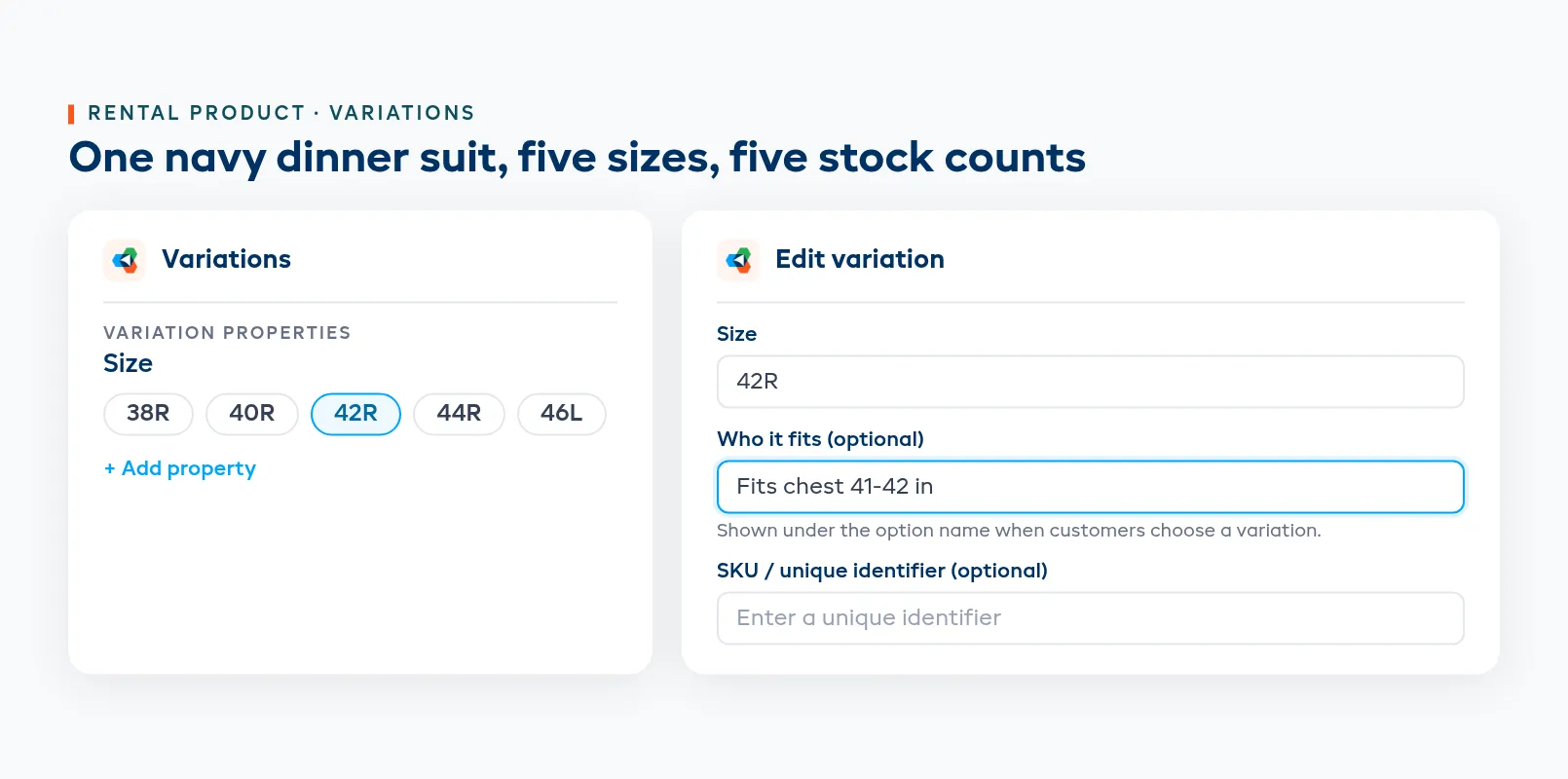
In EquipDash, a garment is a rental product with Variations. Under Variation properties, use Add property to add Size, then one value per size, for example 38R, 40R, 42R, 44R and 46L for a navy dinner suit.
Each size then carries its own stock. Booking a 42R takes a 42R off the shelf for those dates and leaves the 40Rs alone.
Every size has a Who it fits (optional) field. Whatever you type, say "Fits chest 41-42 in" for the 42R, is shown under the size name when customers choose. Copy it from your own fitting chart, since sizes run differently by label.
Gowns, suits and costumes need different tracking
A one-off gown or a period costume is a single item. Track it on its own, with its own Inventory ID and barcode from Generate barcodes, so you know which piece went out and which came back.
Suits in a common size are different. Five identical 40R jackets can be counted as a group in that size, which is faster at the counter.
Jackets and trousers are separate sizes
A groomsman who wears a 42R jacket might need a 34 or a 38 waist. If the suit is one product sized by jacket only, the trousers become a phone call.
We'd set jackets and trousers up as two products, each with its own sizes. A variation can combine two properties, but five jacket sizes times six waists is 30 variations to keep counts on, and most shops pair them at the fitting anyway.
If plus sizes or long fits cost you more to buy, you can price them separately. The pricing tab lets you Set a different price for some variations, and every size without its own price uses the base price.
What the customer sees on your booking page
The customer picks their dates first. Then each size gets its own row with a live count for those dates.
Say the groom from earlier opens your navy dinner suit jacket on his phone. The 38R shows 2 in stock, the 42R 1 in stock and the 44R 3 in stock. The 40R and 46L show Not available, and with your waitlist turned on, each gets a Notify Me button.
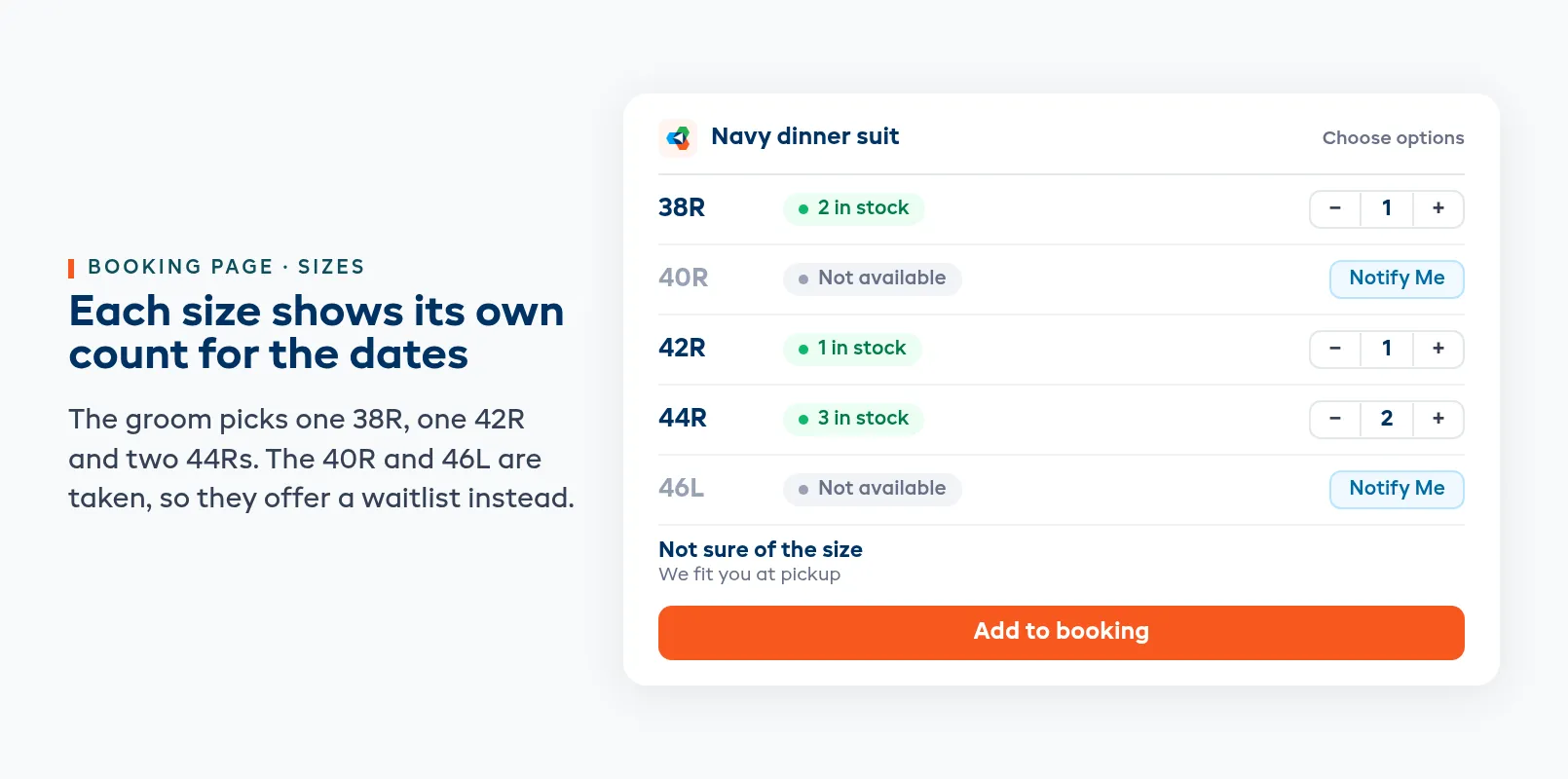
Each row has its own quantity stepper, and it stops at what's free. He picks one 38R, one 42R and two 44Rs, and one Add to booking press adds them all. The 40R and 46L are the two calls you make today.
If only one size is free for those dates, the page picks a quantity of 1 for it already. The customer just checks the dates and adds it.
When the customer doesn't know their size
Plenty of renters don't know their jacket size, and guessing online leads to swaps at pickup. When your sizes have a Who it fits line, the booking page adds a Not sure of the size row with We fit you at pickup.
Choose it, and the booking holds one unit from the size with the most free stock for those dates. The cart and the confirmation email say Size: we fit you at pickup, so staff know to measure before the garment leaves.

We'd still ask for chest, waist and height in your booking questions. A held size gets you through the counter visit, but it isn't a fitting.
Our guide to real-time availability on your booking page covers how live counts work across a whole catalog.
Count cleaning as downtime, not stock
A suit that came back Sunday isn't ready for Monday. It needs cleaning, pressing and a check of the hems, buttons and lining.
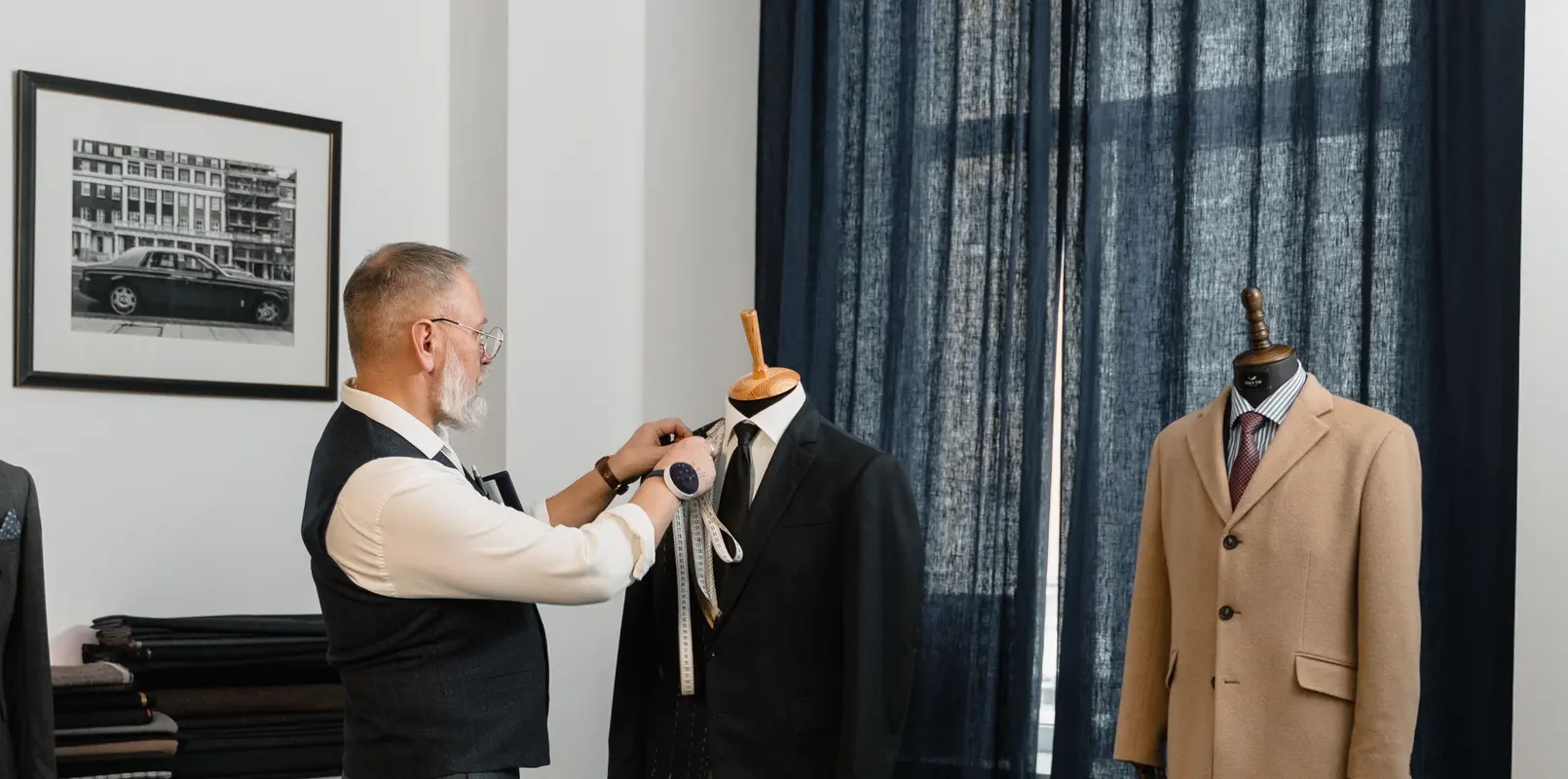
The care label decides how long that takes. Under the FTC's care labeling rule, a garment's label has to give a washing or a drycleaning instruction, and a dry-clean-only gown can't be rushed through a home wash.
Buffer time for the turnaround you can predict
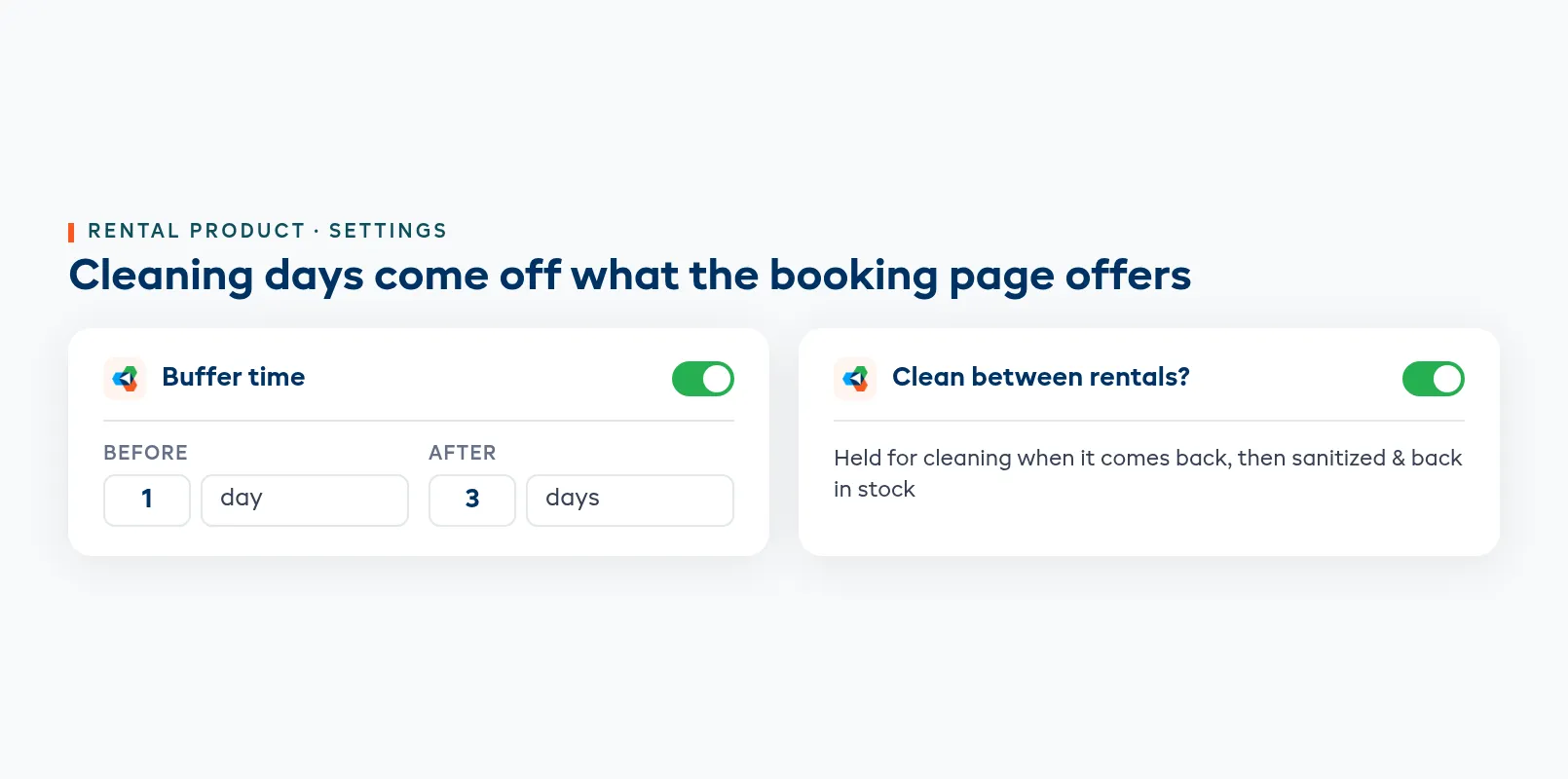
Turn on Buffer time for a product, and every booking blocks extra time before and after it. Without it, the product shows Not set - back-to-back bookings allowed.
For a gown, try 1 day before for steaming and bagging and 3 days after for the cleaners. Those days come off what the booking page offers, size by size.
Clean between rentals for the turnaround you can't
Some garments come back in worse shape than others. Tick Clean between rentals? on the product, and each returned unit is Held for cleaning when it comes back, then sanitized & back in stock.
That unit drops out of stock onto a cleaning job and can't be booked until its cleaning checklist is done. Nobody has to remember which jacket went to the cleaners on Monday.
Repairs and damage
A torn lining or a broken zip takes one unit out of a size. Use Send to workshop, and that unit is off the booking page until it's fixed.
The size count drops by one, and the other units in that size keep renting. Our post on blocked stock that still counts as stock explains why held items have to come off the count.
Peak dates: wedding season and Halloween
Formalwear demand bunches on a few Saturdays. The Knot's 2025 study found October was the most popular wedding month, at 17%, and 84% of couples used a vendor for the groom's attire.
Costume shops get it all in one hit. The NRF expected US shoppers to spend $2 billion on adult costumes for Halloween 2025.
On those dates, size-level stock decides how many orders you can take. Three things help:
- Put a whole wedding party on one booking, one row per size, so you see the gaps before you say yes.
- Check your end sizes first. If the 46L is gone, tell the groom now, not at pickup.
- Read your waitlist entries for each sold-out size. They tell you what to buy before next season.
For the Halloween rush itself, our Halloween weekend rental ops guide covers staffing and turnarounds. Wedding shops booking a year out can read wedding rental software for one date booked months ahead.
What to ask before you buy clothing rental software
Most rental software can count items. Ask these questions in the demo, with one of your own garments:
- Does availability check each size for the customer's dates, or only the style?
- Can each size carry a fit note the customer sees while booking?
- Does a garment at the cleaners come off the count until it's back?
- Can a one-off gown be tracked as a single item with its own ID?
- What happens when a customer doesn't know their size?
- Can a customer join a waitlist for one sold-out size?
If an answer is "you can keep that in a note," expect double bookings on your busiest Saturday. Our guide to preventing double bookings shows where they usually start.
The EquipDash clothing rental software page shows how sizes, cleaning and the booking page fit together. Plans and prices are on the EquipDash pricing page.
Clothing rental software checklist
- Each garment set up with a Size variation, one value per size you own.
- A Who it fits line on every size, copied from your own fitting chart.
- One-off gowns and costumes tracked as single items with their own ID.
- Buffer time set for each product's cleaning turnaround.
- Clean between rentals? ticked for anything that must be cleaned before it rents again.
- Damaged units sent to the workshop so they drop off the count.
FAQ
What is clothing rental software?
It's the system a garment rental shop runs on. It tracks what you own in each size, what's booked for which dates, and what's at the cleaners, and it shows customers which sizes are free when they book.
Does EquipDash track each size separately?
Yes. Each size is a variation of the product with its own stock, so booking a 42R never takes a 40R off the shelf. The booking page shows a count for each size on the dates the customer picks.
How do I stop a garment at the cleaners from being booked?
Set Buffer time on the product to block days after each rental, or tick Clean between rentals? so each returned unit is held on a cleaning job until it's done. Either way the booking page stops offering it.
What if a customer doesn't know their size?
If your sizes have a Who it fits line, the booking page offers We fit you at pickup. The booking holds a unit from the size with the most free stock, and staff confirm the real size at the counter.
Can customers join a waitlist for a sold-out size?
Yes, once you turn on the waitlist. A size that isn't available for the chosen dates shows a Notify Me button, and the customer leaves a name and email to hear if it frees up.
in one place