How to Choose Plant Hire Software: A Buyer's Checklist for Yards
Say a customer rings at 6:45 AM. The mini digger you dropped yesterday has a split hydraulic hose, and he has a crew standing around waiting. Is there another one free today? Which yard has it? And does the paperwork on the first machine say what condition it left in? Plant hire software earns its fee on mornings like that, so test it on mornings like that.
Plant hire is the UK, Ireland, Australia and New Zealand term. In the US the same business is heavy equipment or contractor equipment rental, and the software question is identical. This checklist is for a yard that rents excavators, telehandlers, skid steers, dumpers, plate compactors, breakers and the attachments that go with them. It's written to be used in a demo, with a pen. Each section has what to ask, what a good answer looks like, and what should make you walk away.
What a yard needs that a shop doesn't
A bike shop and a plant yard both rent things by the day. After that they diverge.
Your machines don't come back to a counter. They sit on a site 40 miles away until the job ends or the customer forgets to call. A hired excavator is worth many times what a bike is, so a deposit mistake costs real money. Servicing runs on engine hours as much as on the calendar. A bucket, a breaker or a set of forks goes missing between sites, and nobody notices until the next customer asks for it.
A yard with a handful of machines and one person on the phone can live without half of this list. It gets expensive to ignore once two people hand machines out, or once machines live in more than one yard.
Every machine gets its own record
A pooled count works for traffic cones. It doesn't work for a 3-tonne digger, because that machine has a serial number, a service history and a damage history of its own.
Ask the vendor to open one machine and show you its code and status (available, reserved, out on hire, in the workshop), every hire it has been on, the condition notes and photos from each pickup and return, its service history, and what you paid for it. That last one lets you see when it has paid itself off.
Open it on a phone, standing in a customer's yard. If the answer to any of this is "put the serial number in the description box," keep looking. And ask how you load 150 machines. Pasting your spreadsheet beats typing.
Track the machines one by one and pool the small stuff. Cones and fuel cans don't need a history. For where to draw the line, see our guide to inventory tracking.
Attachments that don't wander off
A digger without its bucket isn't a hire. A breaker that arrives without the right pins means a phone call and a second delivery. Software that lists "mini excavator" as one line leaves you to remember the rest.
The test is the return screen. When the machine comes back, does it list the attachments so staff tick them off one at a time? And if the customer returns the machine but not the bucket, can you see exactly what is still out?
In EquipDash, you list the attachments on the machine under Contents, and staff tick them at pickup and return. A part can be a name on that list, or you can link it to its own rental product. If you track each bucket or breaker as an item, it gets its own code, status, service history and condition reports, and booking the machine holds that unit for the same dates. Switch on "Part of this product only" if you never hire the attachment on its own. Leave a missing bucket unticked at return; the booking records it as missing and, if you set a replacement cost, offers to put it on the bill. You can also offer an attachment as a rental extra, which is likewise a real product with its own stock. Run this test in the trial with one machine and one linked attachment.
Service that takes the machine off the calendar
This is the one that hurts most when it's missing. A machine that is due its service gets booked anyway, goes out, and breaks on site.
You want four things. Sending a machine to the workshop takes it off sale until the work is done. A damaged return lands in the repair queue with the notes the staff member wrote. A service interval is set once on the product, so the job opens itself. And a failed critical check on the job keeps the machine in the workshop.
Then ask what the interval runs on, because many yards service on engine hours. EquipDash sets a service interval in days or in rentals (the number of hires), one or the other. It doesn't have an engine-hours interval, so a yard that services every set number of hours would record the hour reading as a number on the pickup and return checklist and keep an eye on it there. That works, but it's a manual step. If hours-based alerts are a hard requirement, put the question to every vendor on your list, EquipDash included, and make them show it.
Our maintenance tracking guide covers service schedules by equipment type.
Pickup and return checks with numbers and photos
Plant disputes are rarely about whether a machine came back. They're about the state it came back in, and whether the hour meter says what the customer says it says.
A tick box isn't enough. The checklist for a machine should take a number (the meter reading), a note and a photo, and a critical item that fails should stop the machine leaving the yard.
EquipDash booking checklists can ask for a pass or fail, a typed value, a number or a photo. Pre-departure checks must be finished before an item is picked up. Items in a "Before return" section must be finished before the booking is returned. A critical failure blocks the handover. Staff with the right permission can override a block, but they have to type a reason, and the booking keeps a red "Checklist overridden" badge.
Run it in the trial like this: a pickup with an hour reading and three photos, then a return with a split hose. Then ask where those photos will be in a year, on the booking or on the machine. You want both. Our guide to check-in and check-out systems goes deeper on the counter side.
Quotes and deposits sized to the machine
A yard sells on the phone. The customer asks for a price for a week, and the job is won or lost in the next hour. So time it: phone call to signed agreement.
The quote should come from live availability, with real prices, so the quote total is the booking total. The customer should be able to sign and accept it online, and one click should turn it into a booking. EquipDash quotes work that way. See the quotes feature.
A signed quote is not the same thing as the hire contract. After the customer accepts, EquipDash can send a rental agreement, which is the contract for the booking. You write the wording once under Settings, then Rentals, then Agreement. It's emailed when the booking is made (a quote waits until the customer accepts), they sign from the email, the confirmation page, or on your screen at the counter, and the signed PDF is kept on the booking. A waiver is a different document, signed by each person about themselves. On the Pro plan you can also attach extra agreements to the quote itself, which have to be signed before the customer can accept.
Deposits are where yards get hurt. One figure for every customer and every machine means you either scare off the small job or underprotect the big one. In EquipDash you set a shop-wide deposit and then add rules, for example a higher figure when the hire runs 28 days or more, or when the customer is outside your state. A single high-value machine can carry its own deposit per unit. The highest matching amount wins, and each booking keeps a note of which rule set its deposit. Try setting one up for the most expensive machine you own.
Delivery and collection
If you deliver, delivery is part of the price. It can't be a text message afterwards. Ask whether the software works out the charge from the site address, and whether you can price by distance, flat fee or zone.
In EquipDash, delivery is a Pro plan feature. You can charge per mile or kilometer with a free radius and a minimum charge, a flat fee, or by zone (by distance or by postcode). You can also set the furthest distance you'll go, a minimum order and how much notice you need. Rentals, bundles and store items in one booking become one journey and one charge. Distances come from open map data, so they're close rather than exact, and postcode zones are the exact option.
Once a delivery is booked, open Bookings, then Fulfillment, and choose the Deliveries tab. You get that day's drop-offs and collections, late stops first, then in time order, with the address, the phone number and what's going on the van. You can open directions, print or download a run sheet, and tick a stop done. The same list is in the EquipDash app, so the person driving has it on their phone. It doesn't plan the route or tell a low-loader which machine goes on first. If you need a dispatch board that builds a load order, put that on your must-test list.
Invoices and your accountant
Accounting is the part that bites months later. Ask whether bookings become invoices in your accounting system without retyping, whether payments and refunds are recorded against them, and whether deposits are kept apart from income.
EquipDash connects to Xero, QuickBooks and MYOB. With Xero, bookings arrive as invoices, payments and refunds are recorded against them within seconds, customers become contacts, and each Stripe payout is built to match your bank feed. Ask your accountant to look at one sample invoice before you commit.
Account customers are the other half. Ask the vendor to repeat a past booking for a returning customer in the demo, and time it.
Reports that tell you what to buy
Utilization shows which machines earn their keep and which ones sit at the back of the yard costing you finance. Say you own four mini diggers that are out about 40% of the available days, and two 5-tonne machines that are out 90%. That tells you what to buy next. A report that only shows revenue can't.
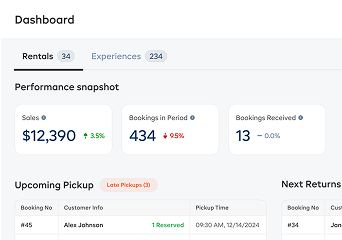
Ask for utilization by machine and period, average hire length, and cost against earnings for each machine. EquipDash's Rentals report shows utilization rate and average rental length, and its Return on investment report sets what each item cost beside what it has earned. See reports and insights. Counter staff don't need to see revenue, so check who can.
What to rank last
A slick customer-facing booking page matters less for a yard that sells by phone. Rank it below everything above. So does a long integrations list. Ask which ones you will use in the first month and ignore the rest.
A one-machine test before you pay
Feature lists all look alike. Take one machine through its whole life instead, in a demo or in a free trial with a few of your real machines loaded.
- Add three machines with their real serial numbers. How long did it take?
- Add a bucket and a breaker as attachments to one of them.
- Quote a week's hire. Does the quote total match the booking total?
- Set a deposit rule for hires of 28 days or more. Does the deposit change when you extend a booking past that?
- Run a pickup with an hour-meter reading and photos.
- Return it with a damaged hose and one attachment missing. Is the machine off sale straight away?
- Try to book that machine for tomorrow. It should refuse.
- Pass the workshop checklist and put it back on sale. Is the full history on the machine?
- Open the utilization and cost reports. Would you buy a machine on the strength of them?
- Ask how you get your data out if you leave.
If the vendor can't show steps 5 to 8 working together, you're looking at a booking calendar, not plant hire software.
What EquipDash covers and what it doesn't
EquipDash is self-serve rental and booking software for equipment rental and tour operators. It isn't a plant-hire-only system, and the table says where that shows.
| What a yard needs | In EquipDash |
|---|---|
| Record per machine | Yes. Tracked items have their own code, status, booking history, condition reports and activity log. Inventory management is on Growth and Pro. |
| Attachments with the machine | List them as contents on the machine. A linked, item-tracked attachment has its own code, status and history, and is held when the machine is booked. Staff tick parts at pickup and return; missing ones stay on the booking. |
| Service that blocks the machine | The Workshop (Growth and Pro) takes it off sale. Intervals are by days or by rentals, not engine hours. |
| Checks with numbers and photos | Yes, with critical items that block handover. |
| Quotes and deposits | Signable quotes, a rental agreement on the booking, optional quote agreements (Pro), and deposit rules. |
| Delivery | Pro plan. Per mile, flat fee or zone. A Deliveries run sheet in Fulfillment and the app. No route planning or load order. |
| Accounting | Xero, QuickBooks and MYOB integrations. |
Plans are Starter at $29/mo, Growth at $69/mo and Pro at $149/mo billed monthly, or from $23/mo billed annually. There is also a booking fee of 2%, 1.5% or 1% on direct online bookings. Every plan comes with a 21-day free trial and no credit card, so you can run the test above on your own machines. Check the pricing page for which plan each feature sits on, because a yard that wants delivery will need Pro.
Self-serve means First booking in about 10 minutes. If you would rather hand over your list of machines, concierge setup means taking bookings within 2 business days, and moving your full history usually takes up to a week. For the wider view of rental platforms, see our complete guide to choosing rental software and the longer equipment rental management software guide.
FAQ
What is plant hire software?
Plant hire software runs a yard that rents out machinery. It holds a record for each machine, takes bookings and quotes against live availability, tracks service and damage, handles deposits and delivery, and passes invoices to your accounting system. "Plant hire" is the UK, Irish, Australian and New Zealand term. In the US it is heavy equipment rental.
What should plant hire software track for each machine?
At minimum, a serial number or your own code, current status, every booking, condition notes and photos from each pickup and return, and service history. Add the purchase cost, so you can see when each machine has paid for itself.
Can EquipDash set service intervals by engine hours?
No. EquipDash sets a service interval in days or in rentals (the number of hires), not on engine hours. A yard that services by hours can take the hour reading as a number on the pickup and return checklist and watch it there, but the alert itself won't run on hours.
Does EquipDash handle delivery for hired machines?
Yes, on the Pro plan. It adds a delivery charge to the booking by distance, flat fee or zone, using the customer's address. Bookings, then Fulfillment, has a Deliveries tab for that day's drop-offs and collections, with a run sheet and the same list in the EquipDash app. It doesn't plan driver routes or load order.
How do deposits work for high-value machines in EquipDash?
You set a shop-wide deposit, then add rules, for example a higher deposit when the hire runs at least 28 days or the customer is outside your state. A single high-value item can also carry its own deposit per unit. The highest matching amount wins, and each booking records which rule set its deposit.
Does EquipDash have a hire agreement besides the quote signature?
Yes. The customer can sign and accept a quote online, and on the Pro plan you can attach extra agreements that have to be signed before they accept. Separately, a rental agreement is the contract for the booking. You write the wording once. It's emailed when the booking is made (a quote waits until it's accepted), the customer signs from the email, the confirmation page or at the counter, and the signed PDF is kept on the booking. A waiver is a different document, signed by each person about themselves.
How long does it take to start taking bookings?
Self-serve is First booking in about 10 minutes. Concierge setup means taking bookings within 2 business days. Moving your full history usually takes up to a week.
in one place