Equipment Rental Management Software: What to Look For in 2026
A customer is at the counter for kayak 14, and nobody can say whether the cracked seat from Thursday's return was ever fixed. Your booking calendar says the kayak is free, because a booking calendar only knows dates. Equipment rental management software is the part that knows where the kayak is, what shape it's in and whether it should go out at all.
Most equipment rental software is sold on the booking page. This guide is about the work after the booking, which covers tracking each unit, check-out and return, maintenance, reports, staff, locations and cost. It ends with a test you can run in any demo or free trial.
If you're earlier in the search, our complete guide to choosing rental software covers platform types and onboarding, and what a rental management system is covers the basics. This post assumes you already know you need one and want to tell a real management tool from a booking tool with a few extra tabs.
Booking tool or management software: where the line is
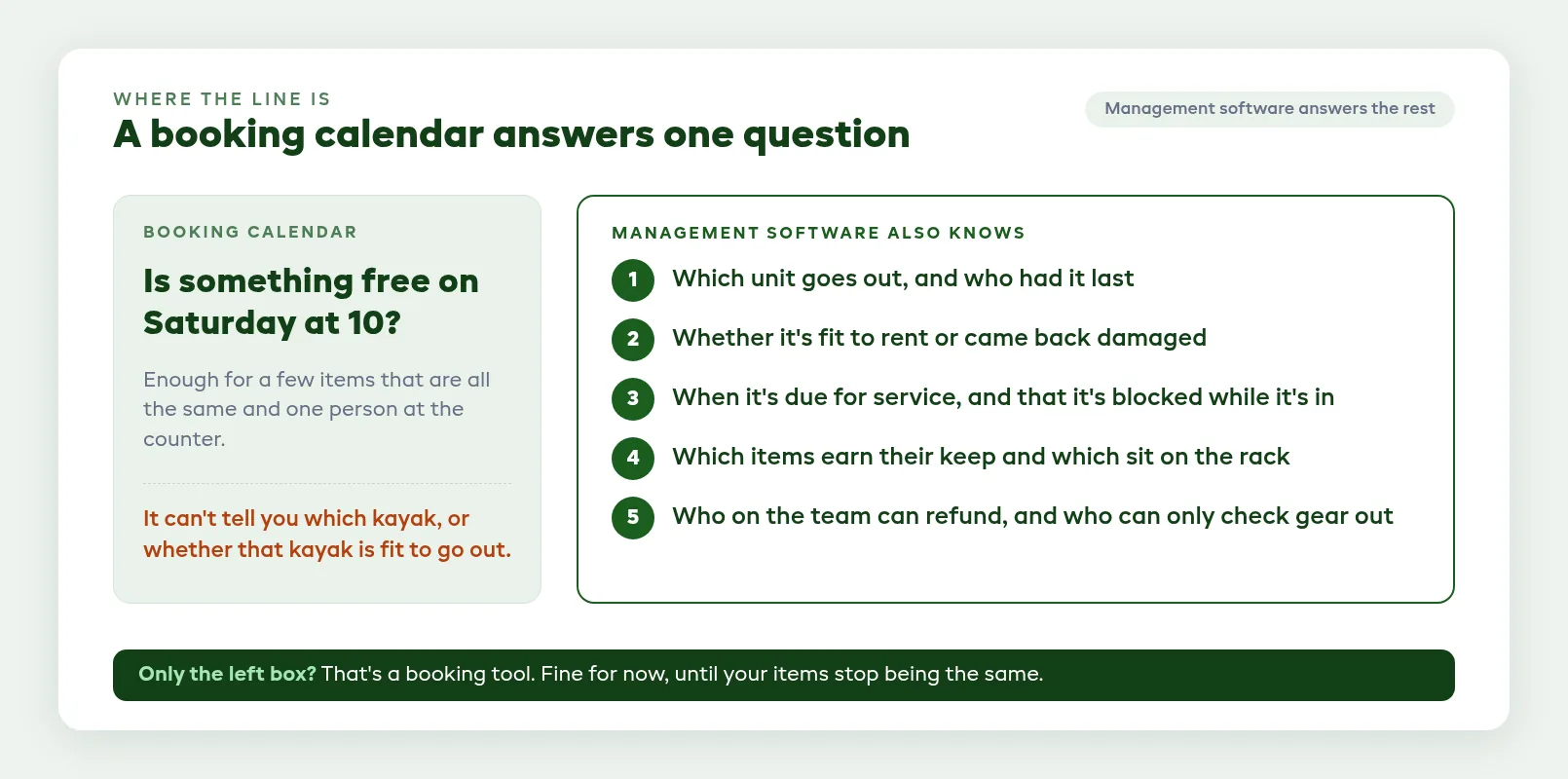
A booking tool answers one question well, whether something is free on Saturday at 10. A booking calendar knows dates. Management software also knows each unit's condition, service status and history.
It should answer these questions without anyone walking out to the rack:
- Which unit goes out, and who had it last?
- Is it fit to rent, or did it come back damaged?
- When is it due for service, and is it blocked while it's in the shop?
- Which items earn their keep, and which ones sit on the rack?
- Who on your team can refund a booking, and who can only check gear out?
If a product only answers the first question, it's a booking tool. That can be enough for a shop with a few interchangeable items and one person at the counter.
Once your items differ from each other (sizes, serial numbers, service histories) or more than two people hand gear out, you need the rest.
One record per unit
Pooled stock or tracked units
There are two ways to count stock. A pooled count says you have 20 life jackets and subtracts as they're booked, which works when it doesn't matter which one a customer takes.
Per-unit tracking gives every item its own code, status and history. Use it for bikes, kayaks, e-bikes, paddleboards and skis, or anything else with a serial number, a size or a service schedule.
Good software lets you choose for each product, so the life jackets stay a pooled count while each kayak carries its own record. The pooled count still has to be right. Coast Guard rules for recreational boats require a wearable life jacket on board for each person, so a count that's two short on a busy Saturday means two people stay on the beach.
What a unit record should hold
- A code you choose, or a run the software numbers for you (K-001, K-002 and so on)
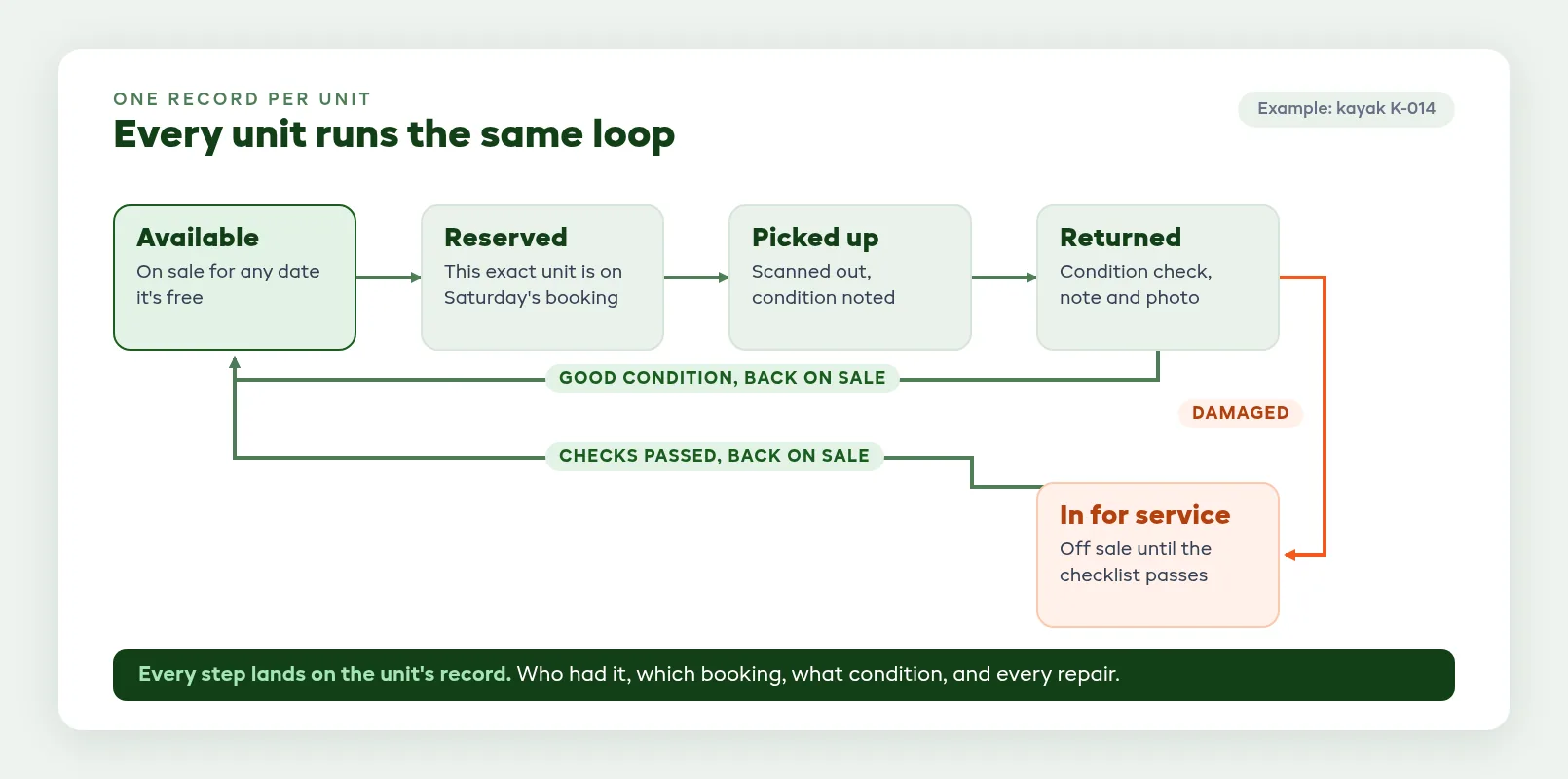
- Its current status: available, reserved, out with a customer, or in for service
- Every booking it has been on
- Every condition note logged at pickup and return, with photos
- Its service history
- What you paid for it and when it went into service, the same two facts you need to depreciate it under IRS Publication 946
Ask how you get existing serial numbers in. Pasting a list from a spreadsheet beats typing 80 codes by hand.
Ask about kits as well. If a bike goes out with a lock and a pump, you want to know whether those parts get their own record and whether a missing one shows up at return.
Per-unit records are also what stop a double booking of one specific item, not just a category. Our guide to how to track each unit's inventory and status covers the counting side in more depth.

Check-out and return without the clipboard
The counter is where records get made or lost. At pickup, staff should attach the exact unit to the booking, ideally by scanning its label, and note its condition before it leaves.
What to check at pickup
Some gear needs a check before it goes out, and for some of it the check is a legal duty. Federal rules say a forklift must be examined before being placed in service, at least daily, and aerial lift controls must be tested each day prior to use.
If you rent that kind of gear, a dated pickup checklist on the unit shows what you checked before it left. A paper sheet in a drawer doesn't.
What to check at return
At return, the same unit gets checked back in with a condition rating, a note and a photo if something's wrong. Look for these:
- The condition note lands on the unit as well as the booking. Six months from now you want to open kayak 14 and see every scuff it has picked up and which booking it happened on.
- A damaged return takes the unit out of stock straight away. If staff have to remember a second step, someone will forget it on a busy Saturday.
- A damage charge starts from the return record. Your team should be able to review what was logged, set an amount and send the customer a payment request without retyping anything.
Keep card numbers out of notes fields and damage spreadsheets. The PCI Security Standards Council sets the data security standard for any business that stores, processes or transmits card data, so the charge should go through the software's payment request and your processor.
Our post on check-in and check-out systems goes deeper on counter flow and peak-hour speed.
Maintenance that blocks the calendar
Back to kayak 14. When an item goes in for repair, the software should take it off sale, and it should stay off until someone marks the work done.
Service on a schedule
Some gear wears with use and some with time. Look for a service interval you can set either way, every so many days or every so many rentals, so a bike that went out 30 times this month comes due before one that sat in the back.
Then check what happens when a unit comes due. A flag on a list only helps if someone reads the list every morning.
Repairs that keep a unit off sale
- Sending a unit in for service removes it from availability with no second step
- Scheduled service, so you can book a unit in for next Tuesday without blocking it today
- An expected finish date, so a long repair doesn't quietly turn into missing stock
- Checklists your team works through, with critical checks that keep the unit out until they pass
- A list of overdue jobs, so nothing sits in the back for three weeks
Ask the vendor to show you a damaged return going straight into the repair queue. If that handoff depends on someone's memory, broken gear will end up back on the calendar.
Our guide to maintenance tracking for rental gear has schedules by equipment type.
Utilization and reports you can act on
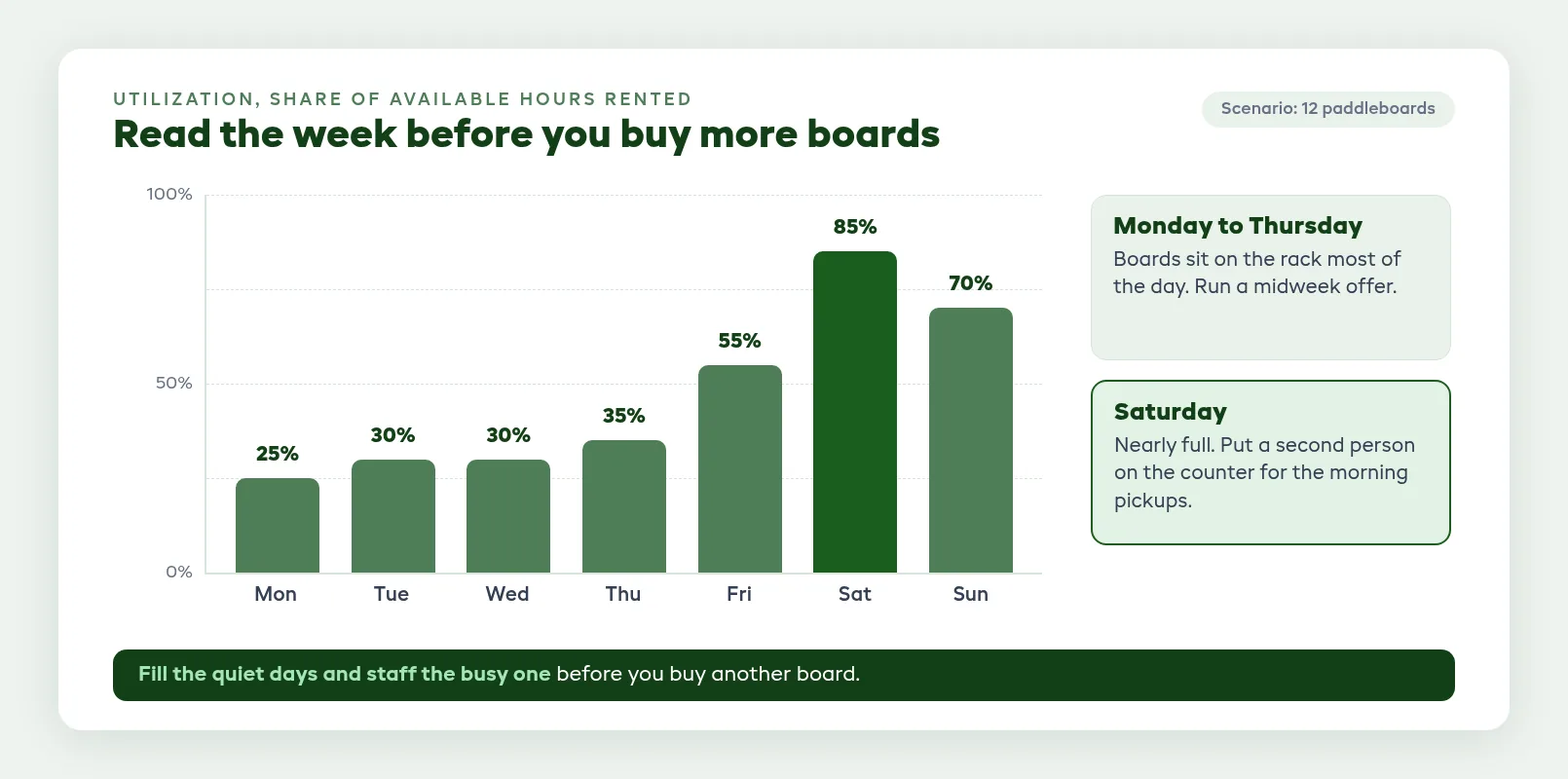
Utilization is the share of an item's available time that it was actually rented. It tells you when to buy more and when to sell some off.
A 12-board example
Say you run 12 paddleboards. Midweek they're out about 30% of the available hours, and on Saturdays 85%.
So skip the new boards. Put a midweek offer on, and add a second person at the counter on Saturday morning, when pickups bunch up.
Reports worth asking for
- Utilization rate by product and period
- Bookings by day of week and time of day, split by pickup and drop-off, for staffing
- Average rental length
- Cost against earnings for each item, so you know which purchases have paid for themselves
- A point-in-time availability view that shows units out, in for service and any shortage
Check who can see what. Your counter staff may need the availability view but not your revenue.
For formulas and benchmarks, see our guide to utilization tracking.
Staff, roles and more than one location
Roles
Roles decide who can do the expensive things. A seasonal hire should be able to check gear out and take a payment, but probably not refund a booking, delete a product or read your revenue reports.
Look for built-in roles that split this sensibly, and custom roles if your team doesn't fit the defaults. An audit log helps when two people remember a change differently.
Locations
Locations matter the day you open a second site, or keep stock in a storage unit customers never visit. Each unit should belong to a location, customers should only see what's at the site they pick, and the calendar and reports should filter by site.
Moving 10 bikes between sites should be one bulk action, not 10 edits.
Pricing models and what management costs
Rental platforms usually charge in one of three ways:
- A monthly plan, often with a small fee on online bookings
- A commission on each booking, with a low or no monthly fee
- Per user, per location or per item
Flat monthly plans
The headline price rarely tells you what management costs. Check which tier per-unit tracking, maintenance, barcode scanning, staff roles, extra locations and deeper reports sit on.
Two vendors' own pages show how this works, as of November 2026. Booqable's pricing page lists downtime scheduling from its Grow plan, barcode scanning as a per-user add-on and extra locations on Scale for a monthly fee per location. EZRentOut's pricing page puts work orders on its Premium plan at $499 a month billed annually, with multiple sites on its custom tier.
On many platforms, ours included, some of these features aren't in the entry plan.
Per-booking fees and commissions
A commission looks cheap in a quiet month and costs more with every booking after that. Price the plan that has the features from this guide you actually need, then add booking fees at your real volume.
A 10-step test for your demo or trial
A feature list can't show you a damaged kayak going off sale. Run one unit through a booking, a return and a service in a demo or trial, with a few of your own items loaded.
Ask the vendor to show you, or do it yourself:
- Add five units of one product using your real serial numbers. How long did it take?
- Book one specific unit for Saturday. Can you see which unit it is?
- Check it out by scanning its label. Does the status change on its own?
- Return it marked damaged, with a note and a photo. Is it off sale straight away?
- Try to book that unit for Sunday. The software should refuse it or give the booking another unit.
- Work through a repair checklist and fail a critical check. Does the unit stay out?
- Pass the check and put it back on sale. Is the full history on the unit's record?
- Open the utilization and cost reports. Would you make a buying decision from them?
- Log in as counter staff. What can't they see or do?
- Ask how you get your data out if you leave, and in what format.
If a vendor can't show steps 3 to 7 working together, you're looking at a booking tool.
Where EquipDash fits
EquipDash covers the list above like this. The plan for each part comes from our pricing page.
- Units. Each product either tracks a total or tracks each item. Tracked items get their own code, status, booking history, activity log and condition reports, and you can paste a list of serial numbers. Inventory management and barcode scanning are on Growth and Pro.
- Check-out and return. Staff log condition at pickup and return, rated from Excellent to Damaged, with notes and photos stored on the unit. A barcode scan finds a unit, records pickup and return, and sends items to and from the Workshop. After a return, your team can set a damage amount, and sending it adds the charge to the booking and requests payment from the customer.
- Kits. Parts set up as linked products, like a lock that goes out with a bike, get their own unit assigned when the bike is booked. A missing part is recorded on the booking at return, with an optional replacement charge.
- Maintenance. In EquipDash, service comes due by days or by number of rentals, and a unit in the Workshop can't be booked. Turn on Track maintenance for a product, set Service every, and its units show Service due when they reach it. The Workshop is on Growth and Pro, a unit marked Damaged at return goes there automatically with the staff member's notes, and a failed critical check keeps it from going back into stock.
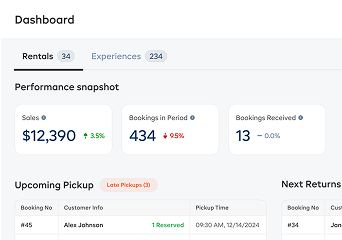
- Reports. The Rentals report shows sales, bookings, average rental length and utilization rate, plus bookings by day and time split by pickup and drop-off. The Return on investment report sets what each item cost beside what it has earned. Advanced reports and data export are on Growth and Pro, and the custom report builder is on Pro.
- Staff and locations. Built-in Admin, Manager and Staff roles. By default, Staff can check gear in and out and record payments, but can't process refunds, delete bookings or see revenue reports. Custom roles and more than one location are on Pro, and every plan includes an audit log.
Plans are Starter at $29/mo, Growth at $69/mo and Pro at $149/mo billed monthly, or from $23/mo billed annually, plus a booking fee of 2%, 1.5% or 1% on direct online bookings. Every plan comes with a 21-day free trial and no credit card, so you can run the 10-step test on your own gear.
FAQ
What is the difference between equipment rental software and equipment rental management software?
People use the terms loosely. Equipment rental software often means the booking side, with availability, online checkout and payments, while management software also runs unit records, check-out and return, maintenance, reports, staff roles and locations. Many products claim both, so test the management side with the 10-step loop above.
Do I need management software if I only have one location and under 100 items?
Not always. If your items are interchangeable and one or two people run the counter, a pooled count and a booking calendar can be enough. You need per-unit records once items differ by size, serial number or service history, or once damage disputes start costing you money.
Can rental management software track maintenance and block items that are out of service?
It should. Sending a unit in for service should take it off sale with no second step, and it should stay off until someone marks the work done. In EquipDash, that's the Workshop on Growth and Pro, and a unit marked Damaged at return goes there automatically.
How does it handle check-out and returns, including damage notes?
Look for software that ties the exact unit to the booking at pickup and logs condition at both ends, with a rating, a note and photos. The record should sit on the unit as well as the booking, and a damage charge should start from that return record.
What reports should equipment rental management software give me each week?
Start with utilization by product, bookings by day and time for staffing, units in for service or overdue, and any shortages coming up. Once a month, check cost against earnings for your most expensive items to decide what to replace or sell.
How much does equipment rental management software cost?
It depends on the model, whether that's a monthly plan with a booking fee, a per-booking commission, or pricing per user, location or item. Check which tier the management features sit on before you compare entry prices. EquipDash plans are $29, $69 and $149 a month billed monthly, or from $23/mo billed annually, plus a 2%, 1.5% or 1% fee on direct online bookings.
How long does it take to switch from spreadsheets?
With EquipDash, the self-serve path gets you to your first booking in about 10 minutes. If our team does the setup for you, you're taking bookings within 2 business days, and a full history migration usually takes up to a week. Loading per-unit records for a large fleet is the slow part, so paste serial numbers from your spreadsheet instead of typing them.
in one place