
 Google Calendar integration
Connect your Google account once. New bookings appear in your calendar within seconds, and time you block there stops new bookings.
How a day looks in Google once EquipDash is connected. The blue event is on the calendar you pick for blocking.
Each confirmed booking becomes a calendar event.
Your widget, POS and API stop taking bookings then.
Blocking never cancels a booking you already have.
Subscribe with a private link, no sign-in.
TWO-WAY CALENDAR SYNC
Bookings go out to your calendar and the time you block comes back to EquipDash, so you keep one calendar instead of two.
Each confirmed booking becomes an event in an EquipDash Bookings calendar.
Change a booking and the event changes. Cancel it and the event goes.
Anything on the calendar you pick stops new bookings for that time.
Your booking page, POS and API all stop taking bookings in blocked time.
Blocking time never cancels a booking you already have.
Subscribe with a private, read-only link. No sign-in needed.
Paste an iCal link from Airbnb, Booking.com or Outlook to block time.
Add phone, pickup spot, headcount or notes to each event.
WHAT EACH ENTRY SHOWS
Each booking arrives with who, when and what was booked. Add more from tags and the preview shows your latest booking as you type.
phone(555) 010-2345pickup locationMain beach hutnumber of people2 peopletotal price$96.00statusConfirmed · Booking #1042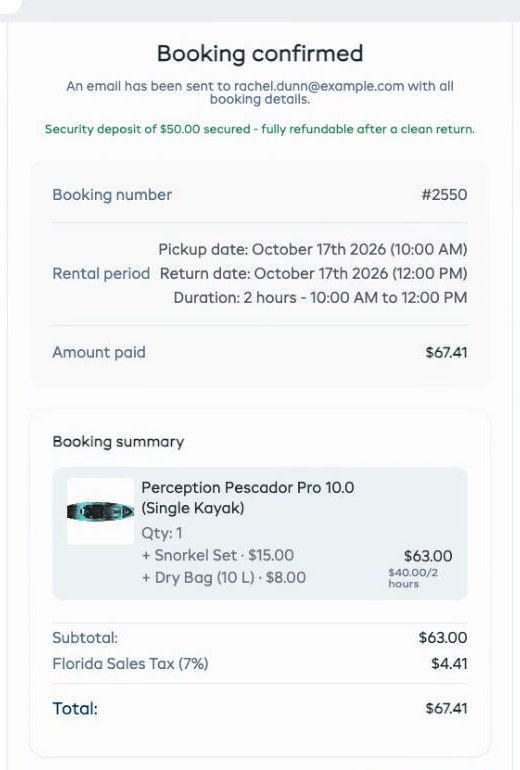
BOOKINGS IN SECONDS
The moment a booking is confirmed, it lands in your calendar with the name, time and what was booked. There's no nightly refresh to wait for.
BLOCK OUT TIME
Days closed, public holidays, a maintenance afternoon. Put it on the calendar EquipDash watches and nobody can book that time.
 Calendars that block bookings
TWO WAYS TO CONNECT
Use either or both. Connect from Settings, under API & Integrations.
| Feature | Google Calendar | iCal link |
|---|---|---|
| Works with | Google Calendar | Apple Calendar, Outlook, Airbnb, Booking.com and any calendar with an iCal link |
| Updates | Within seconds | Every few hours, set by the calendar app |
| Both directions | Yes | Yes |
| Setup | Press Connect Google Calendar and sign in | Copy your private link and add it as a calendar from a URL |
Google CalendarConnectedSETUP
It all sits on one page: Settings, API & Integrations, Google Calendar.
MORE INTEGRATIONS
EquipDash works with the booking channels, payment and accounting apps, and AI assistants you already use.
 WordPress
Website
WordPress
Website
 GetYourGuide
Booking channel
GetYourGuide
Booking channel
 Viator
Booking channel
Viator
Booking channel
 Stripe
Payments
Stripe
Payments
 Xero
Accounting
Xero
Accounting
 QuickBooks
Accounting
QuickBooks
Accounting
 MYOB
Accounting
MYOB
Accounting
 Mailchimp
Email marketing
Mailchimp
Email marketing
 Google Drive
Documents
Google Drive
Documents
 Twilio
Text messages
Twilio
Text messages
 Zapier
Automation
Zapier
Automation
 ChatGPT
AI assistant
ChatGPT
AI assistant
 Claude
AI assistant
Claude
AI assistant
 Gemini
AI assistant
Gemini
AI assistant
 Grok
AI assistant
Grok
AI assistant
 Kimi
AI assistant
Kimi
AI assistant
 Shopify
Website
Shopify
Website
 Wix
Website
Wix
Website
 Squarespace
Website
Squarespace
Website
 Webflow
Website
Webflow
Website
 GoDaddy
Website
GoDaddy
Website
 Square Online
Website
Square Online
Website
 Weebly
Website
Weebly
Website
 Joomla
Website
Joomla
Website
 Framer
Website
Framer
Website
 Any other website
Website
Any other website
Website
FREQUENTLY ASKED QUESTIONS
Find answers to your questions below. Contact us if you couldn't find what you're looking for.
Contact UsIt runs both ways. Confirmed bookings go out to a calendar called EquipDash Bookings within seconds, and anything on the calendar you pick for blocking comes back as closed time, so EquipDash stops taking bookings then.
Start your free 21-day trial and connect Google Calendar in a minute.