
 Viator integration
Make your key in EquipDash and connect it in Viator's Management Center. Every priced experience goes on Viator, and its bookings land in EquipDash.
You only pay Viator's commission.
New priced experiences go on Viator.
A spot sold anywhere is gone everywhere.
Ready for waivers and reminders.
OTA CHANNEL SYNC
Viator, part of Tripadvisor, brings travelers planning a trip. EquipDash keeps the times, prices and bookings behind each sale.
A spot sold on your site, at the counter or on Viator is gone everywhere.
Change a price in EquipDash and Viator gets the new one.
Viator stops selling a session at the same cut-off as your own page.
Customer, party size, date and option arrive with every Viator booking.
Viator customers are ready for waivers, reminders and follow-up.
You pay Viator's commission and nothing on top to us.
CONNECT
Click Make my Viator key. In Viator's Management Center, pick EquipDash under Account > Connectivity and paste the key with your Supplier ID.
Copy your key
Your Viator Supplier ID
 EquipDashViator
REAL-TIME SELLING
Bookings, times and price changes move between EquipDash and Viator on their own, so the channel only sells what you can deliver.
ONE VIEW, EVERY CHANNEL
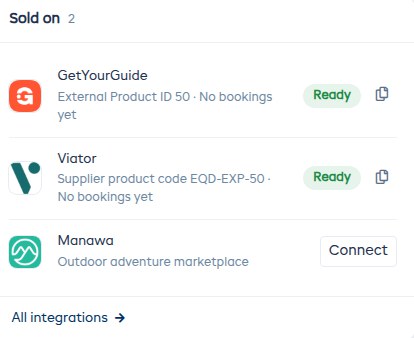
Every experience has a Sold on card showing each marketplace, its status, its product code and anything stopping a sale.
 Direct (website)128POS58Viator42
 GetYourGuide27
ONE VIEW, EVERY CHANNEL
Your reports show how many bookings each channel brings in, with Viator next to your website, the counter and other marketplaces.
IN SETTINGS
The Viator page in EquipDash shows these steps and ticks each one off. Find it in Settings, API & Integrations.
MORE INTEGRATIONS
EquipDash works with the booking channels, payment and accounting apps, and AI assistants you already use.
 WordPress
Website
GetYourGuide
Booking channel
 Stripe
Payments
 Xero
Accounting
 QuickBooks
Accounting
 MYOB
Accounting
 Mailchimp
Email marketing
 Google Calendar
Calendar
 Google Drive
Documents
 Twilio
Text messages
 Zapier
Automation
 ChatGPT
AI assistant
 Claude
AI assistant
 Gemini
AI assistant
 Grok
AI assistant
 Kimi
AI assistant
 Shopify
Website
 Wix
Website
 Squarespace
Website
 Webflow
Website
 GoDaddy
Website
 Square Online
Website
 Weebly
Website
 Joomla
Website
 Framer
Website
 Any other website
Website
FREQUENTLY ASKED QUESTIONS
Find answers to your questions below. Contact us if you couldn't find what you're looking for.
Contact UsNo. EquipDash takes 0% on bookings from Viator. You only pay Viator’s own commission.
Start your free 21-day trial and make your Viator key.